
Transfer Surge is the server-transfer event in Last War: Survival. It lets eligible commanders permanently move their existing account to another warzone inside the transfer group assigned to them.
The key requirements are your Transfer Score and seat color, eligible server range, destination capacity, presidential approval, and 50 Transfer Vouchers. Your Transfer Score is calculated from historical account development at the start of the event, so unequipping gear immediately before Transfer Surge is not a reliable way to lower it.
★Quick Take: Transfer Surge runs for 14 days in the current format: 7 days of preparation, 4 application days, 1 transfer day, and 2 result-display days. You need 50 Transfer Vouchers, can only move within your displayed transfer group, and must be approved by the destination warzone. Once an application is approved, treat the decision as final.
What Is Transfer Surge in Last War?
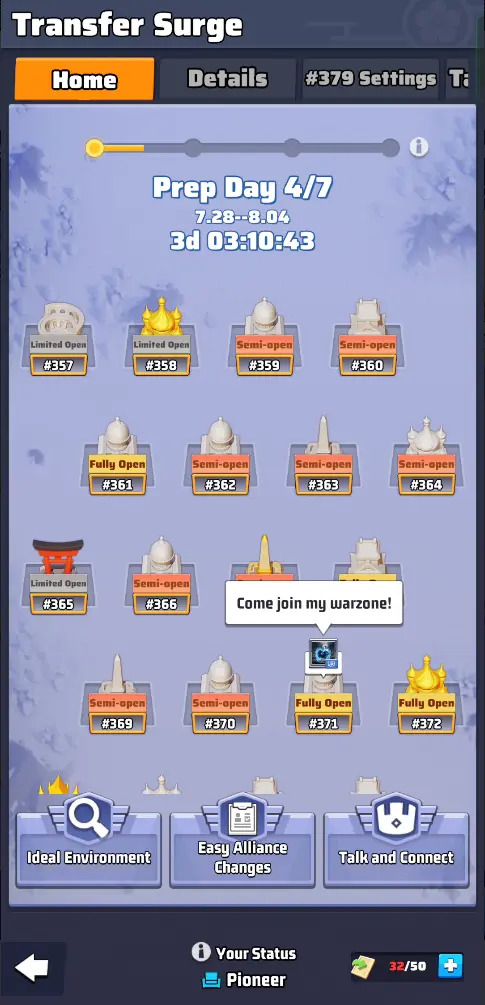
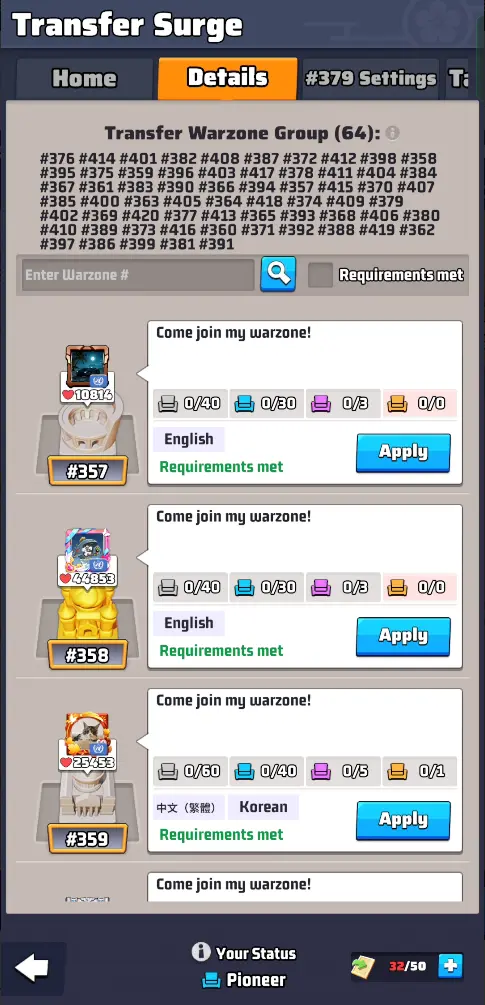
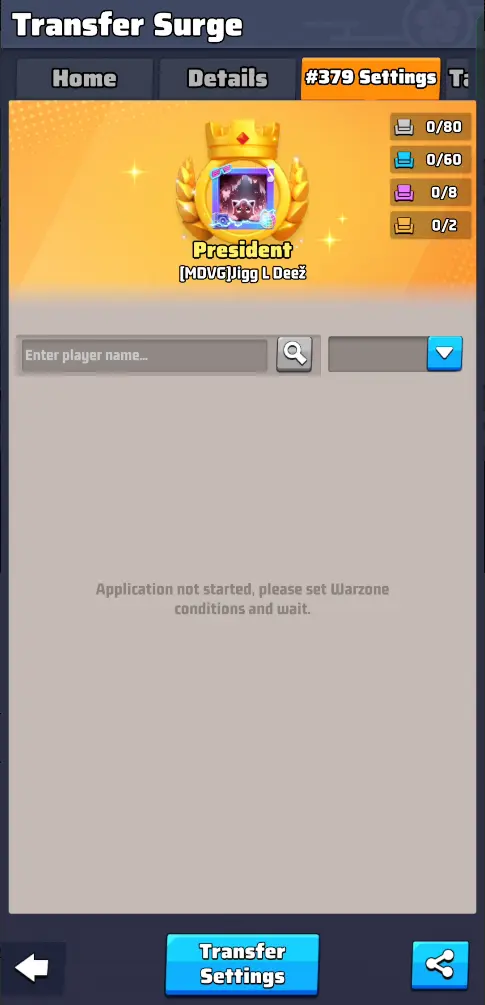
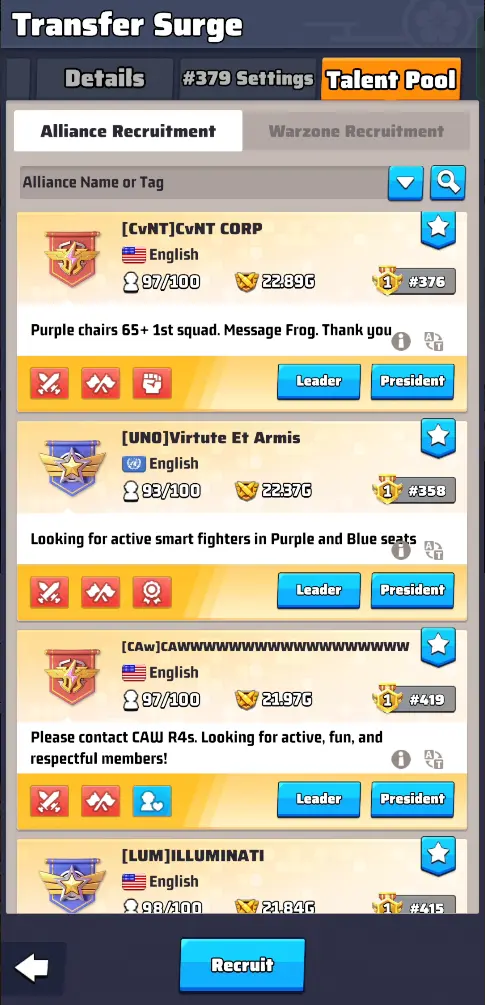
Transfer Surge is the voluntary migration system for moving an established commander to another server, or warzone. It is different from creating a new character because your existing account progression moves with you.
The event becomes relevant from the end of Season 2 onward and returns around the end of subsequent seasons. In the current format, it begins in Week 8 and continues into the off-season.
Players commonly transfer to:
- Join friends or former alliance members.
- Move to a more active warzone.
- Join an alliance that better matches their time zone or language.
- Find stronger event organization and alliance coordination.
- Leave a server suffering from population decline or leadership problems.
- Move into a more competitive or less competitive environment.
A transfer is a major account decision. A stronger destination server can offer better organization while also creating tougher rankings, stricter alliance expectations, and greater competition for event rewards.
When Does Last War Server Transfer Open?
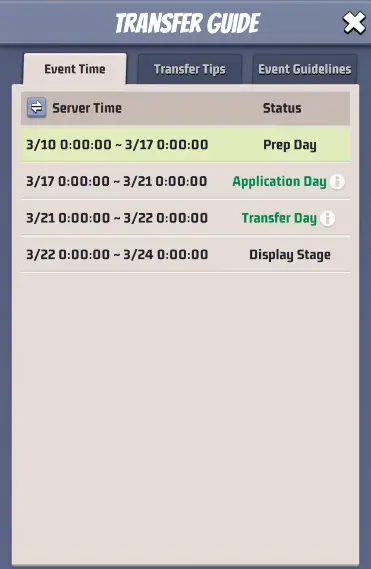
The current Transfer Surge format lasts 14 days and is divided into four phases:
| Phase | Duration | What You Do |
|---|---|---|
| Preparation | 7 days | Check Transfer Score, seat color, server range, destination ratings, and recruitment options. |
| Application | 4 days | Apply to an eligible destination with capacity for your transfer category. |
| Transfer | 1 day | Approved commanders complete the actual migration. |
| Display Stage | 2 days | Final transfer results are displayed. |
Transfer Surge occurs once per season cycle rather than remaining permanently available. If you transfer and later regret the destination, you normally need to wait for the next Transfer Surge before moving again.
!Important: Do not rely on an old calendar date for Transfer Surge. Server groups progress through seasons at different times. Use Week 8 and the countdown displayed in your own event interface rather than a date taken from another warzone.
Last War Server Transfer Range Explained
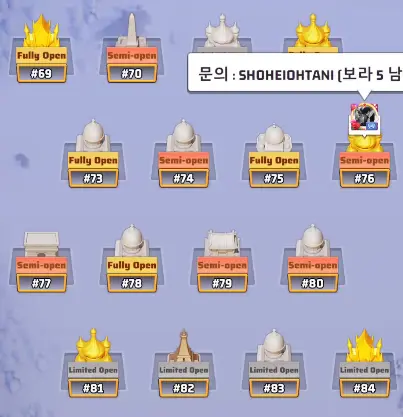
You cannot transfer to any Last War server you choose. Transfer Surge assigns your account to a Transfer Warzone Group containing servers at broadly comparable stages of account age and progression.
Current transfer guidance shows that server groups typically begin at around 64 warzones after Season 2 and can expand to 128 warzones after Season 4. Some server numbers may be skipped inside a grouping.
For Season 6-era accounts, this means a 128-warzone group can be normal. However, there is no single universal server-number range that applies to every player.
The only reliable range for your account is the list displayed inside your own Transfer Surge event.
This restriction prevents a heavily developed old-server account from moving directly to a much newer server where players have had far less time to progress.
For additional migration basics, see the Last War server change guide.
Last War Transfer Score Calculation
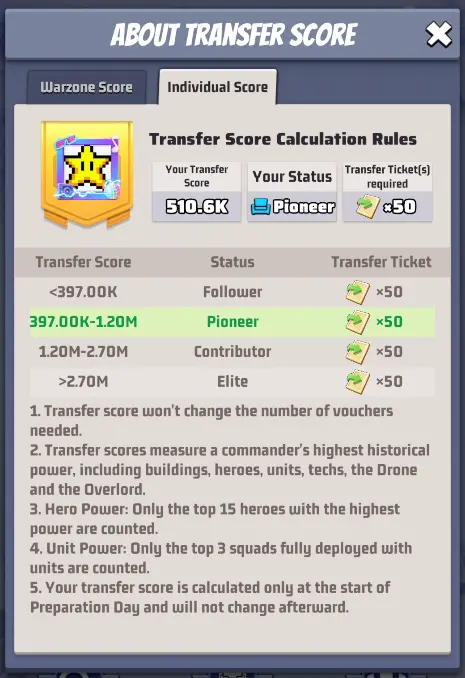
The Transfer Score measures account development and is used to assign your commander status and transfer seat color.
The game calculates it from your highest historical power across several progression systems, including:
- Buildings
- Top 15 heroes by power
- Top three fully deployed squads with units
- Technology
- Drone progression
- Overlord progression
Your score is calculated at the start of the seven-day Preparation Phase and remains fixed for that Transfer Surge event.
Is There an Exact Transfer Score Formula?
No reliable universal weighting formula is published in the current reference material. Community calculators can estimate a Transfer Score from observed data, but they are reverse-engineered tools rather than a guaranteed reproduction of the game’s internal calculation.
For transfer planning, the score displayed by your actual event is the source of truth.
| Transfer Score Question | Answer |
|---|---|
| Are all heroes counted? | No. The documented calculation uses your 15 highest-power heroes. |
| Are all squads counted? | No. The three strongest fully deployed squads with units are counted. |
| Do buildings matter? | Yes. |
| Does research matter? | Yes. |
| Do Drone and Overlord progression matter? | Yes. |
| Can the score change during the event? | No. It is fixed when the Preparation Phase begins. |
Can You Lower Transfer Score by Removing Gear?
Do not count on it. Transfer Score uses historical peak development, so temporarily weakening a formation, unequipping gear, or making other last-minute changes after the event opens does not reliably reduce the recorded score.
If you are planning several months ahead for a future Transfer Surge, controlling how much permanent account power you add may affect where you fall in a future transfer bracket. Once the current event has started, however, the score has already been set.
Buildings, Technology, and Drone Power
Long-term account development contributes to the Transfer Score, so major systems cannot be ignored while planning a future move.
The Last War Headquarters upgrade guide covers major building progression, while the Last War Tech Center guide explains research development.
Drone progression is another documented Transfer Score component. The Last War Battle Data guide explains one of the primary resources used for Drone development.
Transfer Seat Colors and Commander Status
Your individual Transfer Score places you into one of four commander categories:
| Status | Seat Color | Relative Transfer Category |
|---|---|---|
| Follower | White | Lowest |
| Pioneer | Blue | Lower-middle |
| Contributor | Purple | High |
| Elite | Gold | Highest |
There is no universal permanent Transfer Score cutoff for these colors. Thresholds depend on the other accounts and warzones inside your transfer group and can change from one Transfer Surge to the next.
A score that produces a Pioneer seat in one group may therefore produce a different status in another group or later season.
Warzone Score and Open Status
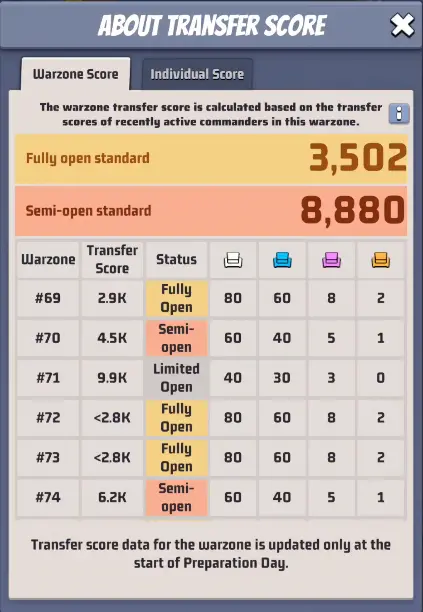
Individual commanders receive a Transfer Score, but destination warzones receive a Warzone Score as well. This score is based on recently active commanders and is compared with the other servers in the same transfer group.
Each destination is then classified as:
- Fully Open: Relatively weaker warzone with the greatest capacity for incoming power.
- Semi-Open: Mid-range warzone with tighter transfer capacity.
- Limited Open: Stronger warzone with the strictest incoming limits.
The thresholds that determine these ratings are group-specific. A Warzone Score that qualifies as Fully Open in one transfer group may not receive the same classification elsewhere.
Current Transfer Seat Rules
Older Transfer Surge versions used fixed seat totals for every commander category on Fully Open servers. That rule changed beginning with Season 5.
In the current documented format:
Scroll sideways to view the full table.
| Warzone Rating | Follower | Pioneer | Contributor | Elite |
| Fully Open | Shared score pool | Shared score pool | Shared score pool | 2 |
| Semi-Open | 60 | 40 | 5 | 1 |
| Limited Open | 40 | 30 | 3 | 0 |
For Fully Open warzones, white, blue, and purple applicants now draw from a combined pool of individual Transfer Score points instead of having separate fixed seat totals. The size of that point pool varies by transfer group, so use the number shown in-game.
This change gives Fully Open servers more flexibility in deciding whether to accept many lower-score commanders, fewer stronger commanders, or a mixture.
✓Recommendation: If an alliance plans a group migration, list every member’s seat color before applications open. A destination that appears to have plenty of capacity can still be unable to accommodate your strongest members, and Fully Open servers now need to manage the shared transfer-score budget carefully.
How Many Transfer Vouchers Do You Need?
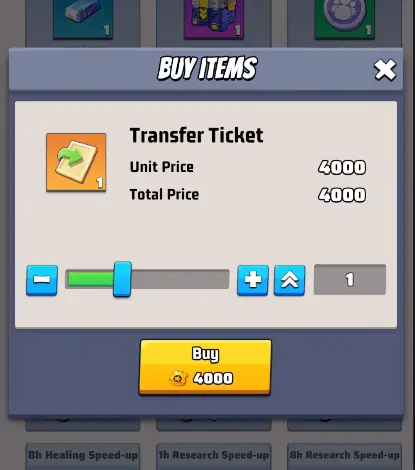
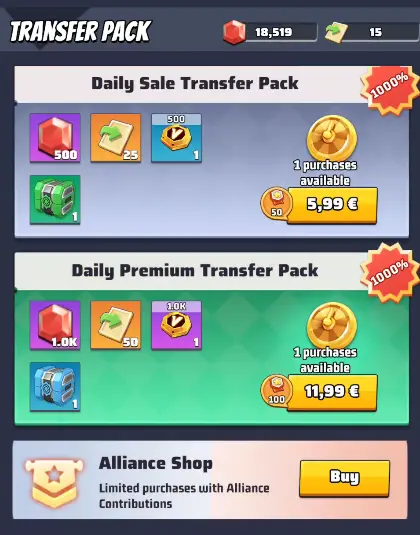
A standard server transfer currently requires 50 Transfer Vouchers. Your seat color and Transfer Score do not change this cost.
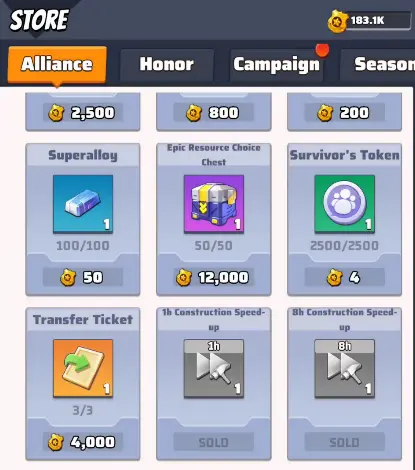
Transfer Vouchers can be accumulated through the Alliance Store, where current guidance lists up to three vouchers per week. Additional voucher availability may appear through event or paid offers.
Because 50 vouchers takes many weeks to collect through the Alliance Store alone, start saving long before the transfer window if you want to minimize paid purchases.
How to Apply for a Last War Server Transfer
The four-day Application Phase is when you choose a destination and submit your request.
Before applying:
- Confirm that the warzone appears in your Transfer Warzone Group.
- Check its Fully Open, Semi-Open, or Limited Open rating.
- Verify that it can accept your seat category or transfer-score cost.
- Review any destination requirements shown in the event.
- Contact the alliance you intend to join.
- Contact destination leadership before competing for a limited seat.
- Submit your application only when you are confident about the destination.
The president of the destination warzone controls approval. Your current president does not need to authorize you to leave.
Once the destination approves your application, the transfer is treated as committed. Do not apply casually while still deciding between several servers.
Talent Pool and Alliance Recruitment
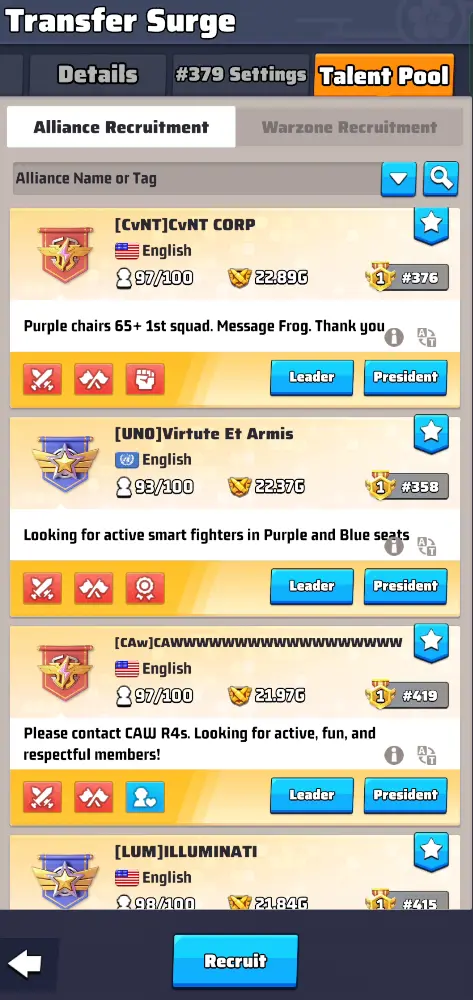
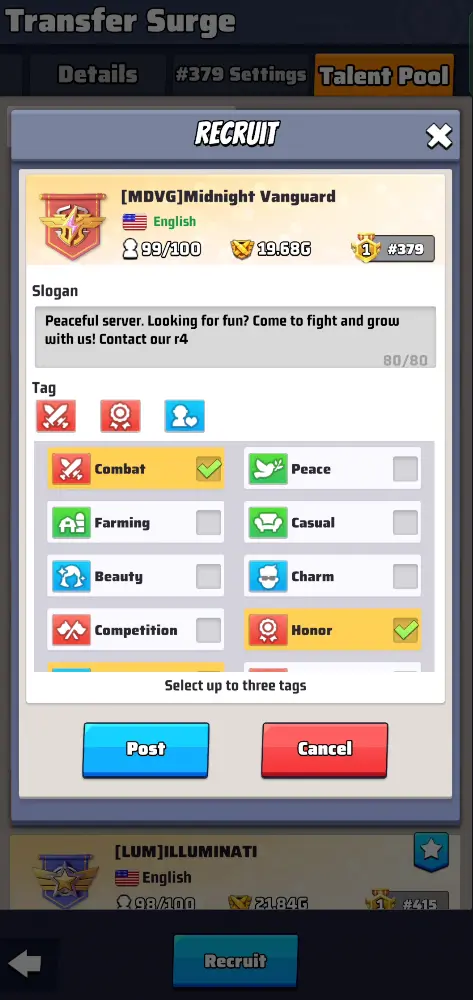
The Talent Pool helps destination alliances recruit commanders during Transfer Surge. Recruitment posts can give you a starting point, but a slogan and alliance power number are not enough to judge whether a server is a good fit.
Before committing, ask about:
- Primary language
- Alliance and server time zones
- Daily activity expectations
- Alliance Duel expectations
- Spending requirements, if any
- Warzone diplomacy and NAP rules
- Desert Storm scheduling
- Season-war organization
- Available R4 or specialist roles
- Whether a place is genuinely reserved for you
If you are coordinating directly with server leadership, the Last War presidential titles guide provides additional context on warzone leadership.
Transfer Day Requirements
Once approved, you can complete the move during the one-day Transfer Phase.
For a manual transfer, you need to meet these conditions:
- You are not in an alliance.
- You are not the warzone president.
- You are not currently in cross-warzone status.
- All squads are back inside your base.
- You have the required 50 Transfer Vouchers.
If you do not manually execute an already approved transfer, the current event format moves the account automatically at reset at the end of Transfer Day.
That is another reason not to submit an application until you are committed to the destination.
What Happens After You Transfer?
The transfer moves your account rather than restarting it. Most permanent account progression remains with the commander.
Progression That Stays With Your Account
- Headquarters and building development
- Heroes, levels, stars, gear, and hero progression
- Exclusive Weapons and Awakening progression where applicable
- Troops
- Research
- Drone and other permanent account systems
- VIP progression
- Inventory items and account resources that remain valid at that stage of the season
Alliance Membership Does Not Transfer
You must leave your previous alliance before the move. After arriving, you need to join an alliance in the new warzone.
The first alliance you join after a transfer currently receives special treatment: normal participation cooldowns are waived for that first alliance, allowing you to settle in more quickly. If you then leave and switch again, normal cooldown rules return.
The Alliance Support Hub guide can help after you settle into a new alliance.
Arena and Rankings Can Change
Your account power moves with you, but server-specific rankings do not simply preserve the same position. Arena eligibility and leaderboard positions are recalculated against the players on your destination server.
This matters if you are moving from a weaker warzone to a much stronger one. Your account can remain exactly as powerful while dropping substantially in local rankings.
In-Progress Actions
Some actions already in progress are completed by the migration process, with relevant rewards delivered through mail. Claiming important rewards and finishing critical tasks before Transfer Day is still the safest approach.
Season 6 Transfer Surge: What Should You Know?
The basic Transfer Surge framework remains the same for Season 6-era accounts: you still have an assigned server group, an individual Transfer Score, a seat category, destination capacity, 50-voucher cost, and presidential approval.
Three points are particularly important for Season 6 players:
- Your server range may be much larger: Post-Season 4 transfer groups can span 128 warzones rather than the earlier 64-warzone format.
- Fully Open destinations use the newer point-pool system: White, blue, and purple applicants compete for a shared Transfer Score budget instead of the old fixed seat totals.
- Your account is more developed: By Season 6, systems such as advanced hero, Drone, research, Overlord, and troop progression can make Transfer Score planning more important.
Do not use an old Season 2 or Season 3 seat-color cutoff to predict your Season 6 category. Transfer thresholds are recalculated for each grouping and event.
How to Choose the Best Server to Transfer To
The best destination is not automatically the server with the highest total power.
Compare at least these factors:
| Factor | Why It Matters |
|---|---|
| Alliance activity | Active alliances improve event participation and coordinated progression. |
| Time zone | A powerful alliance is less useful if its major events occur while you are asleep. |
| Language | Communication matters during seasonal wars and alliance events. |
| Warzone strength | Stronger servers can provide better organization but tougher rankings. |
| Leadership stability | Frequent political conflict can make an otherwise strong server difficult to enjoy. |
| Your expected alliance | Secure a real destination before transferring rather than arriving without a plan. |
| Seat availability | A server may be attractive but impossible to enter in your category. |
| Playstyle | A competitive spender alliance may be a poor fit for a casual F2P player, and vice versa. |
Players who cannot reach their preferred server through Transfer Surge sometimes compare other progression paths. As an optional alternative, you can browse Last War accounts for sale. Check each listing’s actual warzone, progression, transfer eligibility, heroes, and season status rather than assuming an account can later transfer to a particular destination.
Transfer Surge Preparation Checklist
- Check the start date and countdown on your own server.
- Confirm your Transfer Warzone Group.
- Record your individual Transfer Score.
- Identify your Follower, Pioneer, Contributor, or Elite status.
- Check destination open status and available capacity.
- Confirm whether the destination can accept your seat category.
- Contact the destination alliance before applying.
- Confirm that the destination president supports the move.
- Collect 50 Transfer Vouchers.
- Claim important rewards before Transfer Day.
- Leave your current alliance before manually transferring.
- Recall all squads to your base.
- Make sure you are not in cross-warzone status.
- Step down from the presidency if applicable.
- Double-check the destination before submitting the application.
Common Transfer Surge Mistakes
Using an Old Transfer Score Cutoff
Seat-color thresholds change between transfer groups and events. A historical Pioneer or Contributor cutoff from another server group is not a guaranteed threshold for yours.
Trying to Lower Score After Preparation Begins
The current Transfer Score is already fixed when the Preparation Phase starts. Unequipping gear or weakening formations afterward does not give you a new score for that event.
Using the Old Fully Open Seat Table
Fully Open warzones no longer use the original fixed white, blue, and purple seat allocations. These categories now share a Transfer Score pool whose size depends on the group.
Assuming Your Transfer Range Is Always 64 Servers
Later-season groups can contain 128 warzones. Always inspect your current event instead of relying on an older server-range guide.
Applying Before Talking to the Destination
Getting approved without a confirmed alliance can leave you on a new server with no planned position. Contact recruiters and leadership first.
Waiting Until the Event to Collect Vouchers
The Alliance Store provides only a limited number each week. Saving well in advance makes a free or lower-cost transfer much easier.
Choosing a Server Only for Its Power Ranking
A top server can also have difficult rankings, restrictive alliances, inconvenient event times, or a playstyle that does not suit you. Server culture and organization matter as much as raw power.
FAQs
How is Last War Transfer Score calculated?
Transfer Score uses historical account power from buildings, your top 15 heroes, your top three fully deployed squads, technology, Drone progression, and Overlord progression. It is calculated at the start of the Preparation Phase and remains fixed for that event. A universal official weighting formula is not published, so use the score shown in-game rather than treating community calculators as exact.
What is the Last War server transfer range?
You can only transfer inside the Transfer Warzone Group displayed for your account. Groups commonly begin around 64 warzones after Season 2 and can expand to 128 after Season 4, but the exact servers available to you are determined by the current event.
How many Transfer Vouchers do you need?
A current Last War server transfer costs 50 Transfer Vouchers. The cost does not increase because you have a higher Transfer Score or seat color.
Can I transfer after Season 2?
Yes. Transfer Surge becomes available from the end of Season 2 onward and returns around the end of later seasons. In the current format it spans Week 8 and the following off-season period.
What changes for Season 6 Transfer Surge?
The core rules remain the same, but later-season accounts can have 128-warzone transfer groups and use the newer Fully Open shared point-pool system. Exact Transfer Score thresholds and destination capacities still depend on your specific group.
Can an entire alliance transfer to the same server?
Members can coordinate applications to the same destination, but an alliance itself does not transfer as one object. Each commander must qualify individually, and seat or score capacity can prevent some members from joining the same server.
Conclusion
Last War Transfer Surge gives you a real opportunity to improve your server environment, but the decision should be planned before Application Day. Check your Transfer Score, seat color, eligible server range, destination capacity, alliance fit, presidential approval, and 50-voucher requirement before committing.
For more server strategy, seasonal updates, event guides, and progression advice, browse the Last War Survival guides on Heaven Guardian.