

Whiteout Survival Top Up
 Global
Top up Whiteout Survival for Global accounts with fast, secure, and convenient delivery. Choose from packs or gems, complete your purchase easily, and get back into the game with a smooth top-up experience.
This page is for an assisted Whiteout Survival login top-up service for custom packs. To complete the purchase, you will need to sign in to your game account, and after payment our team may contact you if a Google or Facebook verification code is required. If you prefer a self-service Frost Star top-up, that is a different method.
Security note: Only provide temporary login or verification details inside the official Heaven Guardian private ticket after payment and confirmation. We never ask you to share codes with random users, sellers, or unofficial accounts.
🧊 Standard Packs


📅 Weekly & Monthly Cards


🎉 Event Packs


🛡️ Hero & Gear Packs


🌟 Premium Bundles


💎 Gems Top Up


Heaven Guardian Top Up Guide
Whiteout Survival Top Up Guide, Important Notes and FAQ
Looking for a fast, guided, and reliable Whiteout Survival top up? Heaven Guardian helps players buy in-game packs, gems, special packs, value packs, and premium packages with clear support from our team.
This guide explains how Whiteout Survival recharge works, what information is required, how login top up is handled, and what you should prepare before ordering.
Read First
Important Notes for Whiteout Survival Login Top Up
Please read these instructions carefully before placing your Whiteout Survival top up order.
Important security reminder: This product is a Login Top Up service. Our team needs temporary access to your game account to complete the purchase on your behalf. Only share required verification details inside your official Heaven Guardian private order ticket.
- This product is a Login Top Up service, which means our team logs in to your game account to complete the purchase on your behalf.
- Please make sure all required information is filled in accurately so your Whiteout Survival top up can be processed quickly.
- After payment is successful, you may need to cooperate with our team by providing a Google or Facebook verification code.
- Please pay close attention to real-time chat messages from our team during the process.
- Do not log in to the game while the top up is being processed to avoid interruptions or login conflicts.
Tip: Preparing your account details and package screenshot in advance will help speed up the order process.
Order Details
Whiteout Survival Top Up Information Required
To complete your Whiteout Survival login top up, please prepare the following information.
Bound Whiteout Survival Account
Your Whiteout Survival account should be bound through Google or Facebook.
Character Name
Prepare your correct in-game character name so our team can confirm the account more accurately.
Package Screenshot and Name
Prepare a clear screenshot of the package and provide the exact package name you want to purchase.
How Products Work
Recharge Result
Price-based Whiteout Survival top up products can be used for matching in-game packs.
If you purchase a product such as 99.99 Standard Packs, it can be used for any in-game pack worth 99.99.
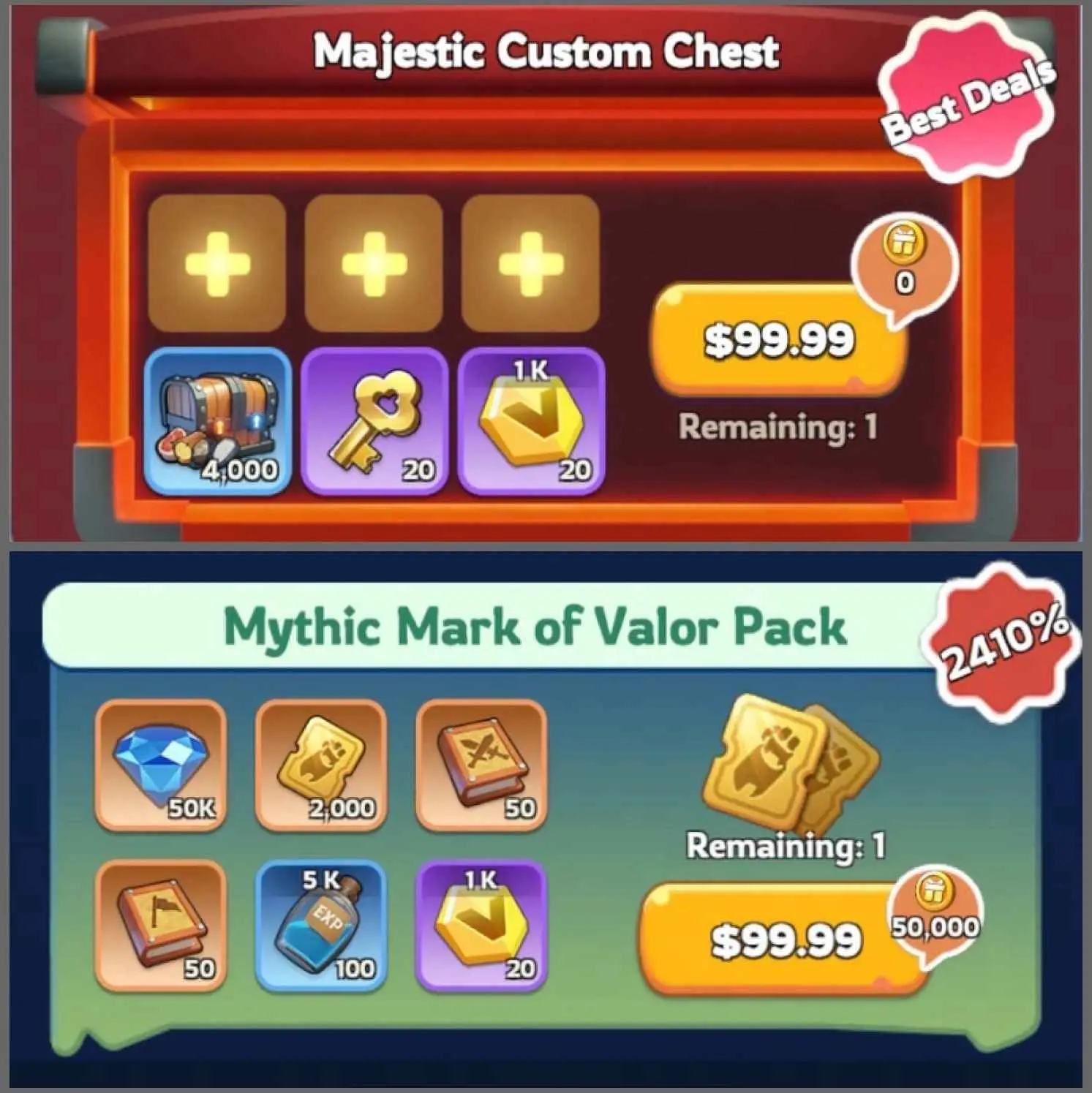
For example, you can contact our team and send the screenshot of the pack you want. Our team will then confirm which Whiteout Survival pack top up should be processed for your order.
The same rule also applies to other price-based packages.
Screenshot required for correct package confirmation
Step by Step
How to Top Up Whiteout Survival Pack
Follow these steps so your Whiteout Survival top up can be completed smoothly and correctly.
-
Place your order and complete payment
Submit your order and complete the payment on Heaven Guardian.
-
Provide your login information
After payment, provide your Google or Facebook login details through the official order process so our team can log in and complete the Whiteout Survival top up.
Important: Please do not log in to the game during this process.
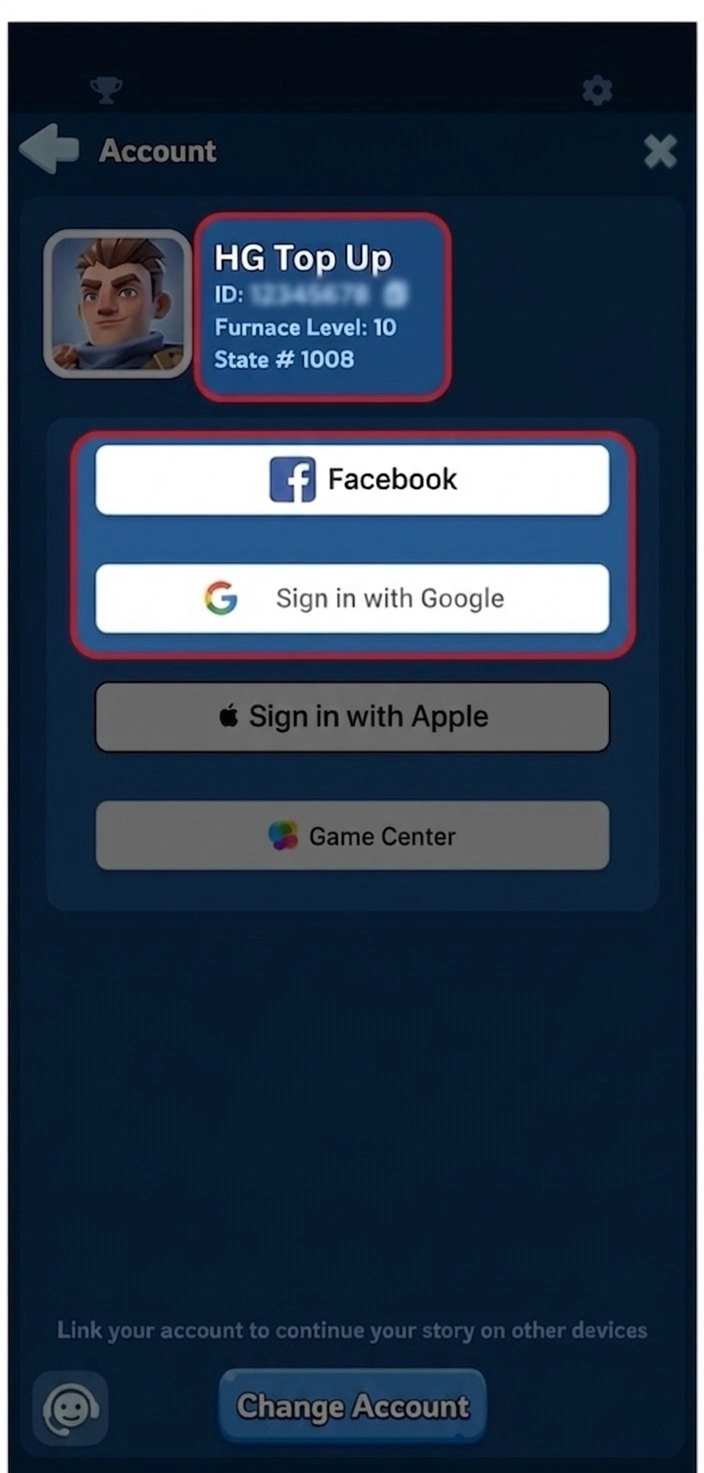
Use the in-game account information to help our team verify the correct account. -
Provide the package screenshot
Send a screenshot of the pack you want to buy, and we will purchase the in-game item based on the product you ordered.
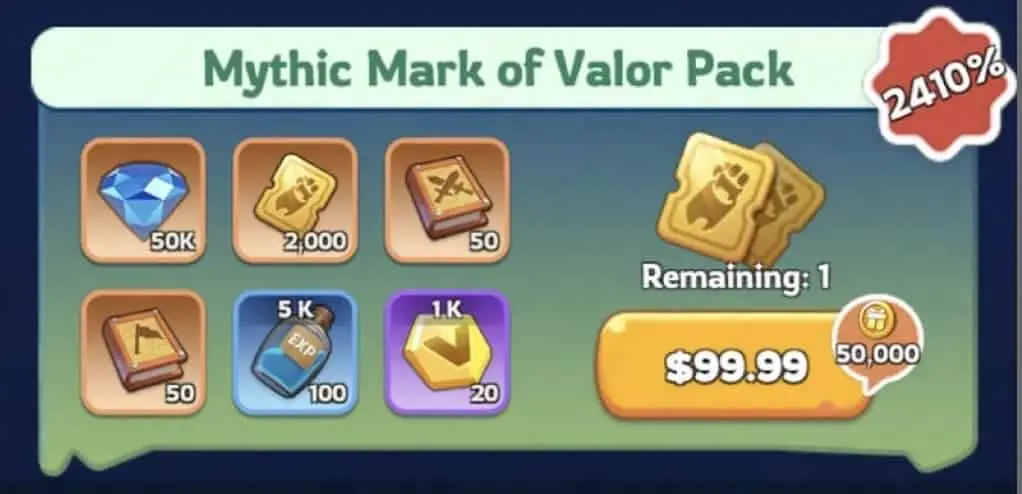
A clear pack screenshot helps reduce mistakes and speeds up processing. -
We complete the top up
After the purchase is completed, we will log out of your account and clear the login history.
-
Receive notification and verify
Once the top up is complete, you will receive a notification. You can then log back in to verify the transaction.
Account Preparation
How to Obtain the In-Game Bound Account and Package Name
Use this guide to prepare your bound account information and package details before ordering.
Bind your account with Google or Facebook
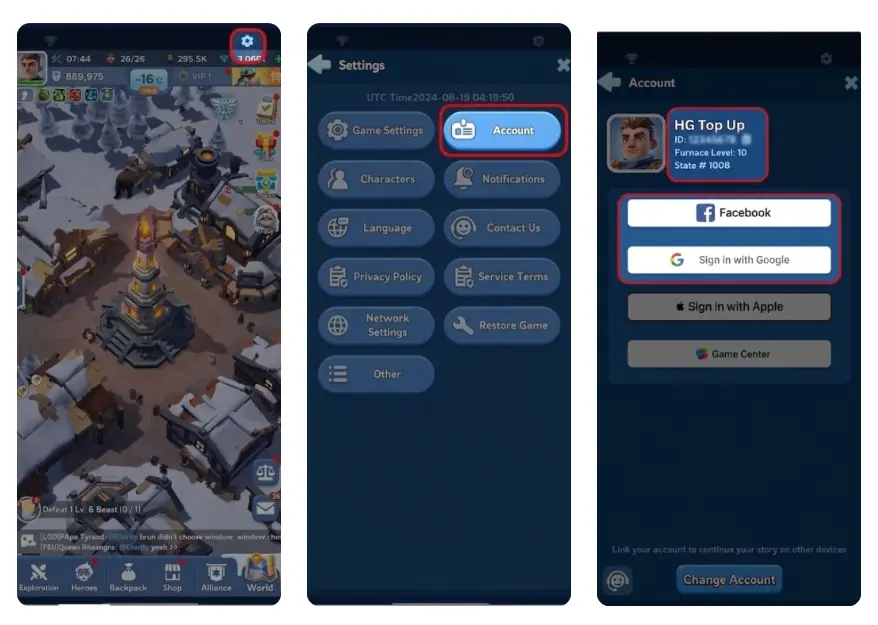
To get your in-game bound account, follow these steps inside Whiteout Survival:
- Log in to the game.
- Click the Gear Icon in the upper-right corner.
- Select Account.
- Link your game account with Google or Facebook.
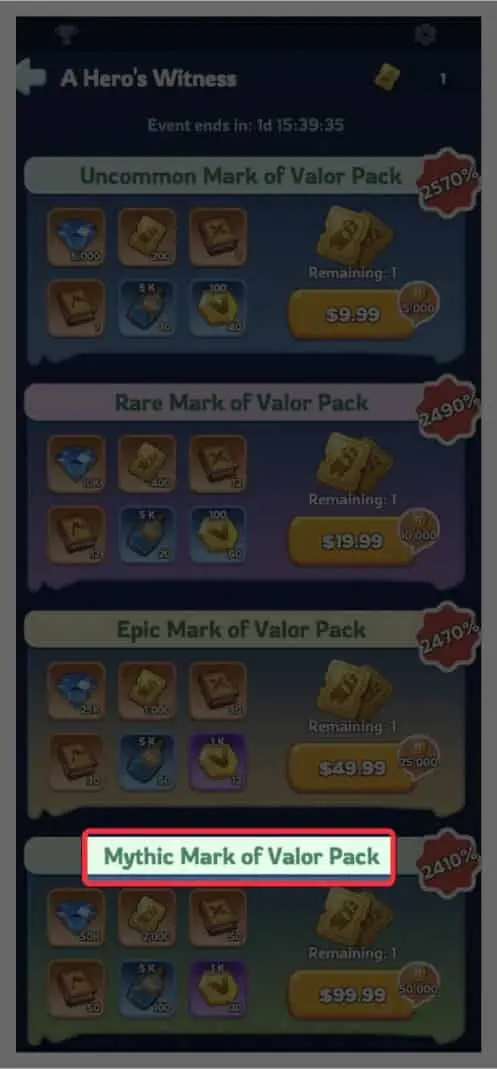
Select the package you want to buy
Log in to the game and check the exact name of the package you want to purchase. Then provide that package name when submitting your information.
Example: If you want to buy the package shown in the screenshot below, please enter Mythic Mark of Valor Pack when submitting your information.
Please also provide the matching screenshot of the pack to help us process your order correctly.
FAQ
Whiteout Survival Login Top Up FAQ
Common questions about Whiteout Survival login top up, verification, account access, delivery time, and refund eligibility.
What is Whiteout Survival Login Top Up?
Login Top Up means the recharge is completed by logging in to your account and purchasing items or packs on your behalf, instead of using a UID-only delivery method.
What details are needed to place a Whiteout Survival login top up?
Usually, you will need to provide:
- Your login method
- Your bound account details
- Verification code or OTP if required
- Your character name
- The package name
- A screenshot of the package
For your safety, never share card details or unrelated personal information.
Is login top up riskier than UID top up?
Yes. Since Whiteout Survival login top up requires account access, it carries more risk than UID top up. This is why it is important to stay in contact with our team and monitor verification requests carefully.
How can I reduce risk before ordering?
- Bind your account to an email or phone number you control.
- Be ready to receive OTP or verification requests.
- Avoid using shared or public devices.
- Take screenshots of your User ID, server, and character name.
- Stay available in case our team needs confirmation.
Do I need to log out while the top up is being processed?
Yes, in most cases. To avoid login conflicts, it is recommended that you log out and do not log back in until you receive confirmation that the order is complete.
How long does Whiteout Survival login top up take?
Many orders are completed within 10-30 minutes, but some may take longer if OTP verification or additional security checks appear.
What should I do if the game asks for a verification code during the process?
Only provide the OTP or verification code through the official Top Up chat for your active order. If you are unsure, contact our team before sending anything.
What if I receive an unexpected security email or SMS?
Check whether the alert matches your active order timing. If it looks suspicious:
- Contact our team immediately.
- Change your password.
- Enable stronger account security.
What if items are partially delivered?
Sometimes packs may be processed in batches. Please take screenshots of your inventory or purchase status and contact our team with your order number for confirmation and follow-up.
Can I refund a Whiteout Survival login top up?
If the order has not been processed or delivered, a refund may be possible depending on policy. Once delivery is completed, refunds are generally not available. Please contact our team with your order number to check eligibility.
Why Heaven Guardian
Why Buy Whiteout Survival Top Up at Heaven Guardian?
Get a more guided and dependable Whiteout Survival top up experience with clear support from start to finish.
Guided order support
Our team helps you complete Whiteout Survival top up orders with clearer instructions and direct assistance when needed.
Help with specific packs and packages
Whether you want a gift pack, a standard price-based package, or a custom top up request, we help you choose the right option.
Support for login top up orders
If your order requires a Whiteout Survival login top up, we provide active guidance during the process, including verification steps when needed.
Smoother and more reliable experience
We focus on responsive communication, careful handling, and a more efficient top up process so you can order with greater confidence.
Ready to order your Whiteout Survival top up?
Join our Discord, send your package screenshot, and our team will guide you through the process.
Whiteout Survival Top Up Reviews
Bought hundreds of dollars’ worth of packages and got them done in under an hour. Fast and reliable service. I will be back.
Really amazing service. I would recommend people using Heaven Guardian.
Five-star service. Great service, absolutely fantastic. Thank you, guys.
Very good experience.
This was truly an amazing experience, smooth and easy.
Whiteout Survival Top Up Options
Whiteout Survival Frost Star vs Assisted Login Top Up
When players search for WOS top up or Whiteout Survival top up, they may be looking for different purchase methods. Some players prefer Whiteout Survival Frost Star as a direct self-service option, while others need help buying specific packs, bundles, or gems through a guided order process.
Self-service
Buy Frost Star Directly
Whiteout Survival Frost Star is generally used as a direct self-service purchase method. This route is best for players who prefer to buy by themselves and manage the purchase directly.
- Best for direct store-style purchases
- Usually handled by the player directly
- Separate from Heaven Guardian assisted orders
Assisted service
Order Packs Through Heaven Guardian
At Heaven Guardian, this page is focused on assisted Whiteout Survival top up for custom packs, selected bundles, gems, and login-based orders where our team helps process the correct package.
- Best for selected packs, bundles, and gems
- Useful for custom WOS pack top up requests
- May require account sign-in and verification
Which option should you choose?
Choose Heaven Guardian assisted Whiteout Survival top up if you want guided help for selected packs and bundles. Choose Whiteout Survival Frost Star top up if you prefer a direct self-service method.
Quick FAQ
Whiteout Survival Top Up Method FAQ
Clear answers for players comparing Frost Star with assisted login pack top up.
What is the difference between Frost Star top up and login pack top up?
Frost Star top up is generally a self-service purchase method, while login pack top up is an assisted service that may require account sign-in and verification to complete the order.
Do you offer WOS top up for packs and gems?
Yes. We provide WOS top up support for selected Whiteout Survival packs and gems, including custom pack requests and login-based purchases.
Is this page for official Frost Star top up?
No. This page is for assisted Whiteout Survival top up and custom login-based pack orders. Direct self-service Whiteout Survival Frost Star purchase is a different option.
Who is assisted login top up best for?
This option is best for players who want help purchasing specific custom packs, bundles, or gems and are comfortable following account sign-in and verification steps during the process.
Do assisted top up orders require verification?
Sometimes, yes. Depending on your login method, our team may need a Google or Facebook verification code to complete the order securely.