Learning how to change states in Whiteout Survival can be confusing because the game provides more than one way to enter another state. The easiest option is to create a new character in the state you want to join.
However, creating a character does not relocate your current city. It starts a separate city with its own heroes, resources, troops, progression, and alliance membership.
This guide explains how to create a new character, how to select a suitable state, the difference between new-character creation and State Transfer, and what to consider before starting over.
How to Change States in Whiteout Survival with a New Character
You can create another character through the Characters menu. The exact position of each button may change slightly between game versions, but the general process remains the same.
- Open your Chief profile. Tap your profile portrait from the main city screen.
- Open Settings. Look for the gear-shaped Settings button on the profile screen.
- Select Characters. This menu displays the characters connected to your current game account.
- Tap Create New Character. The game will open the available state-selection screen.
- Choose your target state. Browse the list or search for a state number if your version provides that option.
- Confirm your selection. Your new character will begin from the introductory tutorial in the selected state.
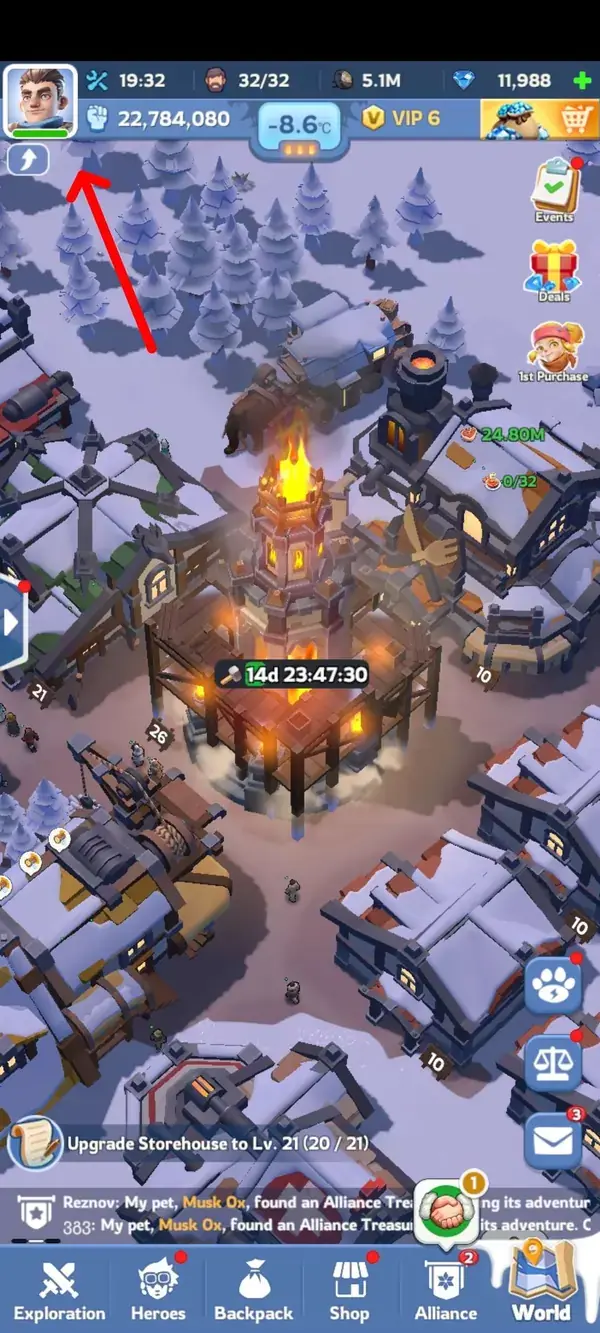
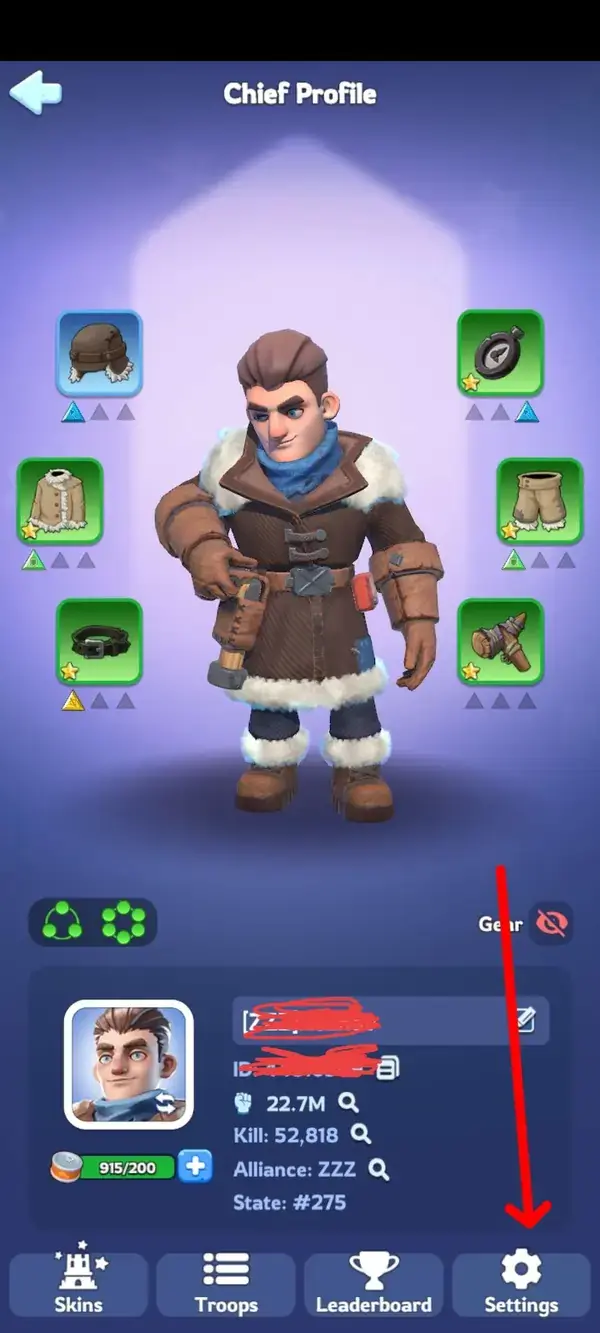
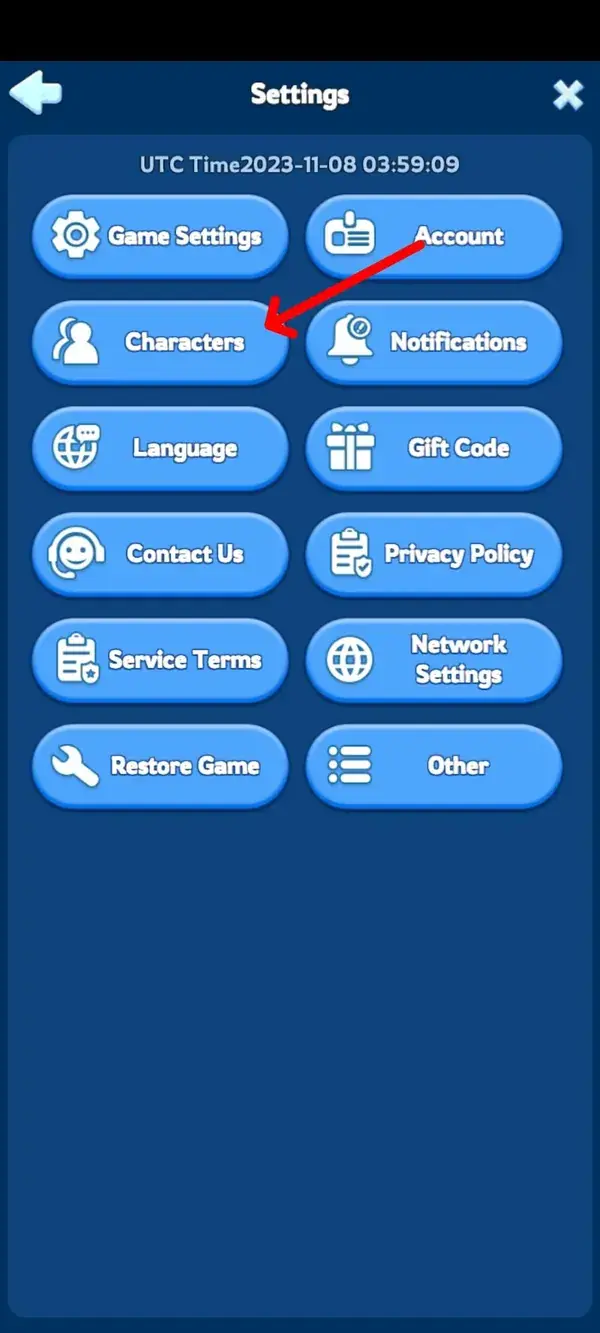
Once the tutorial begins, the new city operates independently. You can return to your main character later through the same Settings > Characters menu.
Does Creating a New Character Move Your Existing City?
No. Creating a new character and moving an existing character are two different actions.
Your new character begins with fresh progression. Heroes, troops, resources, gear, research, Furnace levels, event items, and purchases are not copied from your main character.
| Option | Creates New Progress | Keeps Existing Progress | When It Is Available |
|---|---|---|---|
| Create a new character | Yes | No | When the selected state accepts new characters |
| State Transfer | No | Yes | During eligible State Transfer events |
| State vs State visit | No | Yes | Temporarily during the applicable battle phase |
If you only want to test another state or join friends without abandoning your main city, a separate character is usually the simplest option. If you want your developed city to remain intact, wait until your character qualifies for State Transfer.
Whiteout Survival Character Limits
Whiteout Survival’s official support information lists an overall limit of 10 characters on an account. However, the number of characters that can exist in one state may be affected by state mergers and characters created before those mergers.
Older guides commonly state that only two characters are allowed in one state. That rule should not be treated as universal because merger history can create exceptions and affect whether another character can be added.
The most reliable way to check your current allowance is to open the Characters menu. If the game permits another character in the selected state, the creation option will be available.
Should You Choose a New State or an Established State?
The right state depends on why you are creating another character. A newly opened state provides a more natural starting environment, while an established state may be better when you already know an alliance or group of players there.
Advantages of Starting in a New State
- Similar starting times: Most players begin their cities within a relatively close period.
- Developing alliances: New alliances are actively recruiting members and building their first territories.
- Early-state progression: You can experience hero releases, events, and major features as they unlock.
- More manageable power gaps: Although spending and activity still create differences, fewer players have months of accumulated progression.
- Better for a full restart: You can apply what you learned from your first character from the beginning.
Disadvantages of Starting in a New State
- Limited early hero selection: Hero generations unlock according to the state’s timeline.
- Features unlock gradually: Some events, buildings, pets, and Fire Crystal systems may not be available yet.
- Uncertain state development: It is difficult to predict which alliances will remain active or how cooperative the state will become.
- Rapid early competition: Active players often race for alliance positions, rankings, and first-event rewards.
Advantages of Joining an Established State
- Known community: You may already have friends or an alliance waiting for you.
- More mature game systems: Older states generally have later hero generations and progression features unlocked.
- Clearer state culture: You can research the state’s activity, leadership, alliances, and event performance before joining.
- Experienced guidance: Established alliances may help new players understand events and progression priorities.
Disadvantages of Joining an Established State
- Large power differences: Long-term players may have months or years of accumulated development.
- Stricter alliance requirements: Competitive alliances may require minimum power, activity, event participation, or specific troop levels.
- Difficult Arena progression: Established Arena teams can have stronger heroes, gear, and higher star levels.
- Higher catch-up pressure: You must progress through early buildings and research while the state already uses advanced systems.
| Factor | New State | Established State |
|---|---|---|
| Starting environment | Many recently created cities | Mature cities and larger power gaps |
| Hero availability | Early generations | Later generations based on state age |
| Alliance recruitment | Many alliances are forming | Top alliances may have stricter requirements |
| Best suited for | A complete restart and early competition | Joining a known community or alliance |
What to Check Before Selecting a State
Do not choose a state based only on its number. Spend a few minutes checking whether it matches your goals and available playing time.
1. Confirm Where Your Friends Are Playing
Ask for the exact state number and alliance name. Similar alliance names can exist in multiple states, so verify both details before creating the character.
2. Check the State’s Age and Hero Generation
State age affects the heroes, events, Fire Crystal progression, buildings, pets, and other systems available there. A character created in an established state does not automatically receive its advanced content. You must still develop the new city before using many of those systems.
3. Research Alliance Requirements
Contact the alliance before starting if joining it is your main goal. Ask about minimum power, activity expectations, event schedules, language, time zone, and whether a place is available for a new character.
4. Consider the Time Required for Another City
A second character adds more daily tasks, construction queues, rallies, events, troop management, and alliance responsibilities. Create one only when you can maintain it without weakening your main character’s progression.
5. Do Not Assume You Can Transfer Later
State Transfer uses separate eligibility rules. Target states generally need compatible progression, including matching hero-generation and Fire Crystal stages. Character age restrictions, power limits, invitations, Transfer Pass costs, and destination availability may also apply.
Because transfer rules can change between groups and event rotations, check the current in-game State Transfer panel before making long-term plans.
Starting in an Established State: Practical Considerations
Starting from zero is not the only way to enter a mature state. Players comparing established progression options may review a wos account for sale, but the state number alone is not enough to evaluate suitability.
Check the Furnace or Fire Crystal level, hero generation, Chief Gear, charms, transfer eligibility, current alliance situation, account-binding status, and security process. This route is optional, and creating a new character remains the straightforward choice for players who prefer to build their own progress.
Why Create Another Whiteout Survival Character?
A second character can be useful when it has a clear purpose. Without one, it may become another city that consumes time without improving your overall experience.
Join Friends in Another State
You can start in the state where your friends or gaming community already plays. This avoids waiting for a transfer event, although you will begin with a new city.
Experience a Fresh State Timeline
Veteran players can revisit early hero generations, first alliance battles, initial Sunfire competition, and other state-development stages with better knowledge of resource management.
Test a Different Progression Strategy
A new character lets you change how you spend gems, select heroes, prioritize research, use speedups, and approach early events. These lessons may also improve decisions on your main character.
Explore Another Alliance Environment
Alliance organization can significantly affect the game. A second character allows you to experience different leadership styles, event schedules, communication methods, and competitive expectations.
Maintain a Secondary or Support Character
Some players keep another character for social participation or additional alliance activity. However, resources, heroes, gear, and premium items cannot be transferred directly between your characters.
Beginner Priorities for a New Character
Starting with previous experience gives you an advantage, but only when you avoid spreading resources across too many upgrades.
- Join an active alliance early. Alliance assistance, rallies, territory bonuses, and event participation support faster development.
- Keep the Furnace progressing. It controls many building upgrades and progression requirements.
- Upgrade required buildings first. Avoid spending long construction queues on low-priority buildings when they do not support your next Furnace level.
- Save valuable items for useful events. Speedups, hero shards, gear materials, and Fire Crystal resources may provide additional value when used during scoring events.
- Choose hero investments carefully. Avoid dividing limited shards and experience across every available hero.
- Review the state timeline. Prepare for upcoming heroes and systems instead of investing as though every feature is already available.
- Protect your main character’s schedule. Decide which character receives priority during overlapping alliance events.
Common Mistakes When Creating a New Character
- Expecting the main city to move: A new character starts separate progress.
- Selecting the wrong state number: Confirm the destination before completing character creation.
- Assuming every state is available: Some states may not accept new characters.
- Ignoring the power gap: A fresh character in an established state will compete against long-developed cities.
- Expecting to share resources: Heroes, gems, inventory, troops, and equipment remain tied to each character.
- Planning around an unconfirmed transfer: Future transfer eligibility is not guaranteed.
- Creating too many characters: Maintaining several cities can reduce event participation and progression on the character that matters most.
FAQs
How do I change states in Whiteout Survival?
You can enter another state immediately by creating a new character through Profile > Settings > Characters. This starts a separate city in the selected state.
To move your existing city while preserving its progression, you must qualify for a State Transfer event instead.
Does creating a new character delete my main character?
No. Your main character remains connected to your account. You can switch between available characters through the Characters menu.
How many characters can I have in Whiteout Survival?
Official support lists an overall limit of 10 characters. Per-state availability can be affected by existing characters, state mergers, and current game restrictions, so check the in-game Characters screen.
Can I transfer heroes or resources between characters?
No. Each character has separate heroes, resources, troops, gear, research, buildings, gems, and event progress.
Is creating a new character the same as State Transfer?
No. A new character begins from the tutorial with fresh progression. State Transfer relocates an eligible existing character and preserves most of its personal development.
Should I create a character in a new or established state?
Choose a new state for a more natural restart with other developing cities. Choose an established state when you already know an alliance or community there and accept the larger progression gap.
Why can’t I select the state I want?
The state may be unavailable for new-character creation, full, restricted, or affected by your character allowance. Confirm the state number and review the destinations shown in the Characters menu.
Can I switch back to my original character?
Yes. Open the profile and return to Settings > Characters. Select your original character to load its city again.
Conclusion
Understanding how to change states in Whiteout Survival starts with choosing the correct method. Creating a new character lets you enter another state quickly, but it creates a separate city rather than relocating your existing progress.
A newer state is generally better for players who want a complete restart and an early-state competitive environment. An established state makes more sense when you have friends, an alliance, or a specific community waiting there.
Before confirming your destination, check the exact state number, state age, alliance requirements, character availability, and the amount of time you can commit. Most importantly, do not rely on an assumed future State Transfer when choosing where to begin.
For more progression advice, state strategies, hero tips, and event walkthroughs, explore our collection of Whiteout Survival guides.