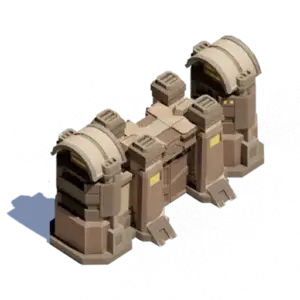
The Whiteout Survival Barricade controls how long your city can remain on fire after a successful enemy attack. If its durability reaches zero, your city can be randomly teleported away from its current position.
This guide explains how Barricade burning works, how to restore its durability, what happens when your city is attacked, which heroes are useful for city defense, and how to prevent an unwanted teleport.
A successful city attack can start a burning timer that gradually reduces Barricade durability. Each successful attack normally adds more burning time. Restore durability through the City Defense menu, extinguish the fire when possible, and use protection or relocation before durability reaches zero.
What Is the Barricade in Whiteout Survival?
The Barricade is a defensive city building with 10 upgrade levels. Its primary purpose is to provide durability while your city is burning after an enemy attack.
It is important to understand what the Barricade does and does not do:
- It provides a durability timer: More durability gives you additional time to respond to a burning city.
- It adds building power: Every upgrade increases your city’s total power.
- It does not make your city impossible to attack: Peace Shields, troop strength, heroes, reinforcements, and alliance positioning provide the main layers of protection.
- It does not directly prevent troop losses: Your heroes, troop statistics, Infirmary capacity, research, and reinforcements determine how well you perform in the actual battle.
A higher-level Barricade is valuable because it gives you more time to notice the attack, return online, repair the damage, extinguish the fire, or relocate your city.
How Whiteout Survival City Burning Works
When an enemy wins a successful attack against your city, the city can begin burning. During this period, the Whiteout Survival Barricade durability gradually decreases.
How Long Does a City Burn?
Under normal world-map conditions, one successful attack is commonly documented as adding approximately 30 minutes of burning time. Additional successful attacks can extend the timer.
For example, if your city has 20 minutes of burning time remaining and another successful attack adds 30 minutes, the displayed burning period may increase to approximately 50 minutes.
Important: Certain events, battlefields, and territory conditions can apply faster burning rules. Always check the active City Defense bar instead of assuming every game mode uses the normal world-map rate.
How Much Barricade Damage Does Burning Cause?
Community testing commonly places normal burning damage at approximately 12 durability points per minute. A continuous 30-minute burn could therefore remove around 360 durability.
This value should be treated as a practical estimate. Game updates, event rules, and special battlefields may change the effective rate.
Being offline is especially dangerous because you cannot restore the Barricade, extinguish the fire, activate protection, or coordinate with your alliance. It is safer to describe this as an increased practical risk rather than assuming that every server applies a separate offline damage multiplier.
What Happens When Your City Is Attacked?
A city attack involves more than the Barricade. When another player attacks and defeats your city defense, several things may happen:
- Your defending troops can become wounded.
- Troops exceeding your Infirmary capacity may be lost.
- Unprotected resources may be plundered.
- Your city may start burning.
- The Barricade begins losing durability while the fire remains active.
- Repeated successful attacks may extend the burning timer.
The Barricade does not decide the outcome of the troop battle. It becomes important after your defense is defeated because it determines how long the city can continue burning before forced relocation.
What Happens When Barricade Durability Reaches Zero?
If your Whiteout Survival Barricade durability reaches 0, the game can move your city to a random location on the world map.
This forced relocation can create several problems:
- You lose your previous position near alliance members.
- You may be moved outside alliance territory.
- Alliance territory bonuses at the old location no longer apply.
- You may have to spend an Advanced Teleporter to return to your alliance hive.
- Your city may become isolated and easier to attack again.
- You can lose an important strategic position during SvS or another conflict event.
Do not intentionally allow the Barricade to reach zero as a repair strategy. Forced relocation is unpredictable, can disrupt your alliance formation, and may leave your city in an inconvenient part of the map.
How to Restore the Barricade in Whiteout Survival
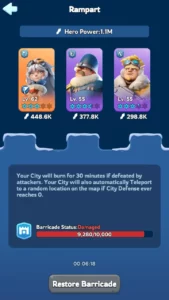
You can restore lost durability through the Barricade’s City Defense menu.
- Enter your city and tap the Barricade.
- Select City Defense.
- Check the current durability and burning timer.
- Tap Restore Barricade when the restoration action is available.
- Return after the cooldown and restore it again if the Barricade is still below maximum durability.
The commonly documented restoration amount is 240 durability every 30 minutes. Because the restoration is limited by a cooldown, one repair may not be enough after repeated attacks.
Does Restoring Durability Stop the Fire?
Restoring durability and extinguishing the fire should be treated as separate actions. Restoration adds durability, but an active fire may continue reducing it until the burning effect is removed or its timer expires.
Check the City Defense screen carefully. If an extinguish or fire-assistance option is available, use it before relying only on repeated restoration.
Can Alliance Members Help Put Out the Fire?
Yes. A game update released in March 2026 added the ability for players to help put out fires on allied cities from the world map.
If your city is burning, communicate in alliance chat and ask nearby members to check your city. This feature makes alliance positioning even more useful during SvS, Brothers in Arms, Sunfire Castle conflicts, and other periods of increased PvP activity.
How to Stop Your City From Burning
The safest approach is to prevent another successful attack while repairing the damage from the previous one.
1. Extinguish the Active Fire
Open the City Defense panel and use the available extinguishing option. Depending on the current game version or situation, the interface wording may vary.
2. Restore Barricade Durability
Use the restoration action whenever its cooldown becomes available. Do not wait until the Barricade is close to zero.
3. Activate a Peace Shield
Use an appropriate Peace Shield before an expected PvP period, particularly if you will be offline. Some battle conditions or active combat states may restrict when a shield can be activated, so do not leave this step until an attack has already started.
4. Relocate to Alliance Territory
Position your city inside or near your alliance hive. Nearby members can reinforce you, monitor incoming attacks, help extinguish fires, and organize counterattacks.
5. Remove Vulnerable Troops
If you cannot shield and expect a much stronger enemy to attack, discuss troop protection with your alliance. Reinforcing a protected city, gathering in a safe area, or using another alliance-approved strategy may reduce avoidable losses.
6. Monitor Infirmary Capacity
Heal wounded troops before major PvP events. If the Infirmary is already full, additional casualties from a city attack can become much more expensive.
Best Heroes for Barricade and City Defense
Barricade heroes do not directly increase the structure’s durability. Their main purpose is to strengthen the troops defending your city.
Open the Barricade and select City Defense to review your defensive hero lineup. Prioritize heroes with strong Expedition bonuses, high star levels, upgraded skills, and suitable defensive effects.
Useful Early-Game Defensive Heroes
- Sergey: His Expedition skills can reduce damage taken by friendly troops and reduce enemy troop Attack. He is one of the most accessible early defensive Infantry heroes.
- Patrick: His Expedition skills increase troop Health and Attack. The additional Health can help a defending formation survive longer.
- Jessie: Her Expedition skills increase troop damage and reduce damage taken. She can be useful when she has stronger stars and skills than your alternative Lancer heroes.
These heroes are useful early options, not a permanent best-in-slot lineup. Later-generation heroes with stronger defender-specific bonuses, better exclusive gear, and higher Expedition statistics can replace them.
How to Choose Your Defense Heroes
Compare heroes using the following order:
- Relevant Expedition skills
- Hero generation and base statistics
- Star level
- Skill level
- Exclusive gear effects
- Hero gear and troop-type bonuses
A fully developed Epic hero can sometimes perform better than a newer Mythic hero with low stars and undeveloped skills. Test different combinations through battle reports rather than selecting heroes by rarity alone.
Best Troop Composition for City Defense
There is no universal troop composition that counters every attacker. The correct ratio depends on your heroes, troop tiers, research, reinforcements, and the enemy’s formation.
As a practical starting point, an Infantry-heavy defensive ratio can be used:
General defensive starting ratio:
60% Infantry / 20% Lancer / 20% Marksman
Infantry generally provide the frontline durability needed to absorb incoming damage. Lancers and Marksmen supply additional damage and help prevent the formation from becoming too easy to counter.
Do not treat 60/20/20 as a fixed rule. Review the attacker’s troop composition and your battle reports. If an opponent repeatedly uses a predictable ratio, adjust your defenders and reinforcements around the troop counter system.
Whiteout Survival Barricade Upgrade Requirements
The Barricade has 10 levels. The first upgrade beyond level 1 requires Furnace level 7, while Barricade level 10 requires Furnace level 30.
Construction times shown below are base times. Research, city bonuses, VIP effects, Chief Orders, hero skills, and other construction-speed bonuses may reduce the time shown in your game.
| Level | Furnace Required | Upgrade Time | Meat | Wood | Coal | Iron | Durability | Building Power |
|---|---|---|---|---|---|---|---|---|
| 1 | None | None | – | – | – | – | 1,000 | 400 |
| 2 | 7 | 10 seconds | – | 5.3K | 1K | – | 1,500 | 3,100 |
| 3 | 10 | 21m 30s | – | 88K | 17K | 4.4K | 2,000 | 9,400 |
| 4 | 13 | 1h 4m 30s | 420K | 420K | 84K | 21K | 5,000 | 21,940 |
| 5 | 16 | 3h 39m | 1.4M | 1.4M | 290K | 74K | 10,000 | 47,240 |
| 6 | 20 | 9h 52m 30s | 5.3M | 5.3M | 1M | 260K | 15,000 | 86,360 |
| 7 | 24 | 1d 13h 44m | 15M | 15M | 3M | 750K | 20,000 | 149,500 |
| 8 | 27 | 3d 55m | 37M | 37M | 7.4M | 1.8M | 25,000 | 217,320 |
| 9 | 29 | 4d 26m | 61M | 61M | 12M | 3M | 30,000 | 267,920 |
| 10 | 30 | 4d 19h 44m | 75M | 75M | 15M | 3.7M | 35,000 | 304,700 |
Should You Prioritize Barricade Upgrades?
The Barricade should remain reasonably close to the maximum level allowed by your Furnace, especially if your state is active in PvP. However, it should not automatically take priority over every other city building.
Buildings such as the Furnace, Embassy, Infirmary, Research Center, troop camps, and Storehouse can provide more immediate progression or combat value. Upgrade the Barricade when:
- You are preparing for SvS or another PvP event.
- Your city is frequently attacked.
- Your alliance holds a contested map position.
- Your current durability is too low to survive repeated attacks.
- You need the building power for a progression objective.
- Your other important buildings are already waiting on Furnace requirements.
You can compare its priority with other buildings in the Whiteout Survival base layout and building priority guide.
Optional progression note: Players comparing established profiles can review a wos account for sale. Check the Furnace level, Barricade level, hero generation, troop tiers, Infirmary capacity, and current state before evaluating an account, because total power alone does not guarantee effective city defense.
Common Barricade Mistakes to Avoid
Ignoring the Barricade Until It Is Almost Empty
A single restoration action may not recover enough durability after several attacks. Start restoring early instead of waiting until the durability bar is nearly empty.
Assuming High Durability Prevents Attacks
Durability gives you more response time. It does not replace a Peace Shield, strong troops, defensive heroes, research, or alliance reinforcements.
Leaving the Wrong Heroes on City Defense
Bear Hunt, gathering, and rally-support heroes are not automatically your best city defenders. Review their Expedition skills before assigning them to the defensive lineup.
Using an Offensive Troop Ratio for Defense
A Marksman-heavy formation may produce high damage but can collapse quickly when defending against repeated attacks. Use enough Infantry to protect the rest of the formation.
Depending on Forced Teleportation
Reaching zero durability is not a reliable repair method. You may lose your alliance position and need another teleporter to return.
Remaining Outside Alliance Territory
An isolated city is harder to reinforce and easier to attack repeatedly. Staying near active alliance members gives you more options when your city starts burning.
FAQ
What happens when your city is attacked in Whiteout Survival?
Your stationed troops defend automatically. If the attacker wins, your troops may be wounded, unprotected resources may be plundered, and your city can begin burning. The burning effect gradually reduces Barricade durability.
How long does a city burn in Whiteout Survival?
A normal successful city attack is commonly documented as adding approximately 30 minutes of burning time. Repeated successful attacks can extend the timer, while certain events and battlefields may use faster burning rules.
What happens when Barricade durability reaches zero?
Your city can be randomly teleported to another world-map location. This removes you from your previous alliance position and may cause you to lose the territory benefits available at that location.
How do you restore the Barricade in Whiteout Survival?
Tap the Barricade, open City Defense, and select Restore Barricade. The commonly documented restoration limit is 240 durability every 30 minutes.
How do you stop a city from burning?
Use the available extinguishing action in City Defense, ask alliance members for fire assistance, restore lost durability, and prevent another attack with a shield, relocation, reinforcements, or alliance support.
Can alliance members extinguish your city?
Yes. Since the March 2026 update, players can help put out fires on allied cities through the world map.
What are the best heroes for Barricade defense?
Use your strongest developed heroes with defensive Expedition bonuses. Sergey, Patrick, and Jessie are accessible early-game options, but later-generation heroes with stronger defender effects may outperform them.
What is the maximum Barricade level?
The maximum Barricade level is level 10, which requires Furnace level 30. The Barricade does not currently continue through Fire Crystal upgrade levels.
Conclusion
The Whiteout Survival Barricade is best understood as your final response timer after a successful city attack. Upgrading it provides more durability, but effective defense still depends on Peace Shields, heroes, troop composition, research, Infirmary capacity, reinforcements, and alliance positioning.
Check the Barricade before major PvP events, restore missing durability as early as possible, and never assume that a large durability bar makes your city completely safe. If your city begins burning, extinguish it, ask your alliance for assistance, and prevent additional attacks before the Barricade reaches zero.
For more progression, hero, event, and combat advice, explore the Whiteout Survival guides on Heaven Guardian.