 A Whiteout Survival teleporter lets you relocate your entire city on the world map. Teleporting can help you join your alliance hive, return to alliance territory, escape danger, position near an event objective, or move beside a specific target.
However, each teleporter follows different rules. A Territory Teleporter does not work like an Alliance Teleporter, while an Advanced Teleporter gives you much more control over the destination. Cross-State Teleporters are also restricted to specific State of Power phases.
This guide explains how to teleport in Whiteout Survival, what every teleporter does, where to get them, and which option to use in common situations.
How Teleporters Work in Whiteout Survival
Normal teleporters relocate your city within its current state. They do not transfer your account permanently to another state. Permanent state relocation uses the separate State Transfer system and its own eligibility requirements.
Your city occupies a 2-by-2 area on the world map. Therefore, a chosen destination must contain four valid and unoccupied tiles. Resource nodes, beasts, other cities, alliance structures, and restricted terrain can prevent placement.
How to Teleport in Whiteout Survival
The exact menu path can vary slightly after interface updates, but the general process remains similar.
- Recall your marches. Bring back troops that are gathering, reinforcing, scouting, attacking, or moving on the map.
- Open the world map. Find the area where you want to relocate.
- Select a valid destination. For precise relocation, choose an open 2-by-2 space and tap the teleport option.
- Select the teleporter. Use an Advanced Teleporter for a chosen location or activate another type from your Backpack.
- Review the preview. Confirm that the destination is safe and that your entire city is positioned where intended.
- Confirm the move. The required item or currency will be consumed once the teleport succeeds.
Why You May Be Unable to Teleport
If the game rejects the move, check the following:
- A march is still outside your city or returning from an activity.
- The destination does not have four open tiles.
- A resource node, beast, city, building, or map obstacle blocks part of the location.
- The selected area belongs to an enemy alliance and does not permit that teleporter type.
- You do not have the required teleporter item or enough Gems.
- An event phase, battlefield rule, cooldown, or temporary restriction prevents movement.
When the restriction is not obvious, read the message shown by the game before spending another item. It usually identifies the march, tile, or event rule blocking the relocation.
Whiteout Survival Teleporter Types Compared
| Teleporter | Destination | Best Use | Common Sources |
|---|---|---|---|
| Territory Teleporter | Near the alliance’s highest-level HQ | Returning to the alliance hive or territory area | Alliance Shop |
| Alliance Teleporter | Near the alliance R5 | Following the leader to an objective | Alliance Shop |
| Advanced Teleporter | A valid location selected by the player | Precise PvP, event, gathering, or defensive positioning | Alliance Shop, VIP Shop, Nomadic Merchant, eligible rewards |
| Random Teleporter | An unpredictable location in the current state | Low-cost escape or unplanned relocation | Rechargeable option, Alliance Shop, Nomadic Merchant |
| Cross-State Teleporter | The opposing state during an eligible SvS phase | State of Power Battle Phase | Provided through the active event |
Whiteout Survival Territory Teleporter
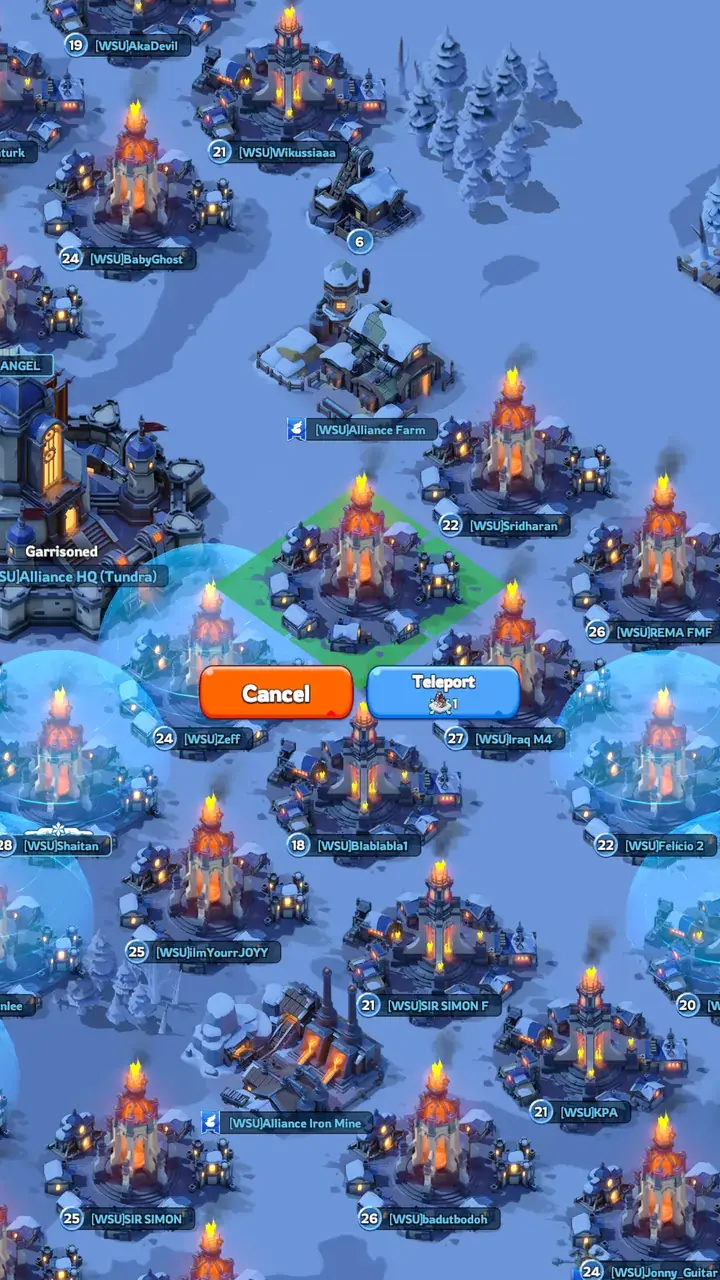
The Whiteout Survival Territory Teleporter relocates your city close to your alliance HQ. If your alliance has constructed its Tundra HQ, the teleporter prioritizes that higher-level HQ. Otherwise, it uses the available Icefield HQ.
This makes it the most practical option when you have moved away for PvP, gathering, Fortress Battles, or other world-map activities and need to return to your alliance’s main area.
How to Get a Territory Teleporter in Whiteout Survival
The primary source is the Alliance Shop, where it can be purchased with Alliance Tokens when available. Shop contents and discounts can rotate, so check the current listing before planning around a fixed price.
Alliance Tokens are commonly earned by contributing to Alliance Tech and participating in eligible alliance activities. Saving a small reserve of tokens for relocation items prevents you from becoming stranded after an event.
How to Use a Territory Teleporter
- Join the alliance whose HQ you want to approach.
- Recall all active marches to your city.
- Open your Backpack and select the Territory Teleporter.
- Tap Use and review the proposed destination.
- Confirm the move if the placement suits your alliance layout.
Best Times to Use a Territory Teleporter
- Returning to the hive after Brothers in Arms or another PvP activity.
- Regrouping after a Fortress, Stronghold, Facility, or Castle operation.
- Moving back toward alliance bonuses and coordinated resource gathering.
- Rejoining the alliance after its main HQ or hive location changes.
- Escaping an isolated map position without paying for precise placement.
Whiteout Survival Advanced Teleporter
The Whiteout Survival Advanced Teleporter allows you to choose a valid destination. It offers the most control and is usually the best item for precise event positioning, defensive relocation, organized attacks, or moving to a specific resource area.
If you do not have the item, the game may offer an immediate teleport for 4,000 Gems. Because this is expensive, check your Backpack and rotating shops before confirming a Gem purchase.
How to Get Advanced Teleporters
Possible sources include:
- The Alliance Shop.
- The VIP Shop.
- The Nomadic Merchant.
- Fortress-related rewards.
- State of Power and other eligible event rewards.
- A direct 4,000-Gem relocation when no item is available.
Availability and discounts can change. Check each shop’s current stock instead of assuming an item will appear every day.
How to Use an Advanced Teleporter Effectively
Open the world map, tap the intended destination, and select the teleport command. Move the placement outline until all four city tiles are valid, then confirm the relocation.
Before committing, inspect nearby cities, alliance territory borders, objectives, and possible attack routes. A precise landing location is valuable only when it supports your next action.
- For PvP: Land close enough to shorten marches but leave room to relocate or shield safely.
- For alliance objectives: Follow markers supplied by R4 or R5 instead of blocking rally leaders.
- For gathering: Select an area with several suitable resource nodes rather than moving for one tile.
- For defense: Avoid isolated positions where reinforcements and alliance support are difficult to reach.
Whiteout Survival Alliance Teleporter
An Alliance Teleporter moves your city close to your alliance’s R5. It follows the leader’s current location, even when the R5 is not standing inside alliance territory.
This distinction matters. The item is useful when your alliance leader has already positioned near a Fortress, Stronghold, Sunfire Castle, Bear Trap, or temporary staging area. However, it is not a guaranteed shortcut to the alliance hive.
Alliance Teleporter vs. Territory Teleporter
- Use an Alliance Teleporter when you want to follow the R5.
- Use a Territory Teleporter when you want to return near the highest-level alliance HQ.
- Use an Advanced Teleporter when an exact tile or formation position matters.
Check the R5’s location before activating an Alliance Teleporter. If the leader is scouting, fighting away from home, or temporarily positioned for an event, you may arrive far from the permanent hive.
Whiteout Survival Random Teleporter
A Random Teleporter sends your city to an unpredictable location in the current state. You cannot select the destination, and the result may place you far from your alliance or in an inconvenient part of the map.
Players can access rechargeable Random Teleports through the game interface. Random Teleporters may also appear in rotating shops, including the Alliance Shop and Nomadic Merchant.
When a Random Teleporter Is Useful
- Escaping an unsafe position when the exact destination does not matter.
- Moving away from a player who continues to target your city.
- Searching a different region for gathering or inactive cities.
- Preserving Advanced Teleporters when precision provides little benefit.
A Random Teleporter can sometimes place your city within another alliance’s territory because you do not manually select the landing tile. Treat this as an unpredictable result, not a reliable method of entering enemy territory.
Cross-State Teleporters During State of Power
A Cross-State Teleporter is an event-specific relocation method used during the State of Power Battle Phase. It allows eligible players to enter the opposing state for cross-state city combat and the Sunfire Castle battle.
Current event information commonly provides each player with three Cross-State Teleporters during the Battle Phase. These teleports can ignore normal alliance-territory placement restrictions associated with regular map movement.
Event schedules, access windows, rewards, and relocation rules may be adjusted between versions or state rotations. Always check the active State of Power event panel and alliance instructions before using a Cross-State Teleporter.
How to Use Cross-State Teleports Wisely
- Shield before the portal opens if you will not be active immediately.
- Coordinate the destination with your alliance before entering the opposing state.
- Do not spend all available teleports on minor targets.
- Keep an exit or repositioning plan for changing battle conditions.
- Confirm whether your reinforcements, marches, and shield status will be affected before moving.
Once cross-state access closes, the event system handles the return to your home state according to the current event rules. Check your location and shield status immediately after returning.
Do Normal Teleporters Work in Event Battlefields?
Do not assume that an inventory-based Advanced Teleporter works inside every event. Several activities use a dedicated battlefield that is separate from the normal state map.
For example, Foundry Battle has its own entry, city movement, cooldown, and return systems. Normal map teleport items should not be treated as the method for moving around that battlefield. Other special events may also provide exclusive relocation charges or abilities.
By contrast, Facilities, Fortresses, Strongholds, and Sunfire Castle exist on the main world map. An Advanced Teleporter can help you position near these objectives when the destination is open and normal map restrictions permit the move.
Which Whiteout Survival Teleporter Should You Use?
| Situation | Recommended Option | Reason |
|---|---|---|
| Return to your alliance’s main HQ | Territory Teleporter | Moves you near the highest-level alliance HQ |
| Follow the R5 to an objective | Alliance Teleporter | Targets the leader’s current area |
| Land on a specific valid tile | Advanced Teleporter | Provides precise destination control |
| Escape without caring where you land | Random Teleporter | Conserves more valuable precision items |
| Enter the opposing state during SvS | Cross-State Teleporter | Regular teleporters cannot provide normal cross-state travel |
How to Build and Manage a Teleporter Reserve
Teleporters are most valuable when you already own them before an emergency or major event. Buying one at the moment you need it can force you to spend Gems or accept an unfavorable shop price.
- Check the Alliance Shop and VIP Shop regularly.
- Buy discounted Advanced Teleporters when your currency budget permits.
- Keep at least one Territory or Alliance Teleporter for returning to your group.
- Use rechargeable Random Teleports before spending premium currency on an unimportant move.
- Review upcoming alliance events before using several teleports for gathering or minor attacks.
- Do not spend your entire Alliance Token balance without maintaining an emergency reserve.
Players joining friends in an established state may also compare normal progression with a suitable wos account for sale. Before considering an existing account, verify its state number, Furnace level, heroes, Chief Gear, transfer eligibility, account binding, and security arrangements rather than evaluating it only by total power.
Common Teleporter Mistakes
Using an Alliance Teleporter Without Checking the R5
The R5 may be outside the hive or temporarily near an event objective. Confirm the leader’s coordinates before following them.
Assuming a Territory Teleporter Gives Exact Placement
The item sends you near the relevant HQ but does not let you choose a precise tile. Use an Advanced Teleporter when formation, Bear Trap distance, or territory coverage matters.
Spending Gems Before Checking the Backpack
An Advanced Teleport can cost 4,000 Gems when you have no item available. Review your inventory and rotating shops before confirming the Gem option.
Teleporting Beside an Enemy Without an Exit Plan
A fast offensive move can leave your city exposed after the target shields, receives reinforcements, or calls stronger allies. Keep another teleporter or Peace Shield ready.
Blocking Important Alliance Positions
A poorly placed city can obstruct rally leaders, trap formations, or access around an objective. Follow alliance markers and leave designated spaces open.
Confusing State Transfer With Teleportation
Regular teleporters move your city within the current state. They do not permanently relocate your character to a different state outside an eligible cross-state event.
FAQ
How do you teleport in Whiteout Survival?
Recall all active marches, open the world map, and select a valid destination with four free tiles. You can then use an Advanced Teleporter for precise placement or activate a Territory, Alliance, or Random Teleporter from your Backpack.
How do you get a Territory Teleporter in Whiteout Survival?
Territory Teleporters are primarily obtained from the Alliance Shop with Alliance Tokens. The shop can rotate its available items and discounts, so check it regularly.
Where does a Territory Teleporter take you?
It moves your city close to your alliance’s highest-level HQ. If the alliance has a Tundra HQ, that HQ is prioritized; otherwise, the available Icefield HQ is used.
What is the difference between an Alliance and Territory Teleporter?
An Alliance Teleporter follows the current location of your R5. A Territory Teleporter sends you near the alliance’s highest-level HQ. The R5 may be positioned away from alliance territory, so the two items can produce very different destinations.
How do you use an Advanced Teleporter in Whiteout Survival?
Open the world map, tap a valid location, and select the teleport option. Adjust the city outline until all four tiles are available, review the area, and confirm the move.
Can an Advanced Teleporter enter enemy alliance territory?
Not under normal world-map rules. An Advanced Teleporter cannot usually place your city directly inside enemy alliance territory, although you may be able to select a valid position beside its border.
Why is Whiteout Survival not letting me teleport?
You may still have an active march, lack a suitable item, or have selected an occupied or restricted destination. Event rules, cooldowns, and temporary battlefield restrictions can also block teleportation.
How many Cross-State Teleporters do you receive in State of Power?
Current event information commonly provides three Cross-State Teleporters during the State of Power Battle Phase. Because event rules can change, confirm the available quantity and access window in the active in-game event panel.
Conclusion
Choosing the correct Whiteout Survival teleporter saves currency and places your city where it can contribute most effectively. Territory Teleporters are designed for returning near your alliance HQ, while Alliance Teleporters help members follow the R5.
Use Advanced Teleporters when exact placement matters. Save Random Teleports for situations where the destination is less important, and reserve Cross-State Teleporters for the eligible State of Power Battle Phase.
Before every move, recall your marches, inspect all four destination tiles, check nearby threats, and confirm that the selected teleporter matches your intended destination. Maintaining a small reserve also prevents an inconvenient position from becoming an expensive problem.
For more relocation advice, alliance strategies, event preparation, and progression tips, explore our collection of Whiteout Survival guides.