There is currently no fixed Whiteout Survival new server release date that players can mark on a calendar. New servers, which the game usually calls states, are opened according to player demand and available capacity rather than a publicly announced timetable.
Community tracking suggests that new states often appear every one or two days during active periods. However, this is only an estimate. The interval can become shorter or longer, so you should not treat it as a guaranteed countdown.
This guide explains how often new states usually open, where to find the newest server, how to create a character there, and what to prepare before starting over.
Is There a Fixed Whiteout Survival New Server Release Date?
No official fixed release calendar is available. Century Games does not normally announce an exact opening date and time for every new state in advance.
Instead, new states appear as the game needs additional space for incoming players. This means a new state may open shortly after the latest one becomes active, but there can also be a longer gap.
Key takeaway: A one-to-two-day interval is a useful observation, not an official Whiteout Survival release schedule. Always confirm the newest available state inside the game.
| Question | Practical Answer |
|---|---|
| Is there a published release calendar? | No dependable public calendar is available for individual state openings. |
| How often do new servers usually open? | They are often observed opening every one or two days, but the interval can vary. |
| Where should players check? | Check the state list through the Characters section in the game settings. |
| Can an existing character immediately move there? | Usually not. Joining immediately normally requires creating a separate character. |
How Often Do New Whiteout Survival Servers Open?
New Whiteout Survival servers commonly appear at intervals of approximately one to two days. Nevertheless, several factors can affect the actual timing:
- New-player activity: A large influx of players can fill available states more quickly.
- State population: The developer may open another state when recently released states reach the desired population.
- Regional demand: Activity can vary between different groups of players and launch periods.
- Maintenance or updates: Technical work may affect when a new state becomes visible.
- Developer adjustments: State-opening rules can change without a permanent public schedule.
Checking once every few hours is usually more practical than repeatedly reopening the game. If you are coordinating with friends or an organized alliance, agree on a state number only after everyone can see it in the character selection screen.
How to Find the Newest Whiteout Survival State
The most reliable method is to inspect the available states from your account’s Characters menu. This screen lets you view existing characters and begin creating a new one in another state.
- Open Whiteout Survival and enter your current character.
- Tap your profile picture in the upper-left corner.
- Select Settings.
- Open the Characters or character-management option.
- Tap Create New Character.
- Review the available state list and look for the most recently opened state.
- Confirm the exact state number before creating the character.
The interface may use a recent-state label, icon, opening time, or another visual indicator. Because interface details can change between updates, confirm the state number rather than relying only on one symbol.
Before confirming: Take a screenshot of the state number and share it with your friends. Creating characters in states with similar numbers is a common mistake when several new states have opened recently.
Does Whiteout Survival Server Time Predict New State Openings?
Whiteout Survival uses UTC for many event schedules, reports, maintenance notices, and daily systems. Many daily activities also refresh around 00:00 UTC.
However, the daily reset should not be treated as a confirmed new-server release time. A new state may become available at another point in the day when additional capacity is required.
Therefore, converting 00:00 UTC into your local time will help with daily resets and events, but it will not reliably tell you when the next state will open.
How to Join a New Server in Whiteout Survival
To enter a newly opened state immediately, you normally need to create a new character. This character has separate progression from the character you already use.
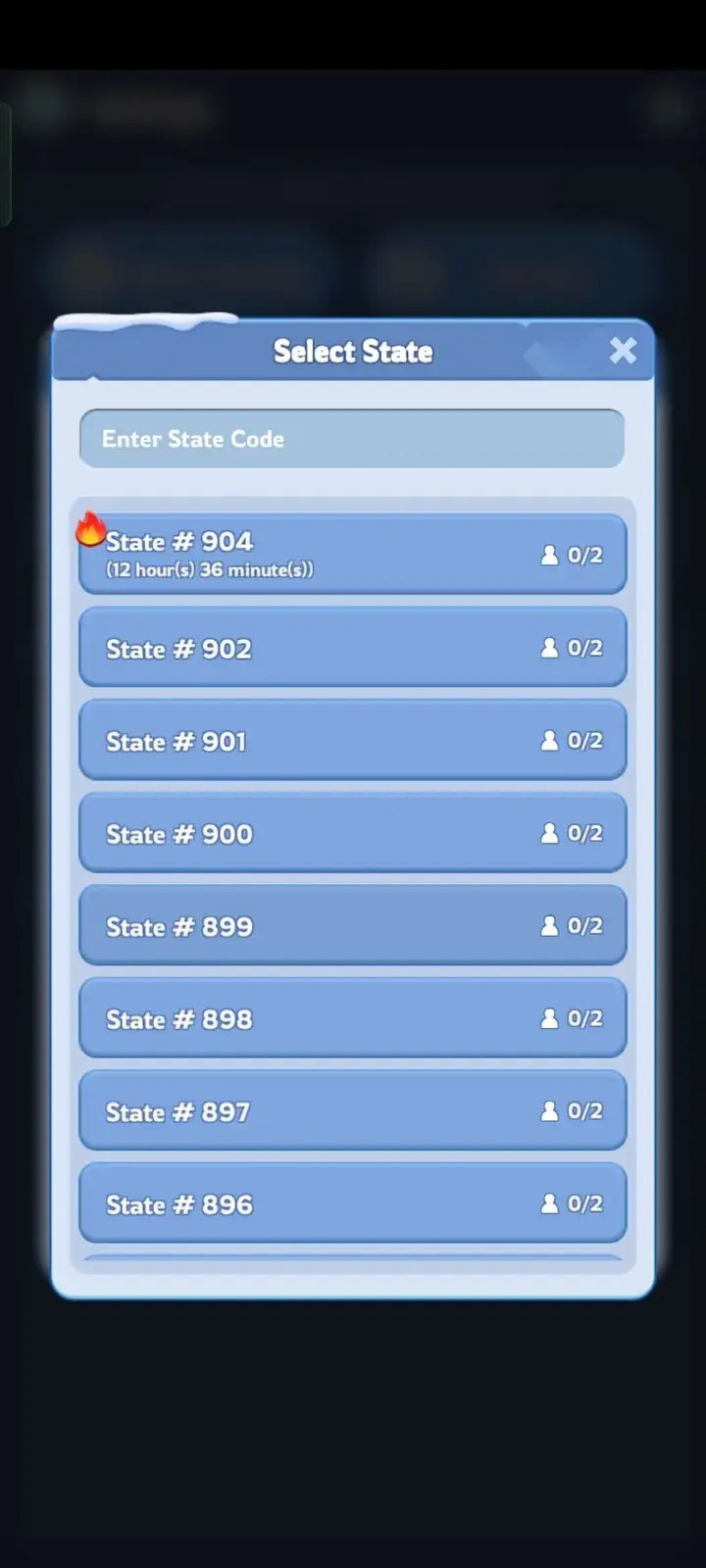
Steps to Create a Character on a New State
- Tap your profile image.
- Open Settings.
- Select Characters.
- Choose Create New Character.
- Search for or select the new state number.
- Confirm your selection and complete the opening tutorial.
Your original character is not deleted when you create another one. You can return to the Characters menu later and switch between the characters linked to your account.
Character limits apply, so players managing several states should check the current limit shown by the game or official support before creating unnecessary characters.
New Character vs. State Transfer
Creating a new character and transferring an established character are different systems. This distinction is important because the State Transfer event does not let every player move directly into the newest state.
| Feature | New Character | State Transfer |
|---|---|---|
| Progress | Starts from the beginning | Moves an eligible established character |
| Availability | Availabilityd9d9;padding:10px;”>Available through character creation when the state accepts new characters | Available during designated transfer events |
| State choice | Can select from states available for character creation | Restricted by transfer groups, state age, power limits, invitations, and other rules |
| Best use | Joining a fresh state from its opening period | Relocating developed progression to a compatible state |
Transfer eligibility can depend on state age, hero generation, Furnace era, character power, available invitations, and the rules displayed during the current event. A newly opened state will generally be too young or incompatible with a much older character.
Always read the current State Transfer event panel before purchasing passes or making plans with another alliance.
Why Start on a New Whiteout Survival Server?
A fresh state can be attractive to beginners and experienced players. Everyone begins with a new character, so you can take part in the state’s early progression instead of entering after major alliances have already been established.
A More Organized Fresh Start
Experienced players can avoid mistakes they made on their first character. You can plan your building order, protect important resources, and invest in heroes more carefully.
Early Alliance Opportunities
New alliances form quickly during the opening period. Active players may have more opportunities to earn responsibility, organize events, recruit members, or help shape their alliance’s strategy.
Starting With Friends
A new state makes it easier for a group to begin at approximately the same stage. Coordinating the state number and joining the same alliance early is still essential.
Experiencing the Full State Timeline
Features, hero generations, events, pets, and advanced progression systems unlock as a state ages. Starting early lets you experience those milestones in sequence instead of entering after many systems are already active.
Keep expectations realistic: A fresh server creates a similar starting date, but it does not guarantee equal power. Spending, activity, alliance organization, and previous experience can produce large differences very quickly.
When Starting From Zero May Not Fit Your Goal
A new state is most suitable when you want to experience early progression. It may be less suitable when your main goal is to join friends who are already established in an older state.
Players comparing other progression options may review a wos account for sale alongside the time required to develop a new character. Before considering that route, verify the exact state number, Furnace level, heroes, Chief Gear, transfer eligibility, account binding, recovery access, security, and applicable game or platform rules.
Best Early-Game Strategy for a Fresh State
Finding the newest state is only the first step. Your decisions during the opening days will have a greater effect on your progress than entering a few minutes earlier.
1. Keep Construction Active
Upgrade the Furnace and its required buildings consistently. Avoid leaving a construction queue idle for long periods, especially during your first sessions.
2. Join an Active Alliance Quickly
An active alliance provides building help, alliance rewards, event participation, territory benefits, and protection. Look beyond the alliance ranking and check whether its members communicate and contribute.
3. Complete the Main Missions
Main missions introduce important systems and provide resources needed for early upgrades. Follow them until you understand which upgrades are required for your next Furnace level.
4. Use Speedups With a Plan
Do not spend every speedup as soon as you receive it. Use them when they unlock meaningful progression or when an active event rewards the same upgrade activity.
5. Develop a Balanced March
Improve useful heroes and troop buildings without spreading your resources across every available option. Early accounts benefit from a clear primary march and steady troop training.
6. Coordinate With Your Group
If you started with friends, decide who will create the alliance, what language or time zone it will use, and how members will handle territory and event times.
Common New-Server Mistakes to Avoid
- Waiting for an exact unconfirmed release time: No dependable public countdown exists for each state.
- Selecting the wrong state number: Confirm the number before completing character creation.
- Assuming your existing progression will copy over: A newly created character starts separately.
- Expecting a completely equal competition: Experienced and high-spending groups can progress very quickly.
- Joining an inactive alliance: An early ranking means little if members stop playing after the first few days.
- Spending every resource immediately: Preserve flexibility for events, Furnace requirements, and important hero upgrades.
- Ignoring account security: Bind your account through the supported options before investing significant time or money.
FAQs
What is the next Whiteout Survival new server release date?
There is no publicly confirmed date for each upcoming state. New states are opened according to player demand and capacity, so players should check the Characters menu for the latest availability.
How often do new Whiteout Survival servers open?
New states are commonly observed opening every one or two days. This interval is not guaranteed and may change depending on player activity or developer decisions.
How can I see the newest Whiteout Survival server?
Open your profile, go to Settings, select Characters, and choose the option to create a new character. The available state list should show the newest states that currently accept character creation.
Do new servers always open at the daily reset?
No confirmed rule states that a new server must open at 00:00 UTC. Although many daily systems use the UTC reset, new-state availability can appear at a different time.
Can I move my current character to a newly opened state?
Usually not immediately. Established characters can only move through State Transfer when they meet the current event rules, and very new states are generally incompatible with significantly older characters.
Does progress carry over when I create a new character?
No. A new character begins with separate city, hero, troop, resource, and progression data. Your original character remains available through the Characters menu.
Is starting on a new state worth it?
It can be worthwhile when you want a fresh progression experience, plan to start with friends, or want early alliance opportunities. It may not be worthwhile if you are satisfied with your developed character and do not want to repeat the early game.
How can friends join the same new server?
Wait until everyone can see the state in the Characters menu, share the exact state number, and confirm it before creating characters. The group should then join or establish the same alliance as soon as the feature becomes available.
Conclusion
The Whiteout Survival new server release date does not follow a dependable public calendar. Although new states are often observed appearing every one or two days, the actual interval depends on demand and can change.
The safest approach is to check the Characters menu, confirm the newest available state number, and coordinate with your group before creating a character. Do not assume that the daily UTC reset guarantees a new launch.
Once you enter a fresh state, focus on steady Furnace progression, active construction, careful resource use, and joining a dependable alliance. These decisions provide a more meaningful advantage than repeatedly refreshing the state list for an exact opening minute.
For more beginner advice, state progression information, and event strategies, explore our collection of Whiteout Survival guides.