The Kingshot Plan Your City event is a two-day early-kingdom event that rewards Construction and Research Power growth.
You receive one event point for every one Power gained through a completed building upgrade or Academy research project. Reaching 60,000 points unlocks all four milestone rewards.
Plan Your City is sometimes confused with the City Development event. However, the two events use different scoring systems. Plan Your City scores Power gained, while City Development scores speedups and Governor Gear improvements.
This guide explains the Plan Your City point system, milestone and leaderboard rewards, construction and research priorities, preparation strategy, F2P planning, and how to reach 60,000 points without wasting resources.
Complete building and research upgrades that provide at least 60,000 combined Power. Prepare resources and prerequisites before the event, collect Alliance Help before using speedups, and choose projects that support your normal city progression. Stop at 60,000 points unless the leaderboard rewards justify further upgrades.
What Is the Plan Your City Event?
Plan Your City is a milestone and ranking event that appears during the early development of a new Kingshot kingdom.
It encourages players to improve two permanent city systems:
- Buildings
- Academy research
The event lasts two days and contains only two scoring tasks. There are no points for training troops, gathering resources, upgrading heroes, or improving Governor Gear.
| Event Detail | Plan Your City |
|---|---|
| Duration | 2 days |
| Schedule | Irregular during early kingdom progression |
| Main scoring | Construction and Research Power |
| Milestone tiers | 4 |
| Final milestone | 60,000 points |
| Ranking eligibility | More than 50,000 points and a top 100 position |
When Does Plan Your City Appear?
Plan Your City has an irregular schedule and normally appears several times during the early weeks of a kingdom.
It is primarily a Generation 1 event. Players in Generation 2 or older kingdoms may no longer see it in the event calendar.
There is no universal date that applies to every kingdom. Check the live event calendar regularly during early progression.
Schedule note: Keep a reserve of Construction and Research Speedups during Generation 1. Plan Your City may appear without following a predictable weekly rotation.
How to Earn Plan Your City Points
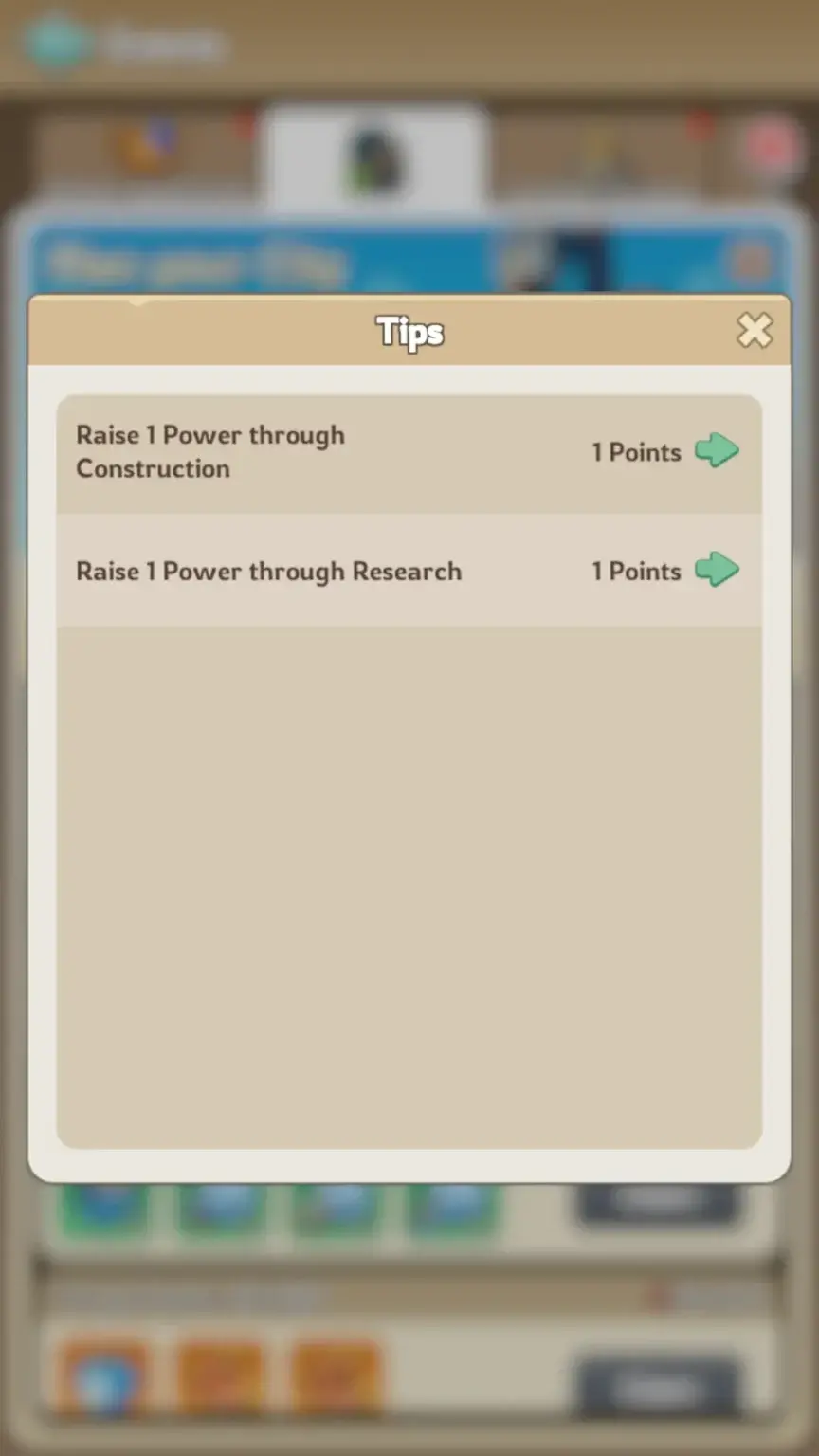
The event has two scoring actions:
| Scoring Action | Event Points |
|---|---|
| Gain 1 Power through Construction | 1 point |
| Gain 1 Power through Research | 1 point |
For example:
- A completed building worth 18,000 Power provides 18,000 event points.
- A research project worth 12,000 Power provides 12,000 event points.
- Completing both provides 30,000 event points.
The type of project does not change the conversion. One Construction or Research Power always equals one Plan Your City point.
When Are the Points Added?
Points are based on the Power added to your account while the event is active.
Starting a long building or research project does not provide the final Power immediately. The Power and corresponding event score are applied when the upgrade finishes.
Therefore, make sure planned upgrades complete before the event countdown ends.
Do Speedups Give Plan Your City Points?
Speedups do not provide points directly.
They help finish buildings and research projects while the event is active. Your score comes from the resulting Power increase, not the number of speedup minutes used.
This means two projects with the same remaining time can provide very different event scores.
| Project | Remaining Time | Power Gained | Event Points |
|---|---|---|---|
| Building A | 10 hours | 20,000 | 20,000 |
| Building B | 10 hours | 8,000 | 8,000 |
Building A gives better event value for the same amount of remaining time, assuming both upgrades support your normal progression.
Plan Your City vs City Development
Plan Your City and City Development are separate events. Their names are similar, but the scoring rules should not be combined.
| Feature | Plan Your City | City Development |
|---|---|---|
| Construction scoring | Construction Power gained | Construction Speedup minutes |
| Research scoring | Research Power gained | Research Speedup minutes |
| Troop training | Does not count | Training and Promotion Speedups count |
| Governor Gear | Does not count | Governor Gear Score counts |
| Final milestone | 60,000 points | 16,000 points |
Players looking for the speedup and Governor Gear event should read the Kingshot City Development event guide.
Plan Your City Milestone Rewards
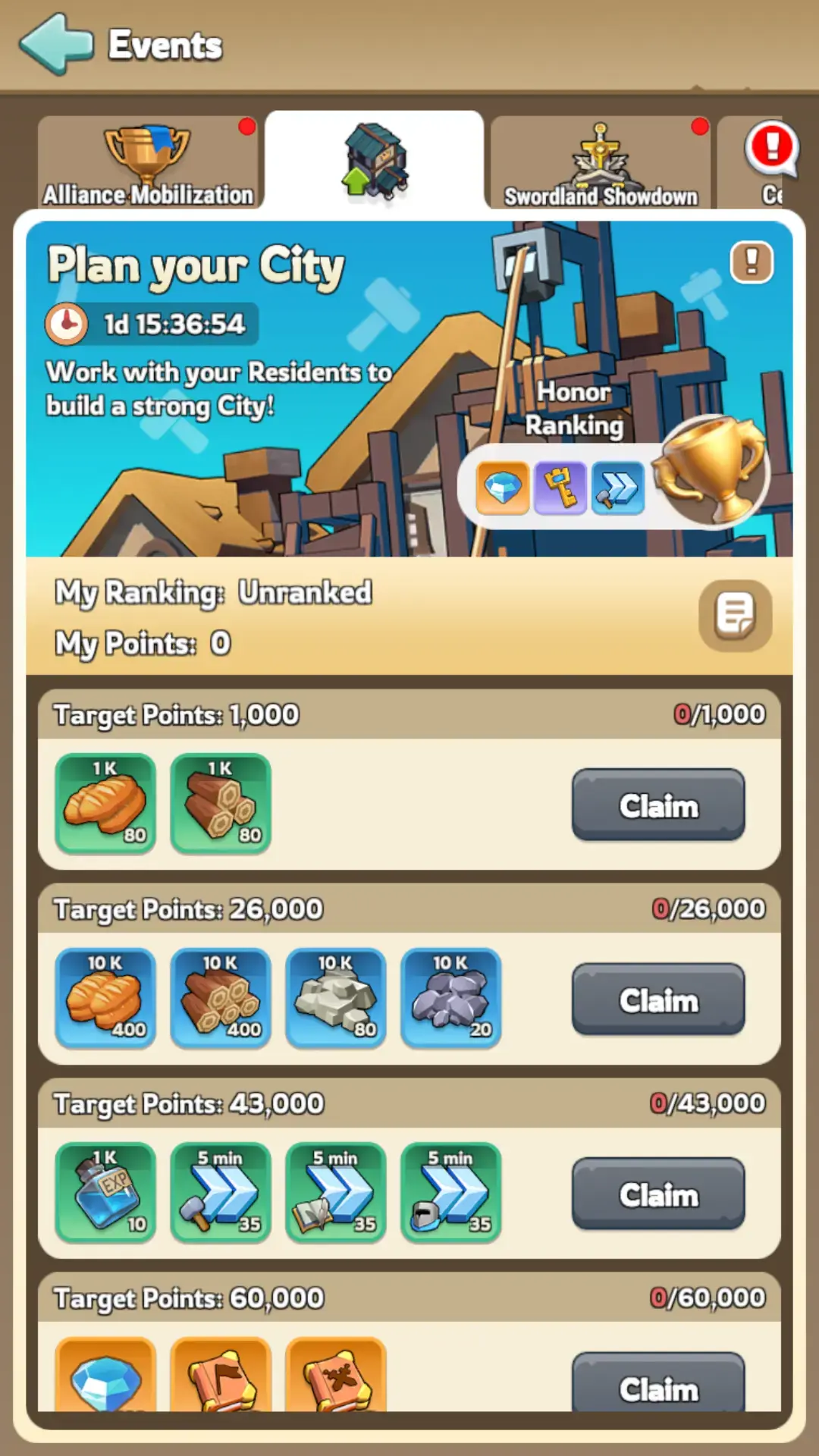
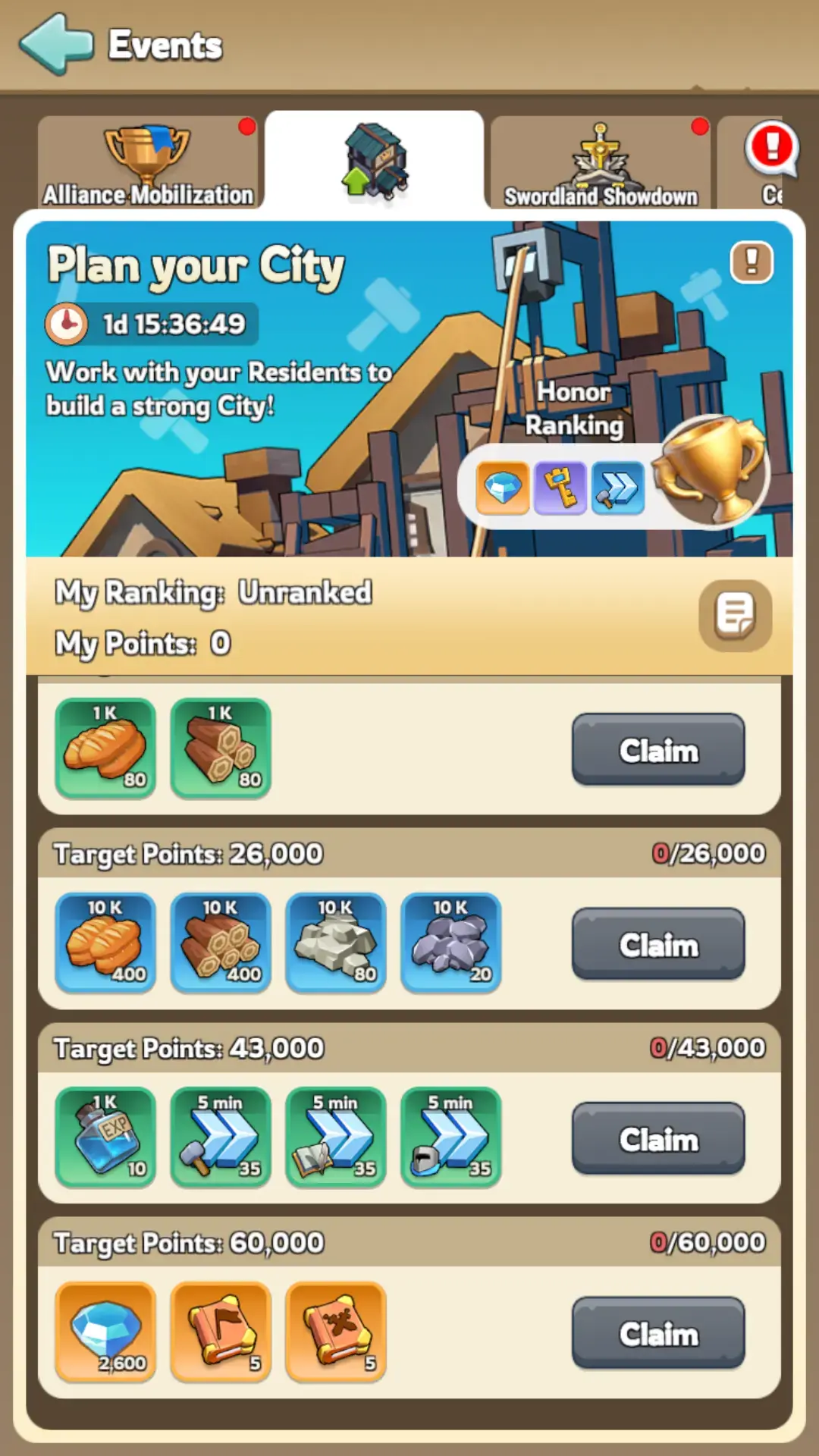
The event contains four milestone thresholds:
| Target Points | Rewards | Total Value |
|---|---|---|
| 1,000 | 80 × 1K Bread and 80 × 1K Wood | 80,000 Bread and 80,000 Wood |
| 26,000 | 400 × 10K Bread, 400 × 10K Wood, 80 × 10K Stone and 20 × 10K Iron | 4M Bread, 4M Wood, 800K Stone and 200K Iron |
| 43,000 | 10 × 1K Hero XP and 35 × 5-minute Construction, Research and Training Speedups | 10K Hero XP and 2h 55m of each speedup type |
| 60,000 | 2,600 Gems, 5 Mythic Conquest Skill Manuals and 5 Mythic Expedition Skill Manuals | Final milestone |
Reward note: Event rewards can change with game updates. Check the rewards displayed in your active event before using a large speedup stockpile.
Plan Your City Ranking Rewards
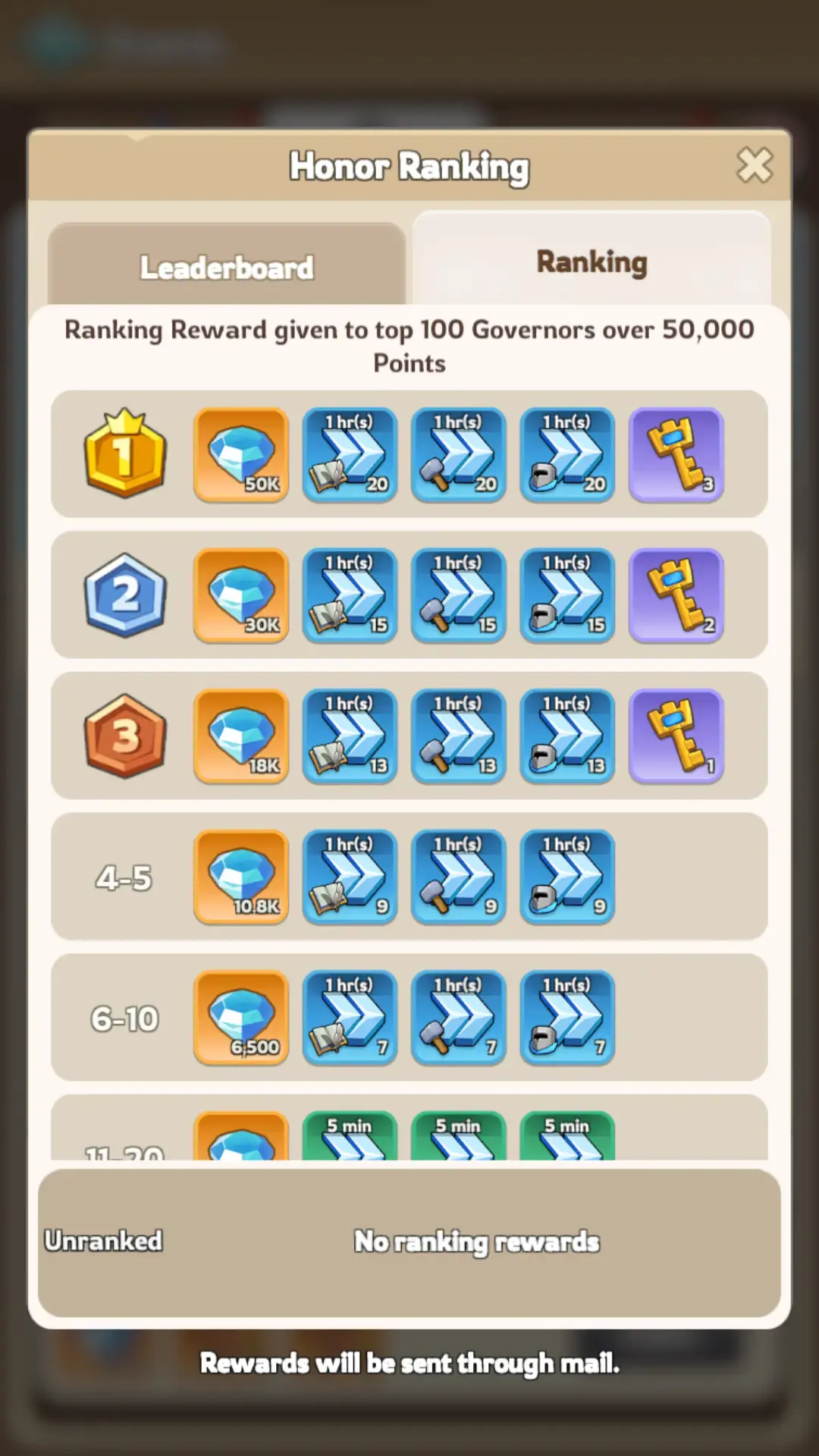
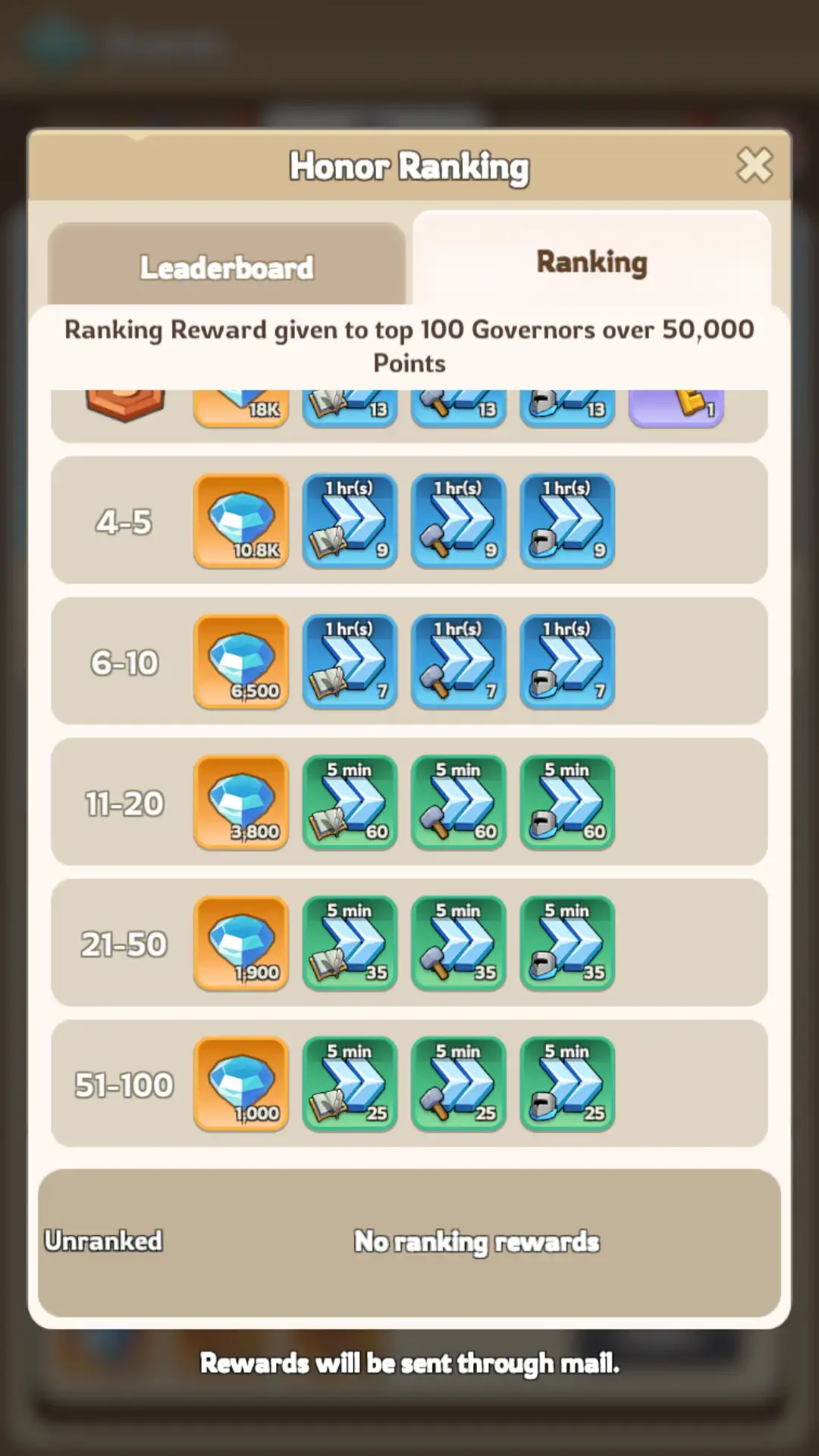
Ranking rewards are available to the top 100 governors who earn more than 50,000 points.
| Rank | Gems | Research Speedups | Construction Speedups | Training Speedups | Epic Recruitment Keys |
|---|---|---|---|---|---|
| 1 | 50,000 | 20 × 1 hour | 20 × 1 hour | 20 × 1 hour | 3 |
| 2 | 30,000 | 15 × 1 hour | 15 × 1 hour | 15 × 1 hour | 2 |
| 3 | 18,000 | 13 × 1 hour | 13 × 1 hour | 13 × 1 hour | 1 |
| 4-5 | 10,800 | 9 × 1 hour | 9 × 1 hour | 9 × 1 hour | – |
| 6-10 | 6,500 | 7 × 1 hour | 7 × 1 hour | 7 × 1 hour | – |
| 11-20 | 3,800 | 60 × 5 minutes | 60 × 5 minutes | 60 × 5 minutes | – |
| 21-50 | 1,900 | 35 × 5 minutes | 35 × 5 minutes | 35 × 5 minutes | – |
| 51-100 | 1,000 | 25 × 5 minutes | 25 × 5 minutes | 25 × 5 minutes | – |
Ranking rewards are delivered through in-game mail after the event ends.
How to Reach 60,000 Points
You can reach the final milestone through construction, research, or a combination of both.
| Example Plan | Construction Power | Research Power | Total Score |
|---|---|---|---|
| Balanced | 30,000 | 30,000 | 60,000 |
| Construction-focused | 50,000 | 10,000 | 60,000 |
| Research-focused | 15,000 | 45,000 | 60,000 |
| Single large upgrade | 60,000 or more | 0 | 60,000+ |
Most early accounts will use several projects rather than one upgrade. Calculate the combined Power before spending speedups.
Plan Your City Point Calculator
Use this formula to calculate the remaining milestone gap:
Points still needed = 60,000 – Current Plan Your City score
Then add the Power values from your planned upgrades:
Expected final score = Current score + Construction Power + Research Power
Calculation Example
Your current score is 22,000.
- Construction upgrade: 21,000 Power
- Research project: 18,500 Power
- Expected additional score: 39,500
- Expected final score: 61,500
This is enough to claim the final milestone without completing another upgrade.
Best Construction Strategy
Prioritize Useful Prerequisites
The best building upgrade provides event points while moving your city toward the next important unlock.
Useful construction priorities include:
- Town Center
- Town Center prerequisite buildings
- Academy
- Embassy
- Command Center
- Barracks
- Stable
- Range
- Infirmary
Avoid upgrading a low-priority building only because its displayed Power is high.
Review the Kingshot Town Center requirements guide before choosing your next major construction project.
Activate Construction Bonuses First
Activate available construction bonuses before beginning a long upgrade.
These may include:
- Construction-related decrees
- Hero development bonuses
- Research bonuses
- Alliance technology
- Temporary city bonuses
Review the final construction timer before confirming the upgrade.
Use Alliance Help Before Speedups
Alliance Help reduces construction time without consuming speedups.
- Start the building upgrade.
- Request Alliance Help.
- Wait for available assists when time allows.
- Use Construction Speedups on the remaining timer.
Using speedups before collecting help wastes free timer reductions.
Use Small Buildings to Close the Final Gap
Large upgrades are efficient for reaching the main milestones. Smaller upgrades become useful when only a few thousand points remain.
Do not complete another major project worth 30,000 Power when you need only 2,000 points, unless that project is already part of your progression plan.
Best Research Strategy
Choose Research With Long-Term Value
The Academy contains Growth, Economy, and Battle research. The best choice depends on your account’s immediate goals.
Useful early research priorities include:
- Construction Speed
- Research Speed
- Training Speed
- March Capacity
- Gathering Speed
- Troop Attack
- Troop Defense
- Troop Health
- Troop Lethality
Select research based on permanent value, not only the displayed Power.
Keep the Academy Available
Avoid starting a long, low-priority research project shortly before Plan Your City appears.
An occupied Academy prevents you from selecting a better project unless you finish the current timer first.
Use Research Bonuses and Alliance Help
Activate available Research Speed bonuses before starting the project. After it begins, request Alliance Help and use Research Speedups only after the free reductions have been applied.
Best F2P Plan Your City Strategy
Before the Event
- Save Construction and Research Speedups.
- Keep General Speedups available for the final gap.
- Gather enough Bread, Wood, Stone, and Iron.
- Finish prerequisite buildings.
- Identify useful projects worth at least 60,000 combined Power.
- Join an active alliance for faster Alliance Help.
- Avoid locking both construction and research behind low-priority projects.
Day 1
- Check all four milestone rewards.
- Review the current leaderboard before committing resources.
- Start your highest-priority construction or research project.
- Collect Alliance Help.
- Finish the project with dedicated speedups.
- Calculate the remaining point requirement.
Day 2
- Complete the remaining milestone gap.
- Use smaller upgrades when close to 60,000 points.
- Confirm every completed project has added its score.
- Stop at 60,000 unless pursuing ranking.
- Save remaining speedups for later events.
Should You Compete for the Leaderboard?
For most F2P players, claiming all four milestone rewards is the safest goal.
Ranking May Be Worth It When:
- You already planned several valuable upgrades.
- Your kingdom’s leaderboard is not highly competitive.
- You can finish inside the top 100 with a reasonable score buffer.
- You have enough resources and speedups to respond to late pushes.
- The additional buildings and research support normal progression.
Stop at 60,000 Points When:
- You would need to upgrade low-priority buildings.
- The top positions are controlled by heavy spenders.
- You need the speedups for a stronger future event.
- You are short on construction or research resources.
- The next ranking tier requires a large additional investment.
Ranking Qualification Does Not Guarantee a Reward
Exceeding 50,000 points makes you eligible for ranking rewards, but you must also finish inside the top 100.
A player with 55,000 points receives nothing if more than 100 eligible players finish above that score.
Plan Your City Ranking Strategy
Players pursuing a rank should calculate their maximum available score before using resources.
Maximum planned score = Total Construction Power + Total Research Power available during the event
Compare that score with the current leaderboard. Do not begin a ranking push when your maximum cannot reach the intended reward tier.
Keep a Score Buffer
Do not aim to finish one point above the current competitor. Other players may have buildings or research ready to complete during the final hours.
A larger score buffer reduces the risk of being overtaken after using your resources.
Avoid Waiting Until the Final Seconds
Connection delays, server lag, or an incorrect Power calculation can prevent a final project from registering in time.
Complete the final ranking push with enough time to confirm that the leaderboard has updated.
What Does Not Give Plan Your City Points?
The following actions do not count:
- Using speedups without completing a Power-producing project
- Training or promoting troops
- Upgrading heroes
- Upgrading Hero Gear
- Upgrading Governor Gear
- Upgrading Governor Charms
- Gathering resources
- Defeating Beasts or Terrors
- Increasing Power through troop training
Only Construction Power and Research Power count toward this event.
Common Plan Your City Mistakes
Confusing Plan Your City With City Development
Plan Your City awards points for Power gained. City Development awards points for speedup minutes and Governor Gear Score.
Using Training Speedups
Troop training and promotion do not count. Save Training Speedups for an eligible troop event.
Upgrading Governor Gear
Governor Gear does not provide Plan Your City points. Save Satin, Gilded Threads, and Artisan’s Vision for City Development or another eligible event.
Using Speedups Before Alliance Help
Collect available Alliance Help first. This reduces the timer without consuming your saved speedups.
Selecting Upgrades Only by Power
Event score matters, but permanent account progress matters more. Choose projects that unlock buildings, troops, research, or useful combat statistics.
Starting Without Enough Resources
Speedups cannot finish a project that you cannot afford to start. Prepare all required resources before the event.
Overspending After 60,000 Points
The milestone track ends at 60,000. Continue only when you have a realistic ranking target.
Expecting the Event in an Older Kingdom
Plan Your City is primarily an early Generation 1 event. It may disappear after the kingdom moves into later hero generations.
Players joining a mature kingdom may face large gaps in buildings, Academy research, troop tiers, and permanent progression. Those comparing established options can review a kingshot account for sale before rebuilding every early city system from the beginning.
FAQ
What is the Plan Your City event in Kingshot?
It is a two-day early-kingdom event that awards one point for every one Power gained through construction or research.
How many points are needed to complete Plan Your City?
You need 60,000 points to unlock all four milestone rewards.
Do speedups give Plan Your City points?
Not directly. Speedups help finish a building or research project, but points come from the Power added when the project completes.
Does troop training count?
No. Training and promoting troops do not provide Plan Your City points.
Does Governor Gear count?
No. Governor Gear upgrades belong to City Development and other gear-related events.
How do I qualify for ranking rewards?
Earn more than 50,000 points and finish inside the top 100 players in your kingdom.
Can F2P players complete the event?
Yes. Prepare useful building and research projects, save speedups, gather resources, and collect Alliance Help before finishing each timer.
Why is Plan Your City not showing in my kingdom?
It has an irregular schedule and primarily appears during early Generation 1 progression. Older kingdoms may no longer receive it.
Conclusion
The Kingshot Plan Your City event rewards permanent growth through construction and Academy research.
You receive one event point for every Construction or Research Power gained. The four milestones are reached at 1,000, 26,000, 43,000, and 60,000 points.
Prepare useful upgrades before the event, collect Alliance Help before using speedups, and combine construction with research when one category cannot provide enough Power alone.
Most players should stop after reaching 60,000 points. Ranking requires more than 50,000 points and a top 100 position, but additional upgrades are worthwhile only when they support your normal progression.
Most importantly, keep Plan Your City separate from City Development. Speedup minutes, troop training, and Governor Gear do not score here. Only Power gained through construction and research counts.
For more event and city progression strategies, explore our Kingshot guides.