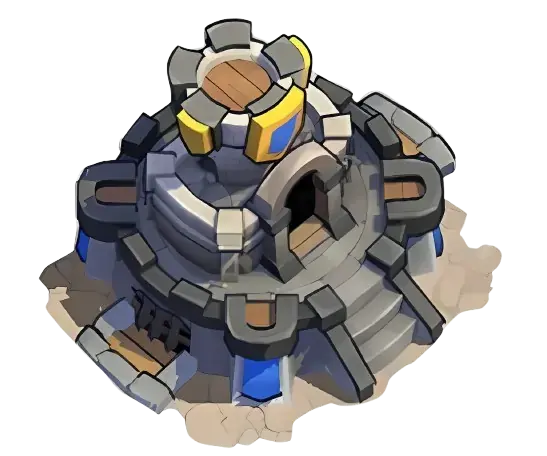
The Kingshot Guard Station controls your city’s defensive durability. When your city loses an attack, it starts burning and the Guard Station continues losing health over time. If its health reaches zero, your city is randomly teleported. Repair it through Guard Station > City Defense > Repair Guard Station, then repeat the repair every 30 minutes until its health is restored.
The Guard Station is one of Kingshot’s most important defensive buildings, especially during kingdom wars and events where repeated attacks can leave your city burning.
However, the building is often misunderstood. Upgrading it does not automatically make your troops powerful enough to defeat every attacker. Its main purpose is to increase the durability of your city defense, slow the path toward forced relocation, and provide a place to assign the heroes responsible for defending your city.
This guide explains how Guard Station damage works, why it may continue losing health without a new attack, how to repair it, which heroes should be assigned, and how to prepare your city before going offline.
What Is the Guard Station in Kingshot?
The Guard Station is a defensive city building unlocked when your Town Center reaches Level 7. Its in-game purpose is to protect the town and increase the durability of your city defense.
The building has three main functions:
- Stores and displays your city-defense heroes
- Provides Guard Station Defense, which determines defensive durability
- Loses health while your city is burning after a defeat
The Guard Station has 10 levels. Unlike most major city buildings, it does not continue into Truegold levels.
Upgrading it increases its Defense value from 1,000 at Level 1 to 35,000 at Level 10.
Important distinction: Guard Station Defense represents the building’s defensive durability. Your actual ability to defeat an attacker still depends on troops, heroes, research, Governor Gear, Charms, reinforcements, pets, skins, and other combat bonuses.
How Guard Station Damage Works
When an enemy attacks and defeats your city, the city begins burning. While the fire remains active, the Guard Station gradually loses health.
The process works like this:
- An enemy attacks your city.
- Your defending formation loses the battle.
- Your city begins burning.
- The fire continuously reduces Guard Station health.
- Additional successful attacks extend the burning duration.
- The Guard Station continues losing health until the fire ends or is extinguished.
- If Guard Station health reaches zero, your city is randomly teleported.
This means Guard Station damage is not limited to the moment when an enemy march hits your city. A previous defeat can continue causing damage for several minutes afterward.
Why Is My Guard Station Damaged Without an Attack?
The most common reason is that your city is still burning from an earlier defeat.
After a successful enemy attack, the fire continues damaging the Guard Station over time. You may therefore open the city-defense screen and see lower health even though no new enemy march is currently attacking.
Possible explanations include:
- Your city is still burning from a previous defeat.
- Multiple attacks extended the burning timer.
- An event attack occurred while you were offline.
- You missed or did not immediately notice the battle notification.
- The health display updated after reopening the Guard Station screen.
Check your battle reports and look at your city on the World Map. If flames are visible, the Guard Station may continue losing health until the fire is extinguished or expires.
If there is no recent defeat, no visible fire, and the Guard Station continues losing health, restart the game and recheck the City Defense screen. Contact Kingshot support with screenshots and your battle-report history if the issue continues.
What Happens When Guard Station Health Reaches Zero?
When the Guard Station reaches zero health, your city is forcibly teleported to a random location on the World Map.
This can create several strategic problems:
- You may be removed from your alliance hive.
- You can lose access to nearby alliance protection.
- Your city may appear in a dangerous or inconvenient location.
- You may be separated from alliance structures and facilities.
- You may need to spend another teleporter to return.
- Your event positioning may be disrupted.
During coordinated warfare, forced teleportation can be more damaging than the resources lost in the original attack. It removes your city from the position selected by your alliance and makes immediate reinforcement more difficult.
How to Repair the Guard Station
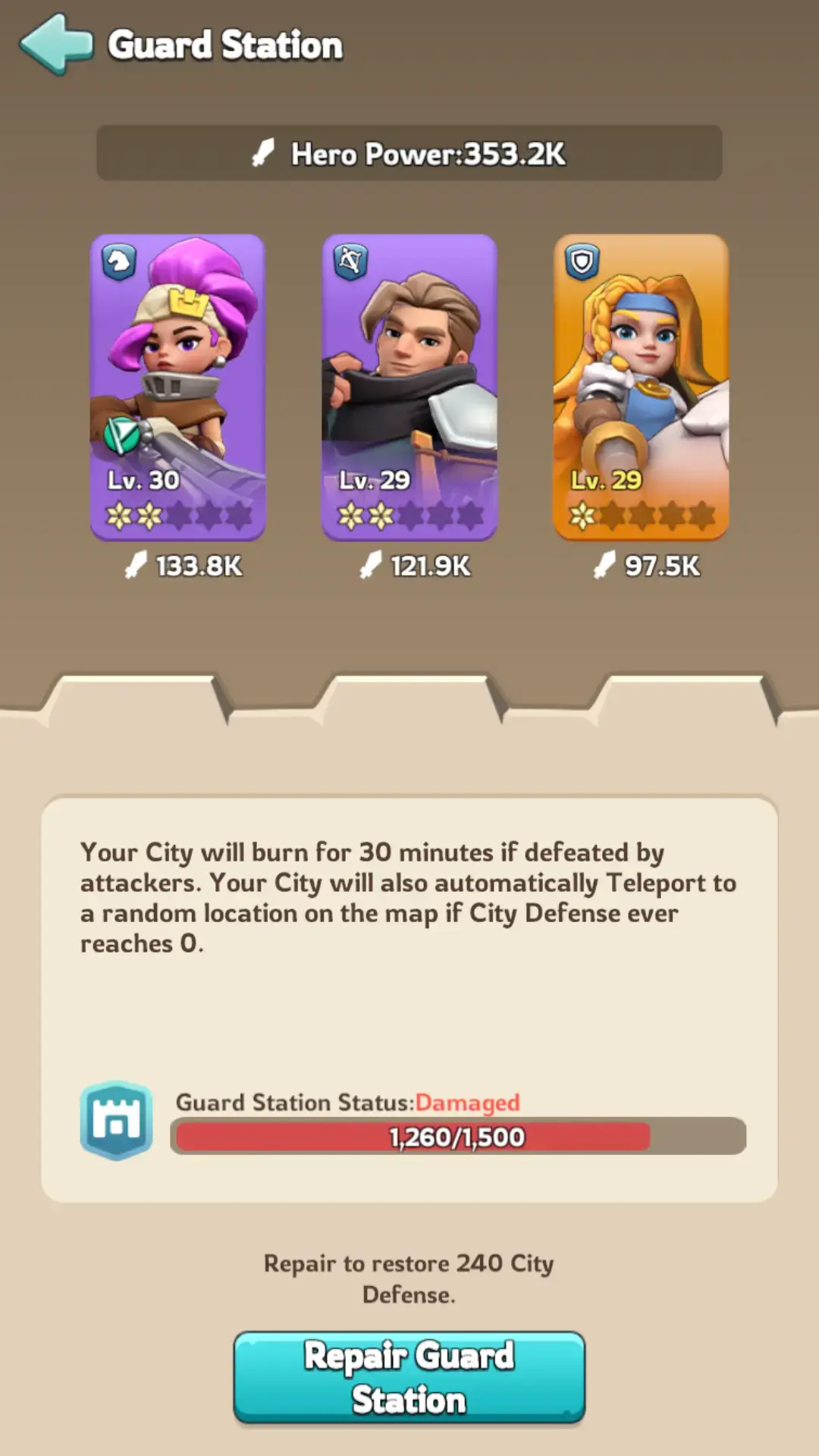
You can restore part of the Guard Station’s health through the City Defense interface.
Guard Station Repair Steps
- Open your city.
- Select the Guard Station.
- Press City Defense.
- Look for the Repair Guard Station button.
- Press the button to restore part of its health.
- Wait for the 30-minute repair cooldown.
- Repeat the process until the Guard Station is fully restored.
The repair does not instantly restore the entire Defense bar. You must return every 30 minutes and perform another repair until the missing health is recovered.
Repair reminder: Set a 30-minute timer after each repair when your Guard Station is heavily damaged. Missing several repair opportunities can leave your city vulnerable during another attack window.
Can You Repair the Guard Station With Gems?
Gems cannot instantly restore a damaged Guard Station to full health.
When your city is actively burning, Gems can be used to extinguish the fire. This stops the ongoing burn damage and prevents the Guard Station from continuing to lose health.
The difference is:
- Extinguish with Gems: Stops additional damage from the current fire.
- Repair Guard Station: Restores some of the health already lost.
Extinguishing the fire does not replace the normal repair process. You may still need to use the Repair Guard Station button every 30 minutes afterward.
Why Is the Repair Button Missing?
The Repair Guard Station button may not appear when:
- The Guard Station is already at full health.
- The previous repair is still on its 30-minute cooldown.
- The City Defense interface has not refreshed.
- You opened the building menu rather than the City Defense screen.
Close and reopen the Guard Station screen after the cooldown. Restart the game if the button should be available but the interface has not updated.
Best Heroes for the Kingshot Guard Station
The best Guard Station heroes are not simply the three heroes with the highest displayed power.
Prioritize heroes that meet the following conditions:
- They are highly developed for your kingdom generation.
- Their star level and Expedition statistics are strong.
- Their skills support city defense or long battles.
- Their exclusive Expedition skill explicitly improves Defender Squads.
- Their exclusive gear is developed enough to strengthen that Defender skill.
- The three selected heroes support the troops actually defending your city.
Defender bonuses may improve Attack, Defense, Health, or Lethality while the hero is used in a defensive role.
Selection rule: A developed older Defender hero can be better than a newly unlocked hero with low stars, weak Expedition statistics, and undeveloped exclusive gear.
Recommended Defender Heroes by Troop Type
| Troop Type | Late-Kingdom Options | Earlier Options | Defender Bonus Examples |
|---|---|---|---|
| Infantry | Charles, Long Fei | Alcar, Eric | Defender Health, Attack, or Defense |
| Cavalry | Sophia | Margot, Hilde, Jabel | Defender Lethality or Health |
| Archer | Wee & Woo, Vivian | Jaeger, Saul | Defender Attack, Defense, or Health |
Strong Late-Kingdom Guard Station Trio
A strong late-kingdom example is:
- Charles: Infantry hero with a Defender Squad Health exclusive bonus
- Sophia: Cavalry hero with a Defender Squad Lethality exclusive bonus
- Wee & Woo: Archer hero with a Defender Squad Attack exclusive bonus
This lineup covers all three troop types and provides multiple Defender statistics. However, it is only effective when the heroes have competitive stars, skills, Expedition statistics, gear, and exclusive equipment.
Strong Mid-Kingdom Guard Station Options
Before Generation 6 or 7 heroes are available, useful Defender choices include:
- Alcar: Defender Health
- Margot: Defender Lethality
- Vivian: Defender Defense
- Long Fei: Defender Attack
- Eric: Defender Defense
- Jaeger: Defender Health
Choose the three that are most developed on your account. Do not replace a five-star hero with a low-star newer hero solely because the newer hero belongs to a later generation.
Early Guard Station Hero Options
Early kingdoms can use:
- Jabel: Defender Lethality through her exclusive Expedition skill
- Hilde: Defender Health and strong general defensive Expedition effects
- Saul: Defender Attack through his exclusive Expedition skill
These heroes also provide broader Expedition effects that can support city defense while newer garrison specialists are unavailable.
Should You Use Your Three Highest-Power Heroes?
Your three highest-power heroes are a reasonable temporary choice, but power alone does not identify the best city-defense lineup.
Compare:
- Hero generation
- Star level
- Expedition Attack and Defense
- Expedition skill levels
- Defender-specific exclusive skill
- Exclusive gear strength
- Hero troop type
- Your defending troop composition
- Governor Gear and Charm alignment
A rally-focused hero may have higher power but an exclusive skill that activates only when initiating an offensive rally. That bonus does not provide the same value as a Defender skill when the hero is assigned to city defense.
Guard Station Heroes vs Reinforcement Heroes
Your assigned Guard Station heroes lead the city’s main defensive formation. Alliance members can also send reinforcements through your Embassy.
For the city owner:
- Use the strongest available Defender heroes in the Guard Station.
- Maintain a balanced troop formation.
- Request reinforcements before expected attacks.
- Ensure the Embassy has enough reinforcement capacity.
For alliance members reinforcing another city:
- Follow the alliance’s requested troop type and ratio.
- Place the requested defensive joiner hero in the first slot.
- Avoid sending random heroes that can replace or conflict with stronger bonuses.
- Withdraw troops when the city owner or alliance leadership requests it.
Reinforcements can improve the city’s available troop count, but they cannot compensate indefinitely for poor heroes, weak troop tiers, low research, or an unsuitable formation.
How to Improve Kingshot City Defense
1. Upgrade the Guard Station
Higher levels provide more Guard Station Defense, allowing the building to withstand more burn damage before reaching zero.
The building should normally be upgraded whenever the required Town Center level becomes available, especially if your kingdom is entering a PvP-heavy period.
2. Assign Defender Heroes
Review the exclusive Expedition skill on each Mythic hero. Skills containing terms such as Defender Squad Attack, Defender Defense, Defender Health, or Defender Lethality are designed for defensive formations.
3. Maintain a Strong Infantry Frontline
Infantry acts as the primary frontline and absorbs much of the incoming pressure. A defense with insufficient Infantry can expose Cavalry and Archers too quickly.
The ideal troop ratio may change with hero skills, generation, enemy composition, and alliance strategy. Follow your alliance’s current formation guidance during major battles.
4. Upgrade the Embassy
The Embassy increases the amount of allied reinforcement your city can hold. More reinforcement capacity allows additional alliance troops to contribute to the defense.
5. Improve Combat Research
Academy and War Academy technologies improve troop Attack, Defense, Health, Lethality, deployment capacity, and other military statistics.
Guard Station durability will not help you win battles if the troops stationed behind it remain severely underdeveloped.
6. Improve Governor Gear and Charms
Governor Gear and Charms can provide substantial troop statistics. Focus upgrades according to your main formation and defensive role rather than spreading materials without a plan.
7. Use Reinforcements Before Attacks
Ask nearby alliance members to reinforce before enemy rallies arrive. It is easier to prepare a city before an attack than to rebuild troop strength after repeated defeats.
8. Use a Shield When You Cannot Defend
A Peace Shield is often more efficient than attempting to defend an attack your account cannot survive.
Use a shield before going offline during:
- Kingdom of Power combat periods
- Known enemy raids
- Alliance conflicts
- Periods when your troops are healing
- Times when your best heroes or marches are unavailable
Confirm that no action on your account will remove the shield before relying on it for offline protection.
Guard Station Level Requirements and Costs
The Guard Station has 10 levels. The following table shows the corrected Town Center requirements, build costs, construction times, Defense values, and building power.
| Level | Town Center | Time | Wood | Bread | Stone | Iron | Defense | Power |
|---|---|---|---|---|---|---|---|---|
| 1 | Starting level | None | None | None | None | None | 1,000 | 400 |
| 2 | Level 7 | 10 seconds | 5,300 | None | 1,000 | None | 1,500 | 3,100 |
| 3 | Level 10 | 21m 30s | 88,000 | None | 17,000 | 4,400 | 2,000 | 9,400 |
| 4 | Level 13 | 1h 4m 30s | 420,000 | 420,000 | 84,000 | 21,000 | 5,000 | 21,940 |
| 5 | Level 16 | 3h 39m | 1.4M | 1.4M | 290,000 | 74,000 | 10,000 | 47,240 |
| 6 | Level 20 | 9h 52m 30s | 5.3M | 5.3M | 1M | 260,000 | 15,000 | 86,360 |
| 7 | Level 24 | 1d 13h 44m | 15M | 15M | 3M | 750,000 | 20,000 | 149,500 |
| 8 | Level 27 | 3d 55m | 37M | 37M | 7.4M | 1.8M | 25,000 | 217,320 |
| 9 | Level 29 | 4d 26m | 61M | 61M | 12M | 3M | 30,000 | 267,920 |
| 10 | Level 30 | 4d 19h 44m | 75M | 75M | 15M | 3.7M | 35,000 | 304,700 |
Build times may be reduced by construction-speed bonuses, alliance help, VIP benefits, heroes, and other development effects.
Is the Guard Station Worth Upgrading?
Yes, the Guard Station is worth upgrading, particularly for active alliances and PvP-focused kingdoms.
It is a relatively low priority when:
- Your kingdom is peaceful.
- You consistently use shields during danger periods.
- A major Town Center prerequisite needs the same resources.
- You are still at a very early development stage.
It becomes a higher priority when:
- Enemy cities frequently raid your alliance hive.
- Kingdom combat events are approaching.
- You participate in Swordland or other defensive content.
- Your city has previously been forced to teleport.
- You regularly remain unshielded while offline.
- Your account is expected to hold alliance reinforcements.
The largest Defense increases occur in the middle levels. Level 4 provides 5,000 Defense, Level 5 provides 10,000, and Level 6 provides 15,000.
Guard Station During Major Events
Swordland Showdown
A burning Guard Station can interfere with entry into the Swordland battlefield. Repair and extinguish it before the event begins, and ensure your soldiers are not occupied elsewhere.
Within defensive combat, a stronger Guard Station also reduces the risk of being removed from an important position after repeated defeats.
Viking Vengeance
Viking attacks test city defenses repeatedly. Assign your strongest defensive heroes, maintain troops, and repair Guard Station damage between attack windows when necessary.
Do not rely on Guard Station level alone. Viking defense also depends on hero strength, troop tiers, research, formation quality, and alliance support.
Kingdom Warfare
During open-city combat, repeated enemy attacks can extend the burning timer and rapidly reduce Guard Station health.
When you cannot defend effectively:
- Use a Peace Shield.
- Teleport to a safer alliance position.
- Ask for reinforcements.
- Extinguish the fire after a defeat.
- Repair every 30 minutes.
- Avoid remaining offline while actively burning.
Guard Station vs Barricade vs Defense Tower
These three buildings are related to defense but perform different functions.
| Building | Primary Purpose | Where It Matters |
|---|---|---|
| Guard Station | City-defense durability, hero assignment, burning, and forced teleport mechanics | World Map attacks and city defense |
| Barricade | Can be garrisoned by heroes to protect an area during Rebel Invasions | Internal Rebel Invasion defense |
| Defense Tower | Attacks enemies entering its alert zone | Internal Rebel Invasion defense |
Upgrading the Barricade or Defense Tower does not replace Guard Station repairs after your World Map city has been defeated.
How to Protect Troops While Offline
When you expect attacks and cannot remain online, prepare before leaving the game.
- Activate a Peace Shield when possible.
- Move excess troops to a protected or strategically safer location when permitted.
- Send reinforcements only according to alliance instructions.
- Keep the Infirmary capacity high enough for expected injuries.
- Avoid holding more open resources than necessary.
- Assign your best Defender heroes before logging out.
- Return your important marches before the attack window.
- Verify that the Guard Station is fully repaired.
Do not assume that having troops outside the city makes the Guard Station safe. An undefended city can still lose, burn, and eventually be teleported.
Common Guard Station Mistakes
- Using the old upgrade table: The correct Town Center requirements range from Level 7 for Guard Station Level 2 to Level 30 for Level 10.
- Thinking damage requires a new attack: An existing city fire continues reducing health over time.
- Ignoring the burning timer: Additional attacks can extend the fire and cause more damage.
- Waiting for an instant full repair: Repairs are limited by a 30-minute cooldown.
- Confusing fire extinguishing with repair: Gems stop ongoing fire damage but do not automatically restore lost health.
- Choosing heroes by power only: Defender Expedition skills are more relevant than offensive rally widgets.
- Using undeveloped new heroes: A strong older Defender can outperform a low-star replacement.
- Ignoring the Embassy: Low reinforcement capacity reduces the support your alliance can provide.
- Assuming Guard Station level guarantees victory: Troops, heroes, gear, research, and reinforcements decide combat outcomes.
- Going offline while burning: Guard Station health can continue falling until the fire ends.
Guard Station Defense Checklist
Before a dangerous combat period, confirm that you have:
- Upgraded the Guard Station to the highest practical level
- Repaired all missing Guard Station health
- Assigned three developed defensive heroes
- Checked their Defender Expedition skills
- Updated your defensive troop formation
- Healed important troops
- Requested alliance reinforcements when appropriate
- Checked Embassy reinforcement capacity
- Prepared a Peace Shield or emergency teleporter
- Removed unnecessary open resources
- Confirmed your city is not burning before going offline
Optional progression route: Players who prefer to start with stronger heroes and established city defenses can review a kingshot account for sale. Compare the kingdom age, Guard Station level, Defender heroes, troop tiers, Governor Gear, Embassy capacity, and transfer eligibility before selecting an account.
FAQ
How do you repair the Guard Station in Kingshot?
Select the Guard Station, open City Defense, and press Repair Guard Station. The button restores part of the missing health and can be used again after the 30-minute cooldown.
Why is my Guard Station damaged without an attack?
Your city is most likely still burning from a previous defeat. The fire continues reducing Guard Station health even when no new enemy march is currently attacking.
What happens when Guard Station health reaches zero?
Your city is randomly teleported to another World Map location. This can remove you from your alliance hive or an important event position.
What are the best heroes for the Guard Station?
Use developed Mythic heroes whose exclusive Expedition skills improve Defender Squads. Late-game examples include Charles, Sophia, and Wee & Woo, while Alcar, Margot, Vivian, Eric, Jaeger, Hilde, Jabel, and Saul are useful earlier alternatives.
Can Gems fully repair the Guard Station?
No. Gems can extinguish an active city fire and stop further burn damage, but missing Guard Station health must still be restored through the normal repair cooldown.
How often can you repair the Guard Station?
You can perform another repair every 30 minutes until the Guard Station reaches full health.
What is the maximum Guard Station level?
The maximum level is 10. It requires Town Center Level 30 and provides 35,000 Guard Station Defense and 304,700 building power.
What is the difference between the Guard Station and Barricade?
The Guard Station controls World Map city defense, burning durability, and defensive hero assignments. The Barricade is used during internal Rebel Invasions and can be garrisoned to protect its surrounding area.
Conclusion
The Kingshot Guard Station protects your city from the consequences of repeated defeats. When your city loses an attack, it begins burning and the Guard Station continues losing health until the fire ends or is extinguished.
Repair the building through the City Defense screen and repeat the repair every 30 minutes. If your city is still burning, extinguish the fire to stop additional health loss. Do not leave the account unattended while the Guard Station is close to zero.
For hero assignments, prioritize developed Mythic heroes with exclusive Expedition skills that explicitly improve Defender Squads. Compare star levels, Expedition statistics, exclusive gear, troop types, and defensive bonuses instead of selecting heroes by displayed power alone.
Finally, remember that Guard Station durability is only one part of city defense. Strong troops, defensive heroes, combat research, Governor Gear, Charms, Embassy reinforcements, alliance coordination, and correct use of Peace Shields are all required to withstand serious attacks.
For more strategy and progression help, explore our Kingshot guides.