Whiteout Survival VIP 12 is the highest standard VIP level and a requirement for unlocking Prestige Benefits. Once you also meet the required period of play, this system gives your additional VIP Points a purpose: use them on the Prestige Spinner, collect skin fragments and Prestige Badges, then work toward the rewards you want.
The October 20, 2026 update also introduced Chief Appearance within Prestige Benefits. These appearance themes use their own currency and include Skin Stat Bonuses, so understanding the different reward paths matters before committing resources.
Understand the Different VIP and Prestige Systems
Several features sit close together in the interface, but they serve different purposes:
| Feature | What it does | What to check |
|---|---|---|
| VIP level | Tracks permanent progress through the standard VIP tiers. | Your current level and progress toward the next tier. |
| VIP Time | Activates ordinary VIP perks and daily VIP rewards. | Whether your activation timer is running. |
| Prestige Spinner | Uses VIP Points for rewards including skin fragments and Prestige Badges. | Attempt cost and the current reward rules. |
| Prestige Shop | Uses Prestige Badges for its listed items. | Item contents, badge price, purchase limit, and refresh timer. |
| Prestige Appearance | Uses Emblems of Exquisiteness to unlock appearance themes. | Theme availability, Emblem requirements, and Skin Stat Bonuses. |
The regular VIP Shop is also a separate feature. Reaching a lower VIP tier and opening that shop does not mean you have unlocked Prestige Benefits.
How to Reach VIP 12 and Unlock Prestige Benefits
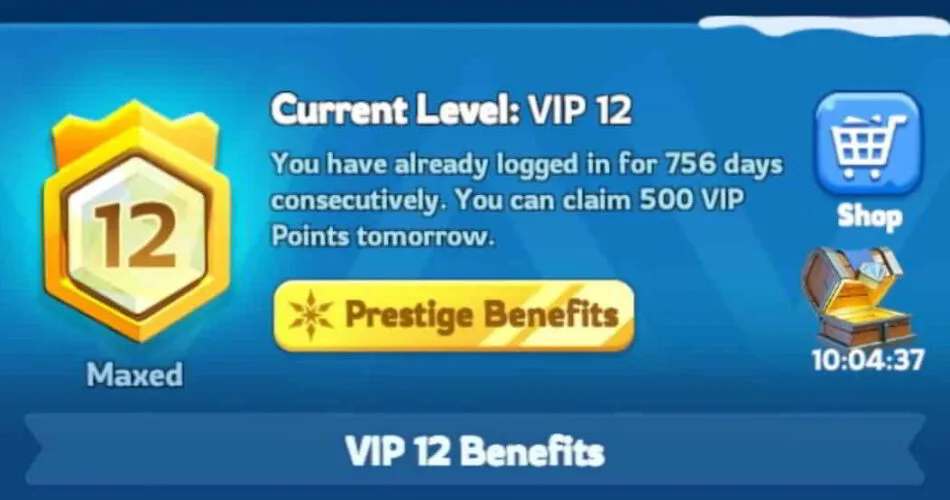
Understand the VIP Point Requirement
The final step from VIP 11 to VIP 12 requires 2,400,000 VIP Points. Progress across all VIP levels totals approximately 4.8 million points. Use your current in-game progress bar to calculate what remains, especially if you have already made progress within VIP 11.
You can build VIP progress through daily login rewards, VIP Point items available in the Alliance Shop, and qualifying purchases. Gems can also be used for VIP Points. Before converting Gems, compare the next VIP benefit with other upgrades you are saving for.
Planning tip: The 2.4 million requirement covers the last VIP upgrade. It does not describe the entire journey from a new account, and it does not include the additional points you may later spend on Prestige rewards.
Check the Additional Unlock Condition
Prestige Benefits require VIP 12 and a qualifying period of play. Check the unlock message in your own VIP interface for the requirement that applies to your account. State progression and feature availability can affect what you see.
- Open the VIP panel and confirm that you have reached VIP 12.
- Look for Prestige Benefits and read any remaining unlock condition.
- Once available, open the Prestige Spinner and Prestige Shop to inspect their reward lists.
- For the new appearance feature, check the Prestige Appearance tab in your updated client.
If Prestige Benefits remain unavailable, check the eligibility message before spending more. Additional VIP Points do not remove a separate time requirement.
Keep Ordinary VIP Benefits Active
Your VIP level remains on the account, but ordinary VIP perks require active VIP status. These include the applicable combat, development, and convenience benefits; the daily free VIP pack also requires activation.
At the top VIP tier, benefits cover troop stats such as Attack, Defense, Health, and Lethality, alongside construction, resource production, and other VIP advantages. Check the current benefits panel for exact values. If those perks stop working, inspect your VIP Time before assuming your level has changed.
How the Prestige Spinner and Prestige Badges Work
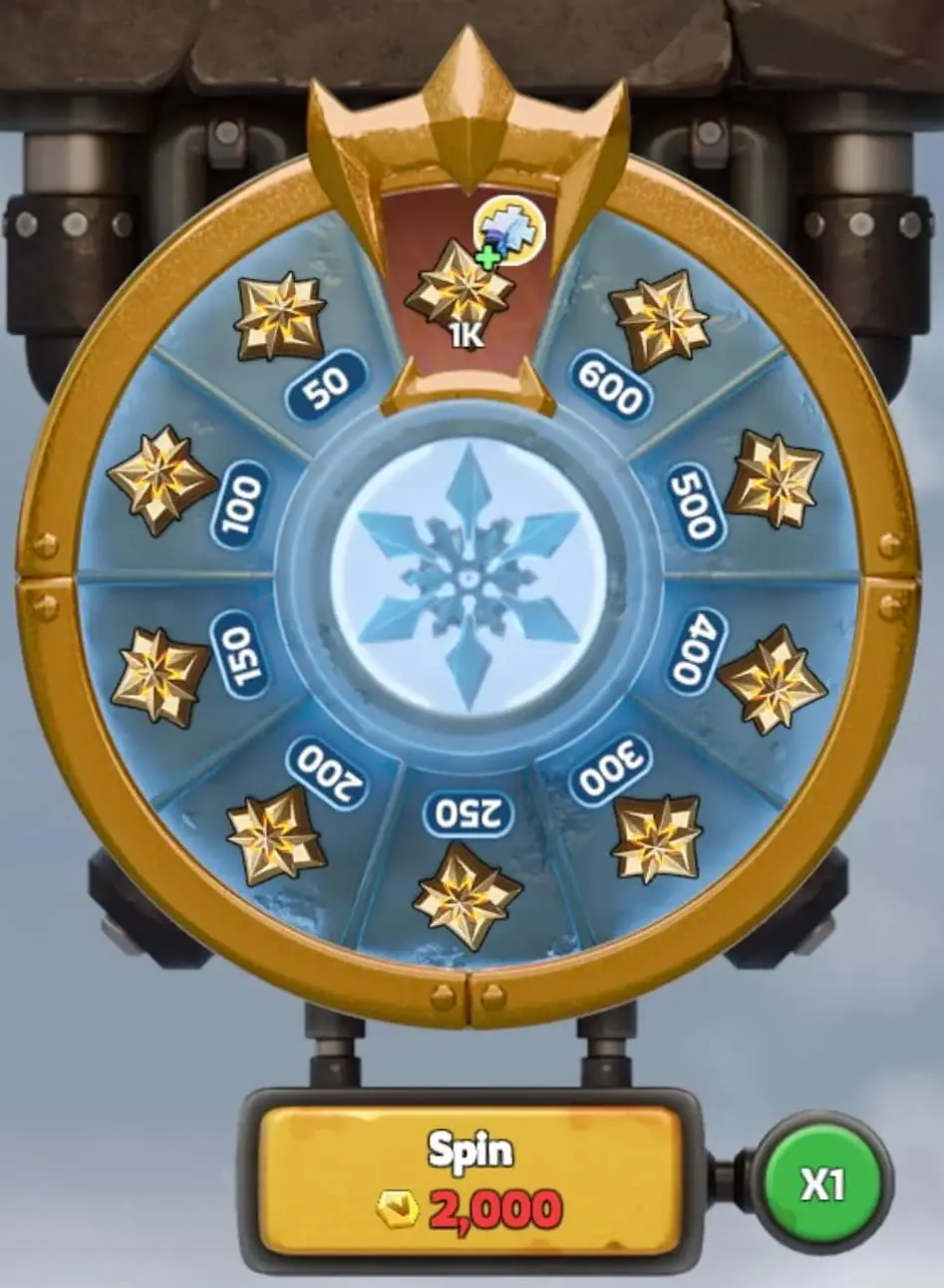
The Prestige Spinner provides the link between extra VIP Points and Prestige rewards. Attempts can award Frost Sphere fragments, Blazing Meteor fragments, and Prestige Badges.
Badges are then spent in the Prestige Shop. This creates two parallel goals: collecting the fragments needed for a skin and building a badge balance for shop purchases. Keep track of both rather than judging your progress only by the rarest reward.
Before using the Spinner:
- Read the VIP Point cost displayed on the attempt button.
- Check the reward information and any probabilities or guarantees shown in your version.
- Record your current fragment totals and set a point budget.
- Stop when you reach that budget or your intended reward.
Chance-based rewards make the total cost of completing a skin uncertain. A single player’s results cannot tell you exactly how many points your own unlock will require.
Which Prestige Shop Rewards Should You Prioritize?
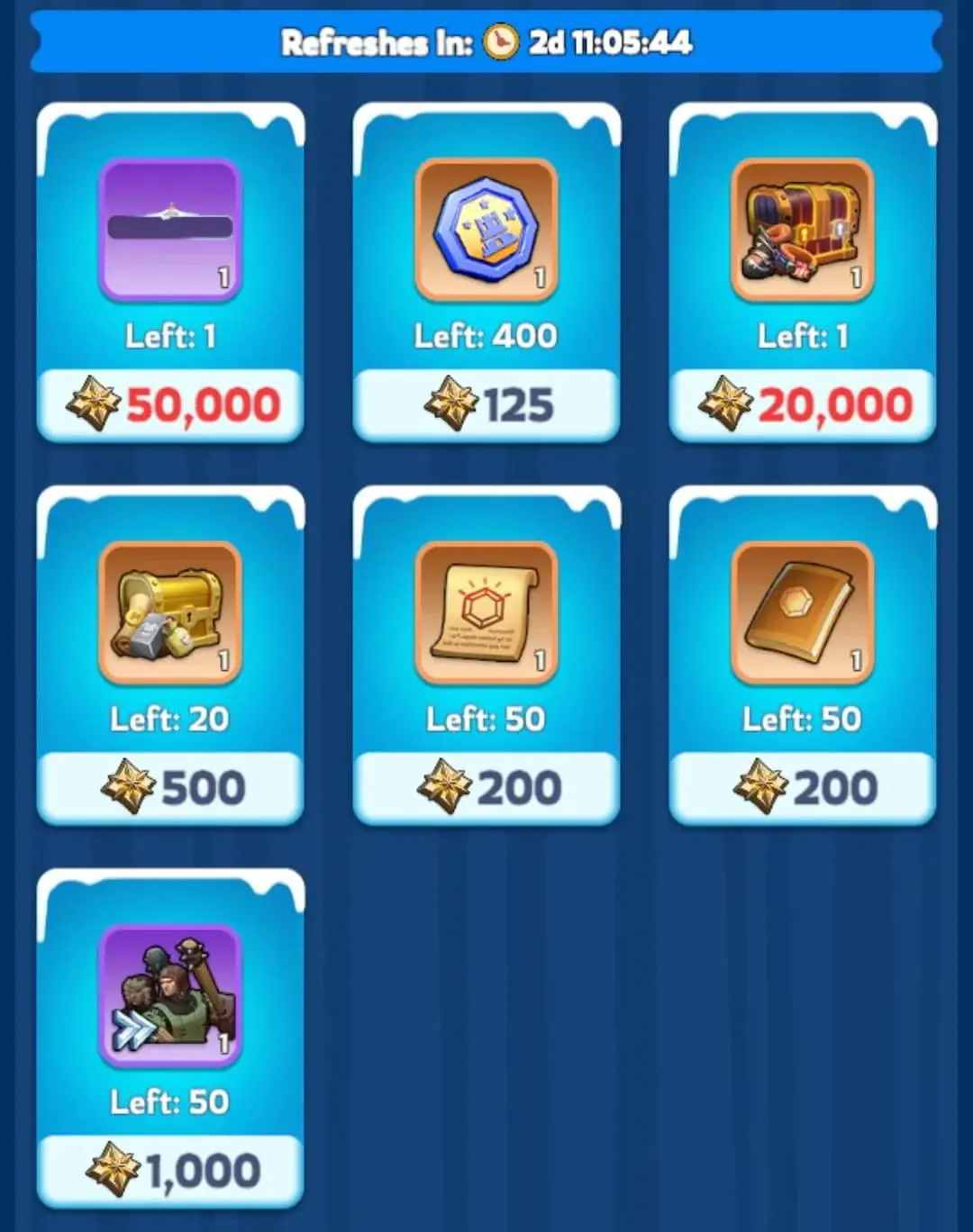
Choose purchases around an account need or a collection goal. Relevant rewards include:
- Ice Age Avatar Frame: A permanent frame with a listed Troops Defense bonus of +2%. It is a one-time shop purchase.
- Ice Age Nameplate: A permanent profile cosmetic, also listed as a one-time purchase.
- Custom Mythic Hero Gear Chest: A Hero Gear reward. Inspect its selection options and compare them with the equipment your heroes already use.
- Skin Tokens: A separate currency used in the Skin Shop. Check the skin you want there before choosing tokens as your Prestige purchase.
For an account with gaps in its main heroes’ equipment, a useful gear selection may deserve attention first. If your gear needs are covered, compare the frame’s permanent stat benefit with the cosmetics you want to collect. These are account-specific choices; the most expensive item is not automatically the most useful.
Read each item’s purchase limit and the shop’s current refresh timer. A refresh does not necessarily make a one-time reward available again. Keep badges unspent when none of the available items supports a clear goal.
Frost Sphere and Blazing Meteor: What the Fragments Unlock
Frost Sphere City Skin
The original Frost Sphere requires 100 Frost Sphere fragments and unlocks a permanent City Skin with Troops Attack +5%.
Frost Sphere also has a Domain system that can benefit qualifying nearby allied cities. Domain effects have their own coverage and eligibility rules, so coordinate city placement with your alliance and check the current Domain description. The owner’s skin bonus and the effects granted to nearby allies should be evaluated separately.
Blazing Meteor March Skin
The original Blazing Meteor requires 100 Blazing Meteor fragments. It unlocks a permanent March Skin with Hunting March Speed +10%.
That hunting-specific bonus is useful when assessing your routine map activity. It should not be treated as a general speed increase for every march. Keep its fragment total separate from Frost Sphere’s; each skin has its own completion requirement.
For a closer look at both prestige skins, their fragment requirements and benefits, read our Whiteout Survival Frost Sphere and Blazing Meteor Guide.
Higher Prestige Merit Rewards
The Prestige system also includes higher Frost Sphere versions through Prestige Merit progression. For example, Frost Sphere II has a listed Troops Attack bonus of +10%, with its own milestone requirement.
Completing the original skin’s fragments does not automatically unlock those higher versions. Inspect the Prestige Merit reward track separately when planning further progression.
Chief Appearance: The October 2026 Update
The October 20 update introduced Prestige Appearance themes for Chiefs who have access to Prestige Benefits. Check the Prestige Appearance tab for the themes currently available to your account; visibility and access may depend on your game version and rollout.
How to Unlock a Prestige Appearance Theme
- Open Prestige Benefits.
- Select Prestige Appearance.
- Choose a theme and inspect its required Emblems and bonuses.
- If you decide to purchase, obtain Emblems through Emblem of Exquisiteness Packs.
- Use the required Emblems of Exquisiteness to unlock the selected theme.
What Each Theme Includes
An unlocked Prestige Appearance theme provides:
- Male and female versions that you can switch between freely.
- A distinct entrance animation for each version.
- A permanent Profile Background Skin.
- Eight exclusive animated emotes.
- The ability to activate the theme’s Skin Stat Bonuses.
Separate purchase path: Prestige Appearance themes use Emblems of Exquisiteness. Plan their unlocks separately from Prestige Badge purchases and Spinner fragments; reaching VIP 12 alone does not grant a theme.
Before buying an appearance pack, check the available theme’s exact stat effects, activation rules, Emblem requirement, and the pack contents shown for your account. Compare the full unlock cost with the benefit you want. Prices and offers may differ by region or platform, and a visual preview alone does not establish the theme’s combat value.
Is VIP 12 Worth Prioritizing?
For Free-to-Play and Occasional-Spending Players
Treat VIP 12 as a long-term target. Keep collecting available VIP Points, but compare each push with your next useful hero, gear, or development upgrade. There is no single completion timeline that applies to every account.
Maintaining useful VIP benefits at your current tier may help your daily progress more than committing every available Gem to the highest level. Choose the next milestone based on what you will actually use.
For Players Already at VIP 12
Set a specific Prestige goal: complete a skin, fill a Hero Gear need, obtain a permanent shop reward, or evaluate an appearance theme. Separate the resources needed for each goal so a new cosmetic does not disrupt an existing upgrade plan.
We recommend reviewing three things before committing more resources: what remains to unlock the reward, which benefit it adds to your account, and whether another upgrade would be more useful now. A high VIP level supports progression, but your heroes, equipment, and overall development still matter.
Explore Whiteout Survival Accounts at Heaven Guardian
If you are comparing developed accounts, review VIP level alongside the State, heroes, gear, and Prestige rewards already unlocked. A VIP 12 label alone does not tell you whether an account owns Frost Sphere, Blazing Meteor, or a Chief Appearance theme.
Browse our Whiteout Survival accounts at Heaven Guardian to compare available listings. Before choosing an account, confirm its current VIP progress, unlocked skins, appearance themes, and other features that matter to your goals.
FAQs
How many VIP Points do you need for VIP 12 in Whiteout Survival?
The final upgrade from VIP 11 to VIP 12 requires 2,400,000 VIP Points. Progress across all VIP levels totals approximately 4.8 million points. Check your current VIP progress bar to calculate the points still needed.
Does reaching VIP 12 immediately unlock the Prestige Shop?
Prestige Benefits also require a qualifying period of play. Check the unlock message in your VIP interface to confirm whether your account meets the remaining condition.
Do VIP 12 benefits work without active VIP Time?
Ordinary VIP perks and the daily free VIP pack require active VIP status. Your VIP level remains on the account when activation expires. Check the VIP timer if your usual benefits stop working.
How do you get Prestige Badges?
Prestige Badges are rewards from the Prestige Spinner, which uses VIP Points. Spend the badges in the Prestige Shop on available items. Your badge return depends on the Spinner rewards you receive.
How many fragments unlock Frost Sphere and Blazing Meteor?
The original Frost Sphere requires 100 Frost Sphere fragments, while the original Blazing Meteor requires 100 Blazing Meteor fragments. Each skin has its own fragment total, and higher versions have separate progression requirements.
Is Chief Appearance included automatically with VIP 12?
No. Eligible Chiefs access the feature through Prestige Benefits, but each appearance theme has its own unlock requirement. Emblems of Exquisiteness obtained through Emblem of Exquisiteness Packs are used to unlock the selected theme.
Can you use Prestige Badges to unlock Chief Appearance themes?
The appearance system uses Emblems of Exquisiteness. Prestige Badges belong to the Prestige Shop reward path, so plan those resources separately.
Are Prestige Appearance themes purely cosmetic?
Themes also provide Skin Stat Bonuses that can be activated. Review the specific theme’s bonus values and activation requirements in your game before purchasing. Its visual features alone do not show its full gameplay value.
Conclusion
Whiteout Survival VIP 12 opens the way to Prestige Benefits once the additional eligibility condition is met. VIP Points fund Spinner attempts, fragments unlock the original skins, and Prestige Badges buy shop rewards. The October 2026 Chief Appearance feature adds another option through Emblems of Exquisiteness, with its own unlock requirements and stat bonuses.
Plan around a specific reward, keep ordinary VIP benefits active when you need them, and check current requirements before using resources. For more help with heroes, gear, events, and account progression, explore the Heaven Guardian Whiteout Survival guides hub.