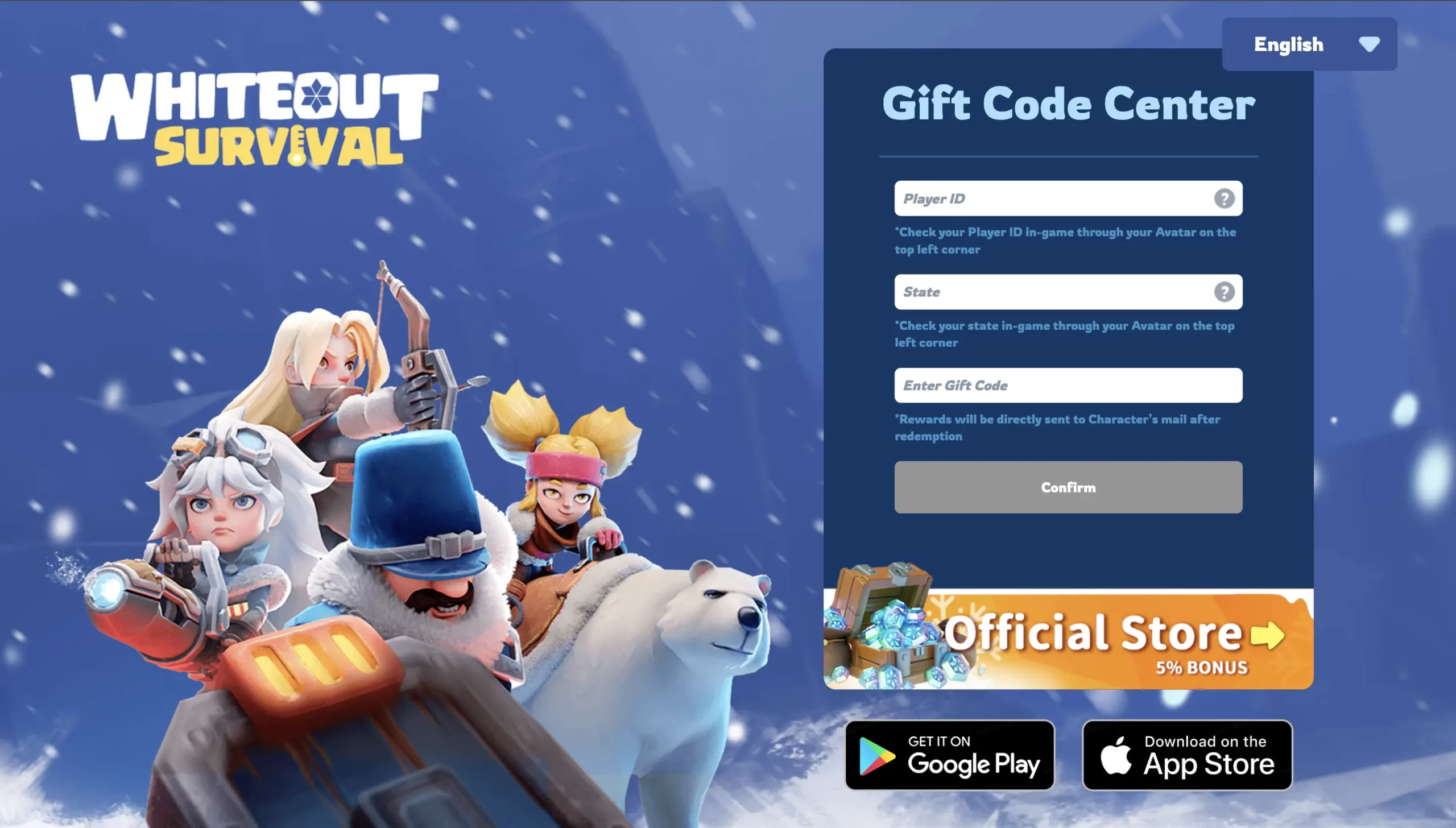
Whiteout Survival gift codes provide free rewards such as Gems, speedups, resources, Hero XP, keys, stamina, VIP points, and other useful items.
However, most codes remain active for a limited time. Some expire within a few days, while others may only work for certain regions or eligible accounts. Redeeming new codes quickly is the best way to avoid missing free rewards.
This Whiteout Survival gift code 2026 guide covers the latest active codes, the updated official redemption system, Android in-game redemption, common error messages, and how the Heaven Guardian auto redeem system works.
Active Whiteout Survival Gift Codes 2026
Code availability can change without notice, and some codes may have regional or account restrictions.
| Gift Code | Rewards |
|---|---|
| FB4Million | 1K Gems, 2 Mythic Shards, 8 Hr Troop Speed |
Enter each gift code exactly as shown. If a code produces an expired, invalid, or eligibility error, it may no longer be available for your character.
Recently Expired Whiteout Survival Codes
These recently released codes have been reported as expired:
| Expired Code | Rewards | Expired |
| JULHD2026JP | 1K Gems, 200 Component XP, 2 Gold Keys | 7/24/2026 |
| WOS0717 | 3-day Primal Vibe Avatar Frame, 500 Gems, 50 Min Speed, 200 VIP | 7/20/2026 |
| 4PWagqPw4 | 7/21/2026 | |
| WOS0715 | 3-day Primal Vibe Avatar Frame, 500 Gems, 50 Min Speed, 200 VIP | 7/18/2026 |
| OFFICIALSTORE0709 | 7/16/2026 | |
| WOS0708 | 7/11/2026 | |
| 2ndYoutubeKR | 7/12/2026 | |
| HappyJuly26 | 7/9/2026 | |
| WOS0706 | 7/7/2026 | |
| 0706FORU | 7/7/2026 |
An expired code cannot normally be restored or redeemed later. Always claim new Whiteout Survival gift codes as soon as they become available.
What Are Whiteout Survival Gift Codes?
Whiteout Survival gift codes are promotional codes that players can exchange for free in-game items.
They are commonly released during:
- Game updates
- Seasonal events
- Holidays
- Community milestones
- Official livestreams
- Social media campaigns
- Collaborations
- Regional celebrations
Rewards vary between codes, but they may include:
| Reward Type | How It Helps |
| Gems | Used for premium purchases and important upgrades |
| General speedups | Reduce construction, research, or training time |
| Training speedups | Help produce troops faster |
| Hero XP | Increases hero levels |
| Hero shards | Support hero advancement |
| Resources | Provide Meat, Wood, Coal, and Iron |
| Gold Keys | Open recruitment chests |
| Chief Stamina | Supports beast and Polar Terror activities |
| VIP Points | Help increase VIP progression |
| Avatar items | Provide limited cosmetic rewards |
Gift code rewards are usually not large enough to replace normal progression. However, collecting codes consistently can provide a useful supply of resources and speedups over time.
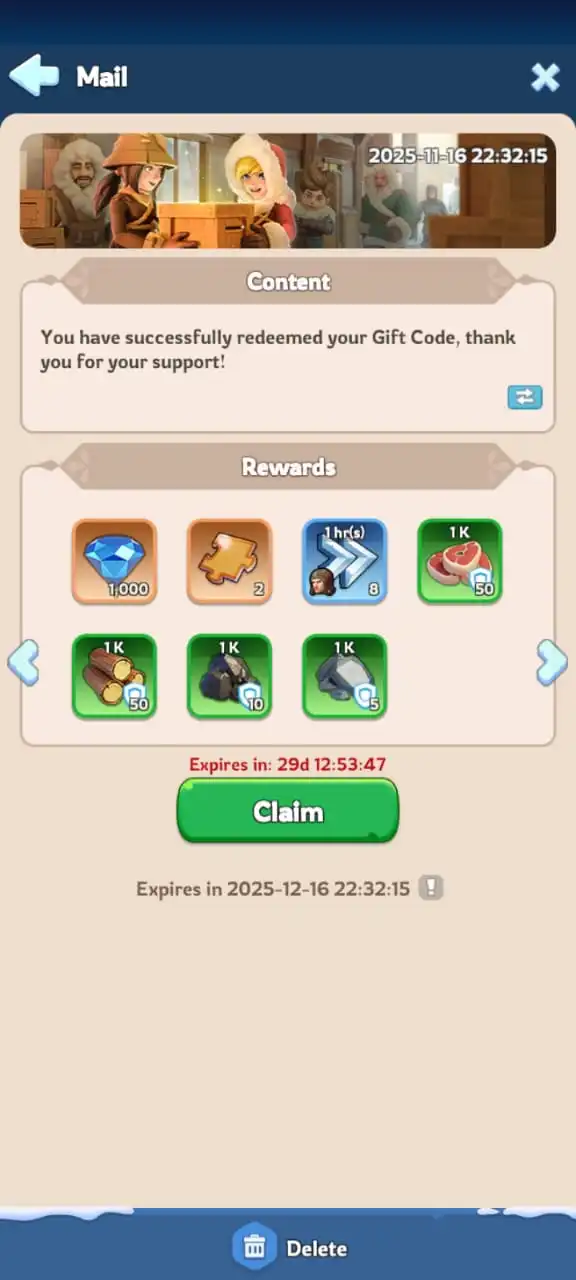
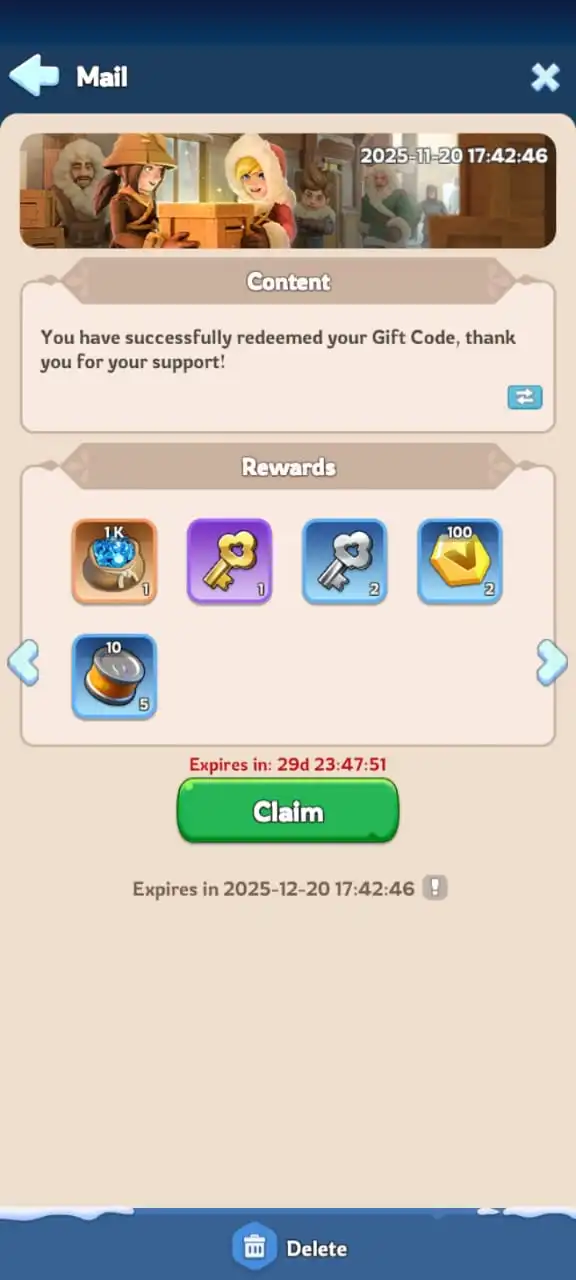
Whiteout Survival Gift Code Redemption Methods
Players can currently redeem codes through the official browser-based Gift Code Center, the Android in-game menu, or an available auto redeem service.
| Redemption Method | Information Required | Best For |
| Official Gift Code Center | Player ID, State, and gift code | iOS players and browser users |
| Android in-game redemption | Gift code | Android players redeeming codes manually |
| Heaven Guardian auto redeem | Player ID and State during registration | Players who do not want to enter every new code manually |
The official Gift Code Center uses your character information to deliver rewards. It does not require your email address, game password, Facebook login, Google login, or other account credentials.
How to Find Your Player ID and State
You need the correct Player ID and State when using the updated official Whiteout Survival Gift Code Center.
Follow these steps:
- Open Whiteout Survival.
- Tap your Chief avatar in the upper-left corner.
- Find the numeric Player ID shown on your profile.
- Copy the Player ID or write it down carefully.
- Check the State number displayed on the same profile page.
- Confirm both details before opening the redemption page.
Your Player ID identifies your specific character. Your State identifies the server where that character is located.
Player ID and State Example
| Detail | Example |
| Player ID | 123456789 |
| State | 1234 |
The examples above are placeholders. Use the exact information shown on your own Whiteout Survival profile.
How to Use the Official Whiteout Survival Gift Code Center
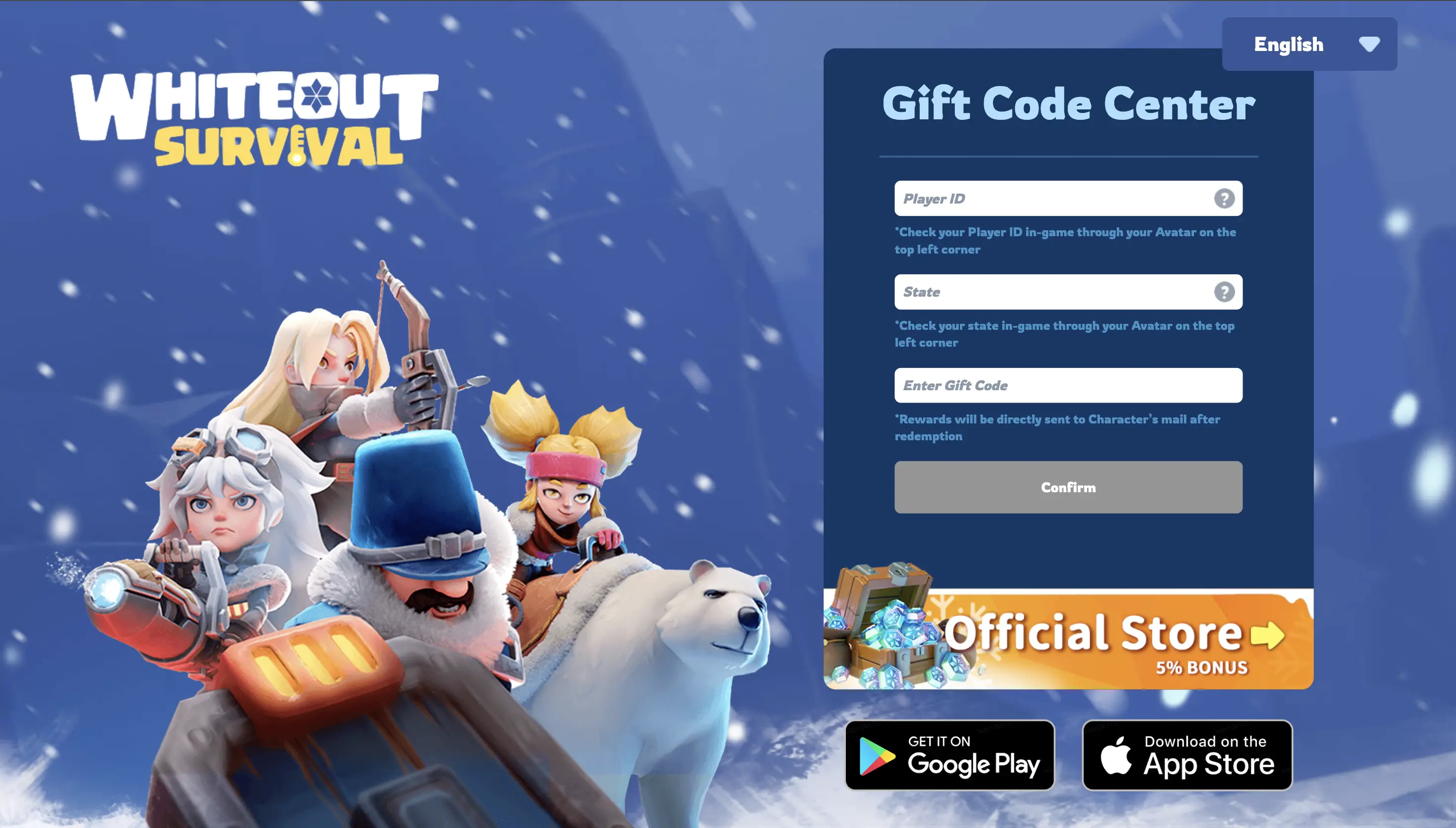
The official browser redemption system has been updated. Players no longer need to go through a traditional account login process.
You only need:
- Your Player ID
- Your State
- An active gift code
Redemption Steps
- Open Whiteout Survival and check your Player ID and State.
- Open the official Whiteout Survival Gift Code Center in your browser.
- Enter your numeric Player ID.
- Enter or select your State.
- Enter the active gift code exactly as shown.
- Review the information for typing mistakes.
- Select the confirmation or redemption button.
- Return to Whiteout Survival.
- Open your in-game mailbox.
- Claim the gift code reward.
The system uses your Player ID and State to identify the correct character. It does not require you to enter a Whiteout Survival password.
Information You Should Never Provide
Manual gift code redemption should not require:
- Your Whiteout Survival password
- Your email password
- Your Facebook password
- Your Google account password
- Payment information
- Verification codes from another account
- Recovery codes
For manual redemption, use the official Gift Code Center and only enter the information requested by the official form.
When to Use the Official Gift Code Center
The browser method is useful when:
- You play Whiteout Survival on iPhone or iPad.
- Your version of the game does not show an in-game Gift Code option.
- You prefer redeeming through a browser.
- You already have your Player ID and State saved.
- The in-game redemption menu is temporarily unavailable.
The official portal processes one gift code at a time. Repeat the steps for each active code you want to claim.
How to Redeem Whiteout Survival Gift Codes on Android
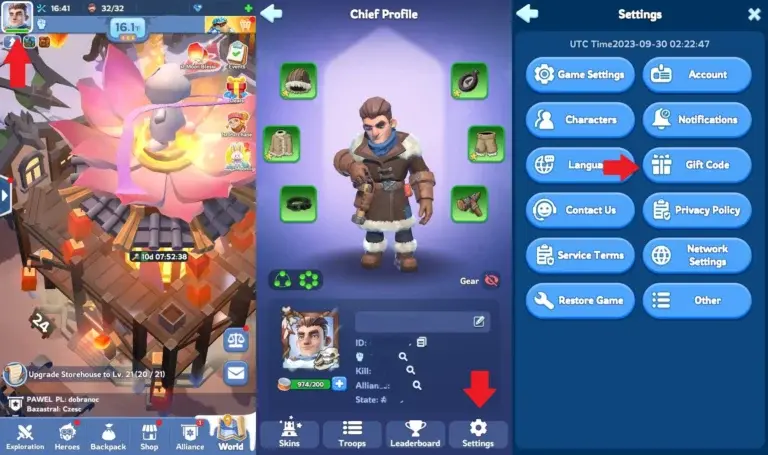
Many Android versions of Whiteout Survival include an in-game Gift Code menu. Recent code guides continue to identify this as the standard Android redemption method.
Follow these steps:
- Open Whiteout Survival.
- Tap your Chief avatar in the upper-left corner.
- Select Settings.
- Find and select Gift Code.
- Enter an active code.
- Tap Redeem or Confirm.
- Check your mailbox if the reward does not appear immediately.
You do not normally need to enter your Player ID or State when redeeming directly through the Android game menu because you are already using the correct character.
What If the Gift Code Button Is Missing?
The option may vary depending on your device, platform, region, or current game version.
When the Gift Code button is unavailable, use the official browser-based Gift Code Center instead.
What Is Whiteout Survival Auto Redeem?
Auto redeem is a separate system designed to process supported gift codes for registered characters without requiring players to manually enter every new code.
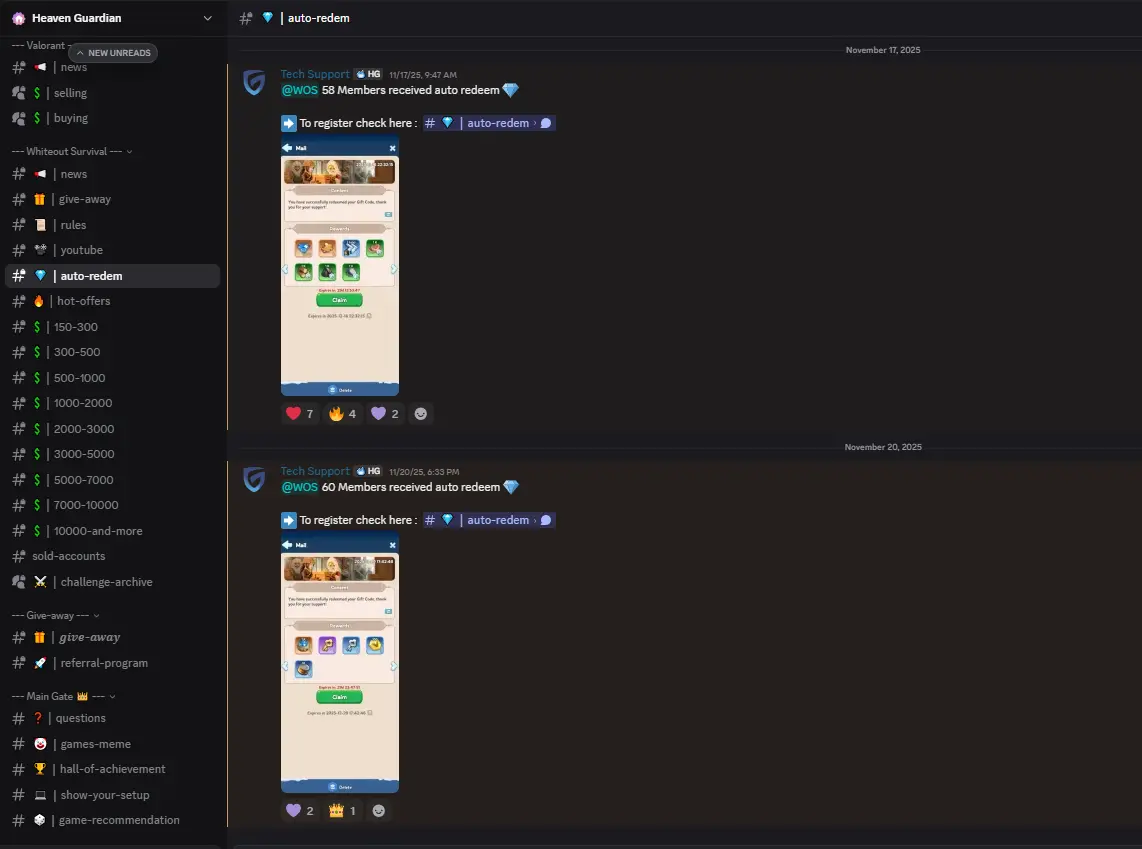
Heaven Guardian provides a Whiteout Survival auto redeem service through its Discord community. This system is separate from the official Century Games Gift Code Center.
Players register their character information once using:
- Player ID
- State
After registration, the system can attempt to process supported active codes for that character.
What Auto Redeem Does
Auto redeem may help with:
- Processing supported active gift codes
- Reducing repeated manual code entry
- Avoiding typing mistakes
- Managing several codes released close together
- Claiming short-duration codes more conveniently
- Reducing the need to repeatedly check the official redemption page
Rewards are still delivered through the normal Whiteout Survival reward system. Players should check their in-game mailbox after a code has been processed.
What Auto Redeem Does Not Guarantee
Auto redeem cannot guarantee that every code will work.
A code may still fail because it is:
- Expired
- Already claimed
- Limited to a particular region
- Restricted to selected accounts
- Connected to a specific promotional campaign
- Limited by Furnace level
- Released before the character was registered
- Unsupported by the auto redeem system
Auto redeem should be described as a convenience tool, not a guarantee that every reward will be successfully claimed.
Manual Redemption vs Auto Redeem
Both methods can be useful, but they serve different types of players.
| Feature | Manual Redemption | Heaven Guardian Auto Redeem |
| Enter Player ID | Required on the official website | Required during registration |
| Enter State | Required on the official website | Required during registration |
| Enter each gift code | Yes | Normally processed by the system |
| Official Century Games system | Yes | No, separate third-party service |
| Best for occasional codes | Yes | Optional |
| Best for frequent new codes | Requires repeated entry | More convenient |
| Requires game password | No | No |
| Rewards sent to the game | Yes | Yes, when redemption succeeds |
| Guaranteed to redeem every code | No | No |
When Manual Redemption Is Better
Manual redemption may be better when:
- Only one code is available.
- You want to use only the official Gift Code Center.
- You do not want to register your character with another service.
- You prefer controlling each redemption yourself.
- You play on Android and have the in-game Gift Code button.
When Auto Redeem May Be Better
Auto redeem may be more convenient when:
- You regularly forget to check for new codes.
- Several codes are released during an event.
- You manage more than one eligible character.
- You want to avoid entering the same information repeatedly.
- You want help processing supported codes before they expire.
Players should choose the method that matches their preferences and comfort level.
Benefits of Whiteout Survival Auto Redeem
Saves Time
Manual redemption requires players to open the page, enter their character details, submit a code, and repeat the process for additional codes.
Auto redeem reduces this repeated work after the initial registration.
Reduces Input Mistakes
Whiteout Survival codes may contain uppercase letters, lowercase letters, and numbers. Some characters can also look similar when viewed on a small screen.
Automatically processing a stored code reduces the chance of entering it incorrectly.
Helps With Short-Lived Codes
Some promotional codes remain active for only a short period. Players who do not check social media every day may discover them after they have already expired.
An auto redeem system can help process supported codes while they are still available.
Useful During Major Events
Anniversaries, seasonal events, livestreams, and community celebrations may release multiple codes close together.
Auto redeem makes these periods easier to manage because players do not have to submit every code individually.
Tips for Redeeming Whiteout Survival Gift Codes Successfully
Redeem New Codes Immediately
Do not wait until the end of an event. Gift code expiration times are not always clearly announced.
Copy Codes Exactly
Copy and paste the code whenever possible. Avoid changing capitalization or adding spaces.
Remove Extra Spaces
A copied code may include a blank space before or after the text. Delete unnecessary spaces before submitting it.
Confirm Your Player ID
One incorrect number may prevent the system from identifying your character.
Select the Correct State
Players with several characters should make sure they use the State connected to the intended Player ID.
Enter One Code at a Time
The official redemption page processes individual gift codes. Do not paste several codes into the same field.
Check Your In-Game Mailbox
Successful rewards may arrive through the mailbox instead of appearing directly in your inventory.
Keep the Game Updated
Using the latest Whiteout Survival version can reduce menu and reward-display problems.
Your Player ID and State are enough for the updated redemption form. Never provide passwords or unrelated account credentials to redeem a gift code.
Common Whiteout Survival Gift Code Errors
The Gift Code Has Expired
This is one of the most common errors. Whiteout Survival codes often have limited redemption periods.
Once a code expires, there is usually no way to claim its rewards.
The Gift Code Is Invalid
Check:
- Capitalization
- Numbers and letters
- Extra spaces
- Missing characters
- Whether the code was copied completely
Try copying the code directly from the active-code table.
The Code Was Already Redeemed
Most public gift codes can only be claimed once by each eligible character.
Receiving this message usually means the reward was previously collected.
The Player ID Is Incorrect
Return to your in-game profile and copy the numeric Player ID again. Do not use your Chief name, alliance name, or State number in the Player ID field.
The State Is Incorrect
Make sure the State matches the character connected to the Player ID.
This is especially important for players who have characters in multiple States.
The Code Is Region-Restricted
Some codes are released for specific regional communities, platforms, events, or promotional campaigns.
A code can be valid but still unavailable for your account.
The Character Is Not Eligible
Certain rewards may require:
- A minimum Furnace level
- Participation in a specific event
- Access to a regional promotion
- An eligible account type
- An active promotional service
Check the code announcement when available.
The Reward Has Not Appeared
Try the following:
- Close and reopen the mailbox.
- Restart Whiteout Survival.
- Confirm that you redeemed the code for the correct Player ID and State.
- Wait briefly for the server to process the reward.
- Check whether the reward was added directly to your inventory.
Contact official game support if a confirmed successful redemption never delivers its reward.
The Official Gift Code Center Is Not Loading
Possible fixes include:
- Refreshing the page
- Enabling JavaScript
- Trying another browser
- Clearing the browser cache
- Disabling an aggressive ad blocker
- Switching between Wi-Fi and mobile data
- Trying again after temporary server maintenance
The official Gift Code Center requires JavaScript to function correctly.
Mistakes to Avoid When Redeeming Gift Codes
- Waiting several days before redeeming a new code
- Entering your Chief name instead of your Player ID
- Selecting the wrong State
- Copying an extra space with the gift code
- Assuming every code works globally
- Trying to redeem the same code repeatedly
- Using an unofficial page that requests a password
- Assuming auto redeem guarantees every reward
- Forgetting to check the in-game mailbox
- Relying on an old screenshot without checking the current code status
The safest approach is to verify new codes quickly, use the official portal for manual redemption, and avoid providing private account credentials.
How to Get More Whiteout Survival Gift Codes
New gift codes do not follow a fixed release schedule.
They are commonly shared through:
- Official Whiteout Survival Facebook page
- The official Whiteout Survival Discord server
- Official YouTube videos and livestreams
- In-game announcements
- Community events
- Holiday campaigns
- Game updates
- Regional promotions
The official Whiteout Survival Discord server includes community events and gift-code announcements.
You can also bookmark this guide and check the active-code table regularly. Because code status changes quickly, look for a recent “last checked” date before attempting an older code.
FAQs
What information is required to redeem a Whiteout Survival code?
The updated official Gift Code Center requires your Player ID, State, and an active gift code.
Do I need to log into my Whiteout Survival account?
No. The current redemption form does not require a traditional account login, email address, or password. It identifies your character through your Player ID and State.
Where can I find my Whiteout Survival Player ID?
Open the game and tap your Chief avatar in the upper-left corner. Your numeric Player ID is displayed on the profile page.
Can I redeem Whiteout Survival codes on Android?
Yes. Android players can normally redeem codes through the in-game Settings menu. The official web redemption page can also be used when the in-game option is unavailable.
Why is my Whiteout Survival gift code not working?
The code may be expired, entered incorrectly, already claimed, region-restricted, or unavailable for your account. Also confirm that your Player ID and State are correct.
Is Whiteout Survival auto redeem official?
No. The Heaven Guardian auto redeem system is a separate convenience service and is not part of the official Century Games Gift Code Center.
Are auto redeem rewards guaranteed?
No. The system can attempt to redeem supported active codes, but codes may fail because of expiration, eligibility requirements, regional restrictions, or previous redemption.
Conclusion
Whiteout Survival gift codes are an easy way to collect free Gems, speedups, resources, Hero XP, keys, stamina, and other useful rewards. Since many codes expire quickly, checking new codes regularly and redeeming them immediately is important.
The updated official redemption system is straightforward. Players only need their Player ID, State, and gift code. No email address, game password, or traditional account login is required. Android players may also be able to redeem codes directly through the in-game Settings menu.
Players who prefer a more convenient option can use the Heaven Guardian auto redeem system to help process supported gift codes after registering their Player ID and State. However, auto redeem remains separate from the official Gift Code Center, and individual code eligibility is not guaranteed.
For more progression tips, event strategies, and hero guides, explore our complete collection of Whiteout Survival guides. Players who want to continue from a more developed starting point can also browse available Whiteout Survival accounts on Heaven Guardian.