 The Whiteout Survival Flame and Fangs event rewards players for completing Lighthouse Intel Missions and defeating special Firebeasts. These activities provide Crystallite Cores, which can be exchanged for Fire Crystals, speedups, resources, and other progression items.
Getting the most value from the event depends on more than clearing the missions that appear. The timing of your Intel claims, your use of Agnes, and the order in which you purchase rewards can all affect your final return.
This guide explains the event schedule, Crystallite Core calculation, pre-event Intel trick, Agnes strategy, Fire Crystal rewards, and the mistakes that commonly reduce event value.
The Whiteout Survival Flame and Fangs event rewards players for completing Lighthouse Intel Missions and defeating special Firebeasts. These activities provide Crystallite Cores, which can be exchanged for Fire Crystals, speedups, resources, and other progression items.
Getting the most value from the event depends on more than clearing the missions that appear. The timing of your Intel claims, your use of Agnes, and the order in which you purchase rewards can all affect your final return.
This guide explains the event schedule, Crystallite Core calculation, pre-event Intel trick, Agnes strategy, Fire Crystal rewards, and the mistakes that commonly reduce event value.
What Is the Whiteout Survival Flame and Fangs Event?
Flame and Fangs is a short PvE event connected to the Lighthouse and its Intel Missions. While the event is active, eligible Intel activities award a temporary currency called Crystallite Cores. You can spend these Cores in the event exchange shop. The most important rewards are usually regular Fire Crystals and, in sufficiently developed states, Refined Fire Crystals. The event may also be described by players as Flame and Fang or Flames and Fangs. These variations usually refer to the same event.Key point: Flame and Fangs is not a competitive ranking event. Your goal is to complete the right Intel Missions, collect as many Cores as possible, and spend them before the exchange closes.
When Does Flame and Fangs Appear?
Flame and Fangs commonly appears during a preparation-week rotation, with Core collection available on Monday and Tuesday. The event interface generally remains open for a third day so players can finish exchanging their Cores.- First two days: Complete eligible Intel Missions, earn Crystallite Cores, and exchange rewards.
- Final day: Exchange remaining Cores, but do not expect another full Core-farming day.
How to Earn Crystallite Cores
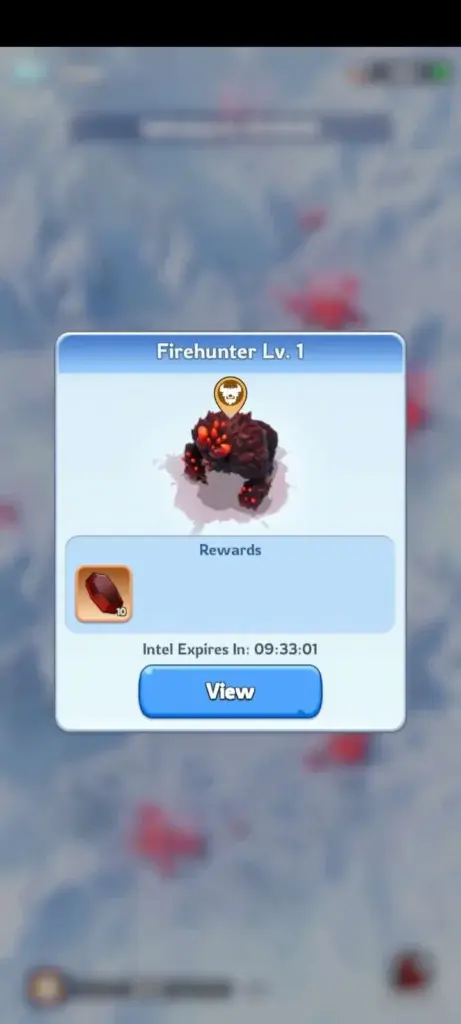
Crystallite Cores come from eligible Lighthouse Intel Missions. However, different missions provide very different returns.| Intel activity | Typical Core reward | Priority |
|---|---|---|
| Special Firebeast mission | 10 Crystallite Cores | Highest |
| Eligible normal Intel Mission | 1 Crystallite Core | Complete after Firebeasts |
| Bounty Intel | 0 Crystallite Cores | No direct event value |
Why Firebeasts should be cleared first
A single Firebeast provides the same number of Cores as ten normal Intel Missions. Missing one therefore costs far more event currency than overlooking one standard mission. Open the Lighthouse after every Intel refresh and identify the special missions first. Keep enough Chief Stamina available to clear them before the next rotation.How the Standard 168-Core Total Is Calculated
On the commonly documented event rotation, players receive three Intel refreshes per day at 00:00, 08:00, and 16:00 UTC. A normal refresh can contain:- Two Firebeasts worth 10 Cores each.
- Eight regular eligible Intel Missions worth 1 Core each.
2 Firebeasts × 10 Cores = 20 Cores
8 regular missions × 1 Core = 8 Cores
Total per refresh = 28 Crystallite Cores
Flame and Fangs Intel Timing Trick for More Cores
The most useful Flame and Fangs strategy begins on the day before the event. By saving one Intel batch and leaving another batch untouched, you can bring additional regular missions into the event window. With clean timing, the commonly reported total increases from approximately 168 to 184 Crystallite Cores.Pre-event schedule
| Time before event | What to do | What to avoid |
|---|---|---|
| 00:00 UTC | Complete and claim Intel normally. | Do not begin stacking missions too early. |
| 08:00 UTC | Complete the new Intel batch but leave its rewards unclaimed. | Do not press Claim All. |
| 16:00 UTC | Leave the new Intel Missions untouched. | Do not complete or claim this batch. |
| Event opening at 00:00 UTC | Claim the saved missions, complete the untouched missions, and clear the new event batch. | Do not forget the saved rewards. |
Timing warning: Using Claim All at the wrong time can break the setup. Follow the UTC schedule shown by your game rather than your phone’s local clock.
How to Use Agnes During Flame and Fangs
Agnes is relevant to Flame and Fangs because her Efficient Recon skill provides additional Lighthouse Intel Missions. Depending on the skill level, she can add between two and eight missions per day. However, Agnes missions count toward the number of Intel Missions that can remain active. Stacking too many can interfere with normal mission spawns, including the more valuable Firebeast missions.Recommended Agnes timing
- Do not activate Agnes during the first 00:00 pre-event batch.
- At the 08:00 pre-event refresh, complete the regular Intel batch.
- Activate Agnes after that batch appears.
- Complete the Agnes missions but leave the rewards unclaimed.
- Do not interact with the 16:00 batch.
- Claim and complete everything after Flame and Fangs opens at 00:00 UTC.
Agnes tip: If additional Agnes missions prevent normal Intel or Firebeast missions from appearing, stop adding more missions and clear your existing queue. Protecting Firebeast spawns is more important than blindly maximizing mission count.
Best Daily Flame and Fangs Routine
A simple routine prevents most missed Cores:- Check the event timer. Confirm when Core collection and the exchange shop close.
- Open the Lighthouse at each refresh. The usual refresh times are 00:00, 08:00, and 16:00 UTC.
- Clear Firebeasts first. Each one is worth substantially more than a normal mission.
- Complete eligible regular Intel. Individual rewards are small, but the total adds up across six event refreshes.
- Watch your Chief Stamina. Keep enough available for every special mission.
- Control Agnes missions. Do not let extra Intel block more valuable spawns.
- Spend Cores before the exchange closes. Do not rely on the automatic conversion.
Best Flame and Fangs Fire Crystal Rewards
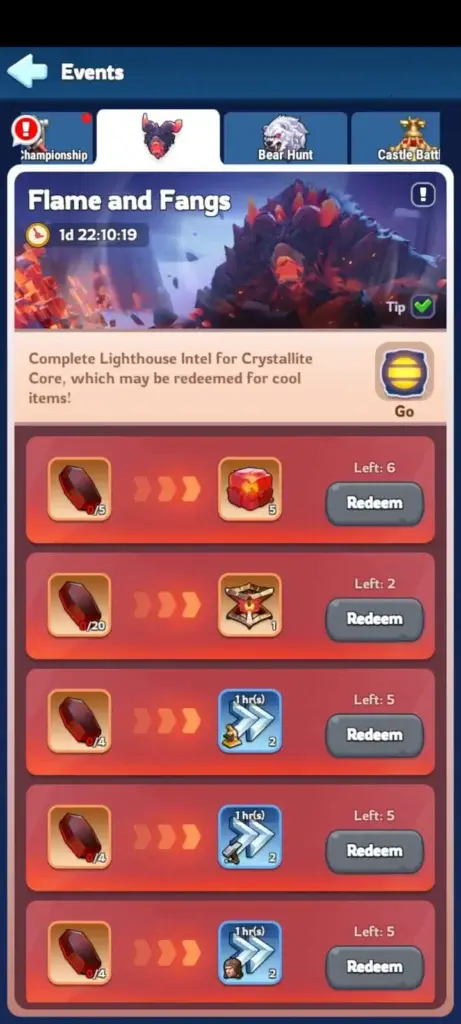 The event shop commonly includes Fire Crystals, Refined Fire Crystals, speedups, Hero XP, and basic resources. Available items and purchase limits can depend on state progression or future event updates, so inspect the live exchange before spending.
Recommended reward priority
| Reward | Suggested priority | Best for |
|---|---|---|
| Refined Fire Crystals | Very high when available | States that have unlocked FC6 and later progression |
| Fire Crystals | Very high | Fire Crystal building and troop progression |
| Training speedups | High when preparing troops or event points | Active and competitive players |
| Construction or research speedups | Medium to high | Accounts with planned upgrades |
| Hero XP | Situational | Newer accounts leveling several heroes |
| Basic resources | Use for leftover Cores | Emptying the remaining event currency |
Should you buy Fire Crystals first?
For most accounts that have entered Fire Crystal progression, regular Fire Crystals are one of the safest purchases. A commonly shown exchange offers five Fire Crystals for five Crystallite Cores, although the current quantity and purchase limit should always be checked in-game. Fire Crystals are needed for advanced building and troop development after normal level-30 progression. Their long-term use normally makes them more valuable than basic resources or Hero XP.When Refined Fire Crystals are the better choice
Refined Fire Crystals become relevant after the state unlocks the FC6–FC8 stage. When they appear in the Flame and Fangs shop, they are often the first purchase for advanced players because they are more restricted than regular Fire Crystals. The shop option is based on state progression. An individual account may be able to purchase the item even if it has not personally reached FC5 yet.When speedups should move higher
Speedups can be a better immediate purchase when you have enough Fire Crystals for your next planned upgrade or need to prepare for an upcoming scoring event. Choose the category that matches your next action. Training speedups help with troop-focused objectives, while construction and research speedups support development projects.Choosing Progression Options in an Established State
Players joining friends in an established state may compare normal early progression with a wos account for sale. Before considering that route, compare the state number, Furnace and Fire Crystal level, heroes, Chief Gear, transfer eligibility, account bindings, and account-security arrangements. An advanced Furnace alone does not guarantee that the account is suitable for your state or alliance.What Happens to Unused Crystallite Cores?
Unused Crystallite Cores do not normally carry into the next Flame and Fangs event. At the end of the exchange period, each remaining Core is automatically converted into 10,000 Meat. Although Meat is useful, this conversion is usually much weaker than deliberately buying Fire Crystals, Refined Fire Crystals, speedups, or another needed item.Do not save Cores for the next event. Review the exchange shop on the final day and spend every remaining Core, even if the last few must be used on basic resources.