
The Whiteout Survival construction queue determines how many building projects you can run at the same time. A new account starts with one queue, which means every building upgrade must wait until the current project finishes.
Unlocking a second construction queue allows two upgrades to run simultaneously. This can greatly improve your overall progression, especially when Furnace requirements and building timers begin to increase.
This guide explains how the second construction queue works, how to unlock it, whether the permanent pack is worth buying, and how to keep both builders productive without exhausting your resources.
How the Whiteout Survival Construction Queue Works
Each active construction queue can handle one building project. With the default queue, you can construct or upgrade only one building at a time. Any additional project must wait until that queue becomes available.
After unlocking the extra queue, you can work on two separate buildings simultaneously. For example, one builder can handle a Furnace prerequisite while the other upgrades a troop camp, resource building, or Research Center.
Important: A second queue does not reduce the timer of an individual upgrade. It increases your construction throughput by allowing two timers to run at once. You only gain the full benefit when both queues remain active.
This distinction matters. Two queues do not automatically make a ten-day upgrade finish in five days. Instead, they allow another building to progress during those same ten days.
How to Unlock the Second Construction Queue
Whiteout Survival generally provides two ways to access the extra construction queue: a temporary gem unlock and a permanent Construction Queue Pack.
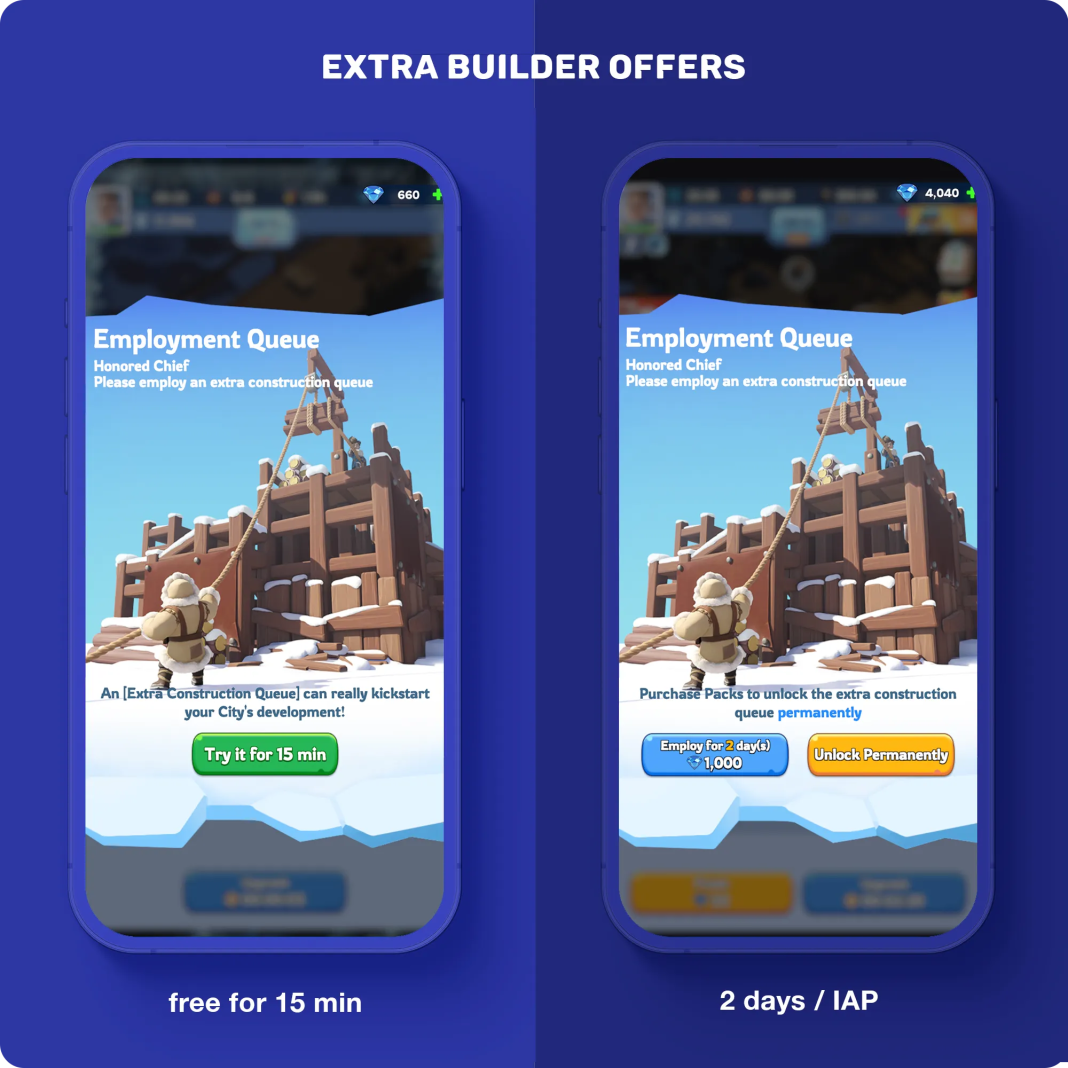
| Unlock Option | Duration | Payment Type | Best For |
|---|---|---|---|
| Temporary Queue | Limited period | Gems | Free-to-play players and short progression pushes |
| Construction Queue Pack | Permanent | Paid in-game purchase | Active long-term players and light spenders |
The temporary option is useful when you have enough resources to start several important upgrades but do not want to make a permanent purchase. However, you will need to spend more gems whenever the temporary access expires.
The Construction Queue Pack in Whiteout Survival permanently unlocks the second builder. Its long-term value comes from being a permanent account upgrade rather than a supply of consumable resources or speedups.
Offer warning: Prices, currencies, temporary durations, and pack contents can differ by region, platform, or game update. Check the current description on your in-game construction screen before spending gems or money.
Can You Unlock Construction Queue 3?
The standard city-building system is commonly documented as one default queue plus one extra queue, allowing two building projects to run simultaneously. A permanent third construction queue is not broadly documented as a normal account feature.
Players searching for Whiteout Survival construction queue 3 may be confusing construction queues with march queues, troop-training queues, research, healing, or another numbered interface element. Game features can change, so use the current in-game construction panel as the final reference for your account.
Is the Extra Construction Queue Worth It?
For most active players, the second construction queue is highly valuable. However, its actual value depends on whether you can supply enough resources and building requirements to keep both queues running.
For Free-to-Play Players
Free-to-play players can benefit from temporarily unlocking the extra queue during periods of heavy construction. It is most useful when you have saved resources, construction speedups, and several planned upgrades.
Avoid spending gems on the queue when your resources are too low to begin a second project. An unused temporary queue provides no progression benefit.
For Light Spenders
The permanent Construction Queue Pack is usually one of the more practical early purchases for players who expect to remain active. It provides an account-wide progression benefit every time both builders are used.
Unlike a resource bundle, the queue does not disappear after one upgrade. Its value continues throughout normal Furnace progression and later building development.
For Mid-Game and Advanced Players
The second queue remains useful as construction timers become longer. One builder can stay focused on major progression requirements while the second handles military, research, resource, or utility buildings.
However, advanced players may occasionally leave a queue idle while saving resources, Fire Crystals, or upgrades for a scoring event. This is a strategic decision rather than a weakness of the queue itself.
Verdict: The extra construction queue is worth using when you play regularly and can keep both builders active. The permanent pack offers the strongest long-term convenience for light spenders, while temporary gem access can work well for carefully planned free-to-play progression.
Best Way to Use Two Construction Queues
Using two builders efficiently requires more than starting random upgrades. Each queue should have a clear purpose based on your current progression goal.
Queue 1: Furnace Progression
Use the first queue for the Furnace and whichever building is required for the next Furnace level. The required supporting building can change as you progress, so always inspect the Furnace upgrade panel before starting another project.
The Embassy frequently becomes an important prerequisite during later progression. Troop camps and other buildings may also be required at different stages.
Queue 2: Supporting Development
Use the second queue to prevent the rest of your city from falling too far behind. Good choices include:
- Infantry, Lancer, and Marksman Camps when you are approaching a new troop tier.
- Research Center when additional growth or combat research must be unlocked.
- Embassy for Furnace requirements, alliance help capacity, and reinforcement-related progression.
- Infirmary when your wounded capacity is becoming restrictive.
- Command Center when rally capacity is important to your role.
- Resource buildings when production is falling behind your construction needs.
- Storehouse and utility buildings when their functions support your current goals.
| Progression Goal | First Queue | Second Queue |
|---|---|---|
| Raise Furnace quickly | Furnace | Next Furnace prerequisite |
| Unlock stronger troops | Required Furnace path | Infantry, Lancer, or Marksman Camp |
| Strengthen overall account | Major progression building | Research Center or utility building |
| Recover from resource shortages | Essential prerequisite | Resource production building |
How to Maximize Construction Efficiency
A second queue creates more opportunities, but construction bonuses and careful timing determine how much value you receive from each upgrade.
- Check your resources first. Confirm that you can fund both planned upgrades before activating temporary queue access.
- Inspect Furnace requirements. Start the required supporting building before it becomes a progression bottleneck.
- Activate applicable construction bonuses. Use available Chief Orders, pet skills, research bonuses, hero skills, appointments, or other account buffs before starting a major project.
- Request alliance help immediately. This allows active members to reduce the remaining timer.
- Start long upgrades before going offline. Short projects are easier to manage while you are actively playing.
- Use speedups after checking the remaining timer. Collect available alliance help and confirm your event goals before consuming large quantities of speedups.
- Review the event panel. Construction scoring rules, milestones, and event rotations can change between states and updates.
Construction Bonuses to Look For
Depending on your account progression and state age, construction efficiency may be improved through features such as:
- The Double Time Chief Order.
- The Cave Hyena’s Builder’s Aide skill.
- Tooling Up research in the Growth research tree.
- Zinman’s development-related skill.
- Alliance technology and alliance help.
- Temporary state appointments or construction bonuses.
- Construction and general speedups.
Timing warning: Some construction bonuses affect only projects started while the bonus is active. Activating them after an upgrade has already begun may not reduce that project’s original timer. Read each skill or buff description before starting a long upgrade.
Common Construction Queue Mistakes
Assuming the Second Queue Halves Every Timer
The second builder does not make individual upgrades complete twice as fast. It allows a second upgrade to progress at the same time.
Unlocking the Queue Without Enough Resources
A temporary queue is wasted if you cannot afford another building project. Prepare the required resources before spending gems.
Upgrading Every Building Before the Furnace
Keeping every building at the same level can slow access to new features and troop tiers. Upgrade required buildings first, then use the second queue to maintain important supporting structures.
Ignoring Construction Buffs
Starting a long Furnace upgrade without checking Chief Orders, pets, research, alliance bonuses, or state appointments can cost you a significant amount of time.
Using Speedups Before Alliance Help
Request help as soon as the project starts. After the available help is applied, decide whether the remaining timer justifies using speedups.
Keeping Both Queues Busy With Low-Priority Buildings
Constant activity is useful, but priority still matters. Do not delay a Furnace prerequisite because both builders are occupied with buildings that provide little immediate value.
Comparing Progression Options in an Established State
Players who want to join friends in an older state may compare starting a new city with evaluating a wos account for sale. Before considering that option, review the state number, Furnace level, heroes, Chief Gear, transfer eligibility, account binding, ownership security, and compatibility with your intended alliance.
An established account may reduce the early construction grind, but it does not replace careful state research, account security checks, or a long-term progression plan.
FAQs
What is the construction queue in Whiteout Survival?
The construction queue is the slot used to build or upgrade structures in your city. Each queue can process one construction project at a time.
How do I unlock the second construction queue?
You can generally access the second queue temporarily with gems or unlock it permanently through the Construction Queue Pack. Check your in-game construction screen for the current options available to your account.
Is the Construction Queue Pack permanent?
The dedicated Construction Queue Pack is commonly offered as a permanent second builder unlock. Confirm that the word “permanent” or equivalent wording appears in the offer description before purchasing.
Can you have three construction queues in Whiteout Survival?
The commonly documented city-building setup supports one default queue and one extra queue. There is no broadly documented standard permanent third building queue. Do not confuse construction queues with march, training, healing, or research activities.
Does the second construction queue double construction speed?
It can nearly double overall building throughput when both queues remain active, but it does not reduce the timer of each individual project. Construction speed bonuses and speedups are separate mechanics.
Is the extra construction queue worth it for free-to-play players?
Temporary access can be worthwhile when you have saved enough resources for two important upgrades. It offers less value when the second queue would remain idle.
What should I upgrade with the second queue?
Use one queue for the Furnace progression path and the other for prerequisites, troop camps, the Research Center, resource buildings, or utility structures. Your current Furnace requirement and account goal should determine the priority.
Should I spend gems on the construction queue or speedups?
A temporary second queue is often more efficient when you can run two meaningful projects for its full duration. Speedups are more useful when you need to complete a specific upgrade or reach an event milestone. Compare both options against your available resources and current goals.
Conclusion
The Whiteout Survival construction queue is one of the most important systems for maintaining steady city progression. Unlocking the second builder lets you work on a major upgrade and a supporting building at the same time.
The permanent Construction Queue Pack offers strong long-term convenience for active light spenders. Free-to-play players can still gain substantial value from temporary access when they prepare enough resources and plan both projects in advance.
For the best results, reserve one queue for Furnace progression and use the other for prerequisites, troop camps, research, or resource development. Activate available construction bonuses before starting long projects, request alliance help, and save speedups for upgrades or events that provide meaningful value.
For more building priorities, progression advice, and event planning strategies, explore our collection of Whiteout Survival guides.