Whiteout Survival Auto Hunting automatically sends a selected march to attack regular Beasts on the world map. It reduces repetitive tapping and makes it easier to spend stamina while you manage your city, review events, or complete other tasks.
However, the feature is not an offline farming system. Your game must remain open, and the hunt can stop when you lose a battle, run out of stamina, teleport, or reach one of your configured safety limits.
This guide explains how to turn on Auto Hunting in Whiteout Survival, which settings to use, what causes it to stop, and whether the Monthly Card is worthwhile for your playstyle.
What Is Whiteout Survival Auto Hunting?
Auto Hunting is a premium convenience feature that repeats regular Beast hunts using the march, Beast level range, stamina budget, and safety settings you select.
Instead of finding a Beast and sending a march manually after every victory, the game searches for another suitable target and continues the hunting cycle. This can save a considerable amount of attention when you need to defeat many Beasts.
Auto Hunting is designed for regular world-map Beasts. It does not automatically start Polar Terror rallies, complete every type of Intelligence mission, or manage alliance rally participation.
Does Auto Hunting Work Offline?
No. The app must remain open for Auto Hunting to continue. Closing or quitting the game disables the active hunting session.
You may be able to leave the game running while you work on another task away from the screen, but your device still needs to keep Whiteout Survival active. Battery-saving settings, connection interruptions, or operating-system restrictions may also affect long sessions.
How to Unlock Auto Hunting in Whiteout Survival
Auto Hunting is currently associated with the Ultra Value Monthly Card, which can be found through the in-game purchase area. The feature remains available while the relevant Monthly Card benefit is active.
The card may also include other benefits, but pack contents, prices, availability, and purchase interfaces can change by region or game update. Always review the current description in the in-game Top Up Center before purchasing it.
How to Turn On Auto Hunt in Whiteout Survival
After activating the appropriate Monthly Card, follow these steps to start an automated Beast-hunting session:
- Open the world map. Tap the World button to leave your city view.
- Open the search menu. Select the magnifying-glass icon on the left side of the world map.
- Select the Beast search option. Make sure you are viewing regular Beasts rather than Polar Terrors or resource tiles.
- Tap Auto Hunting. The Auto Hunting control should appear near the lower part of the Beast search interface when the feature is active on your account.
- Configure the hunting settings. Choose your Beast level range, stamina budget, Infirmary limit, and march formation.
- Review the formation. Confirm that the march can reliably defeat the selected targets.
- Start Auto Hunting. Keep the game open while the automated session runs.
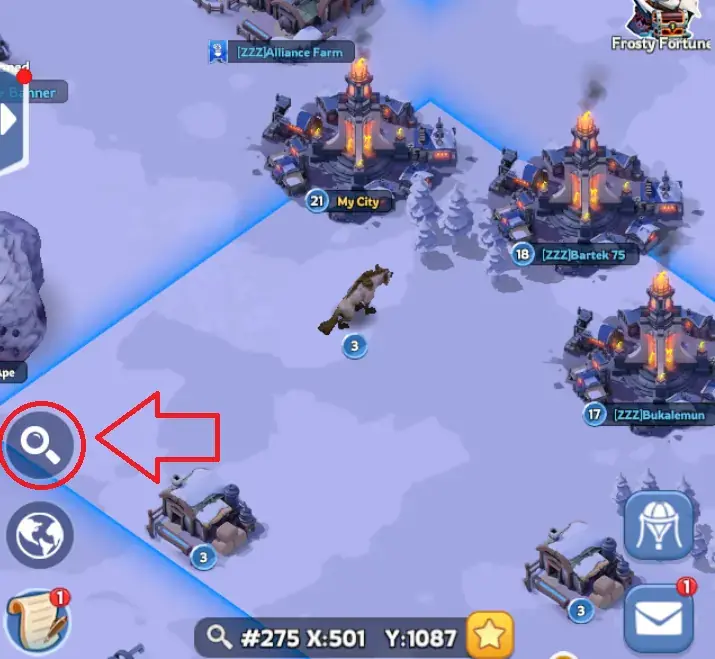
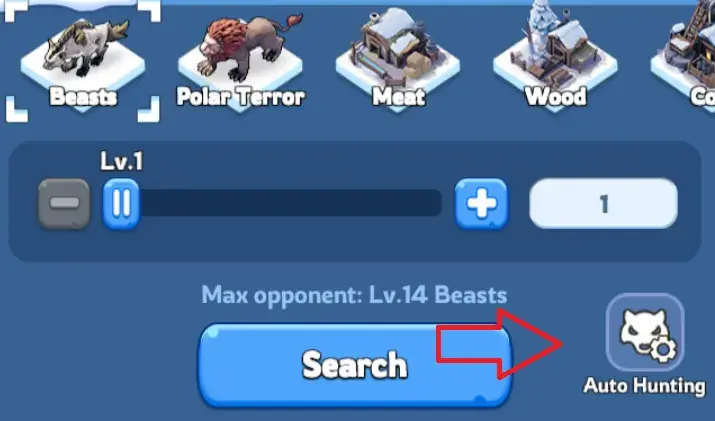
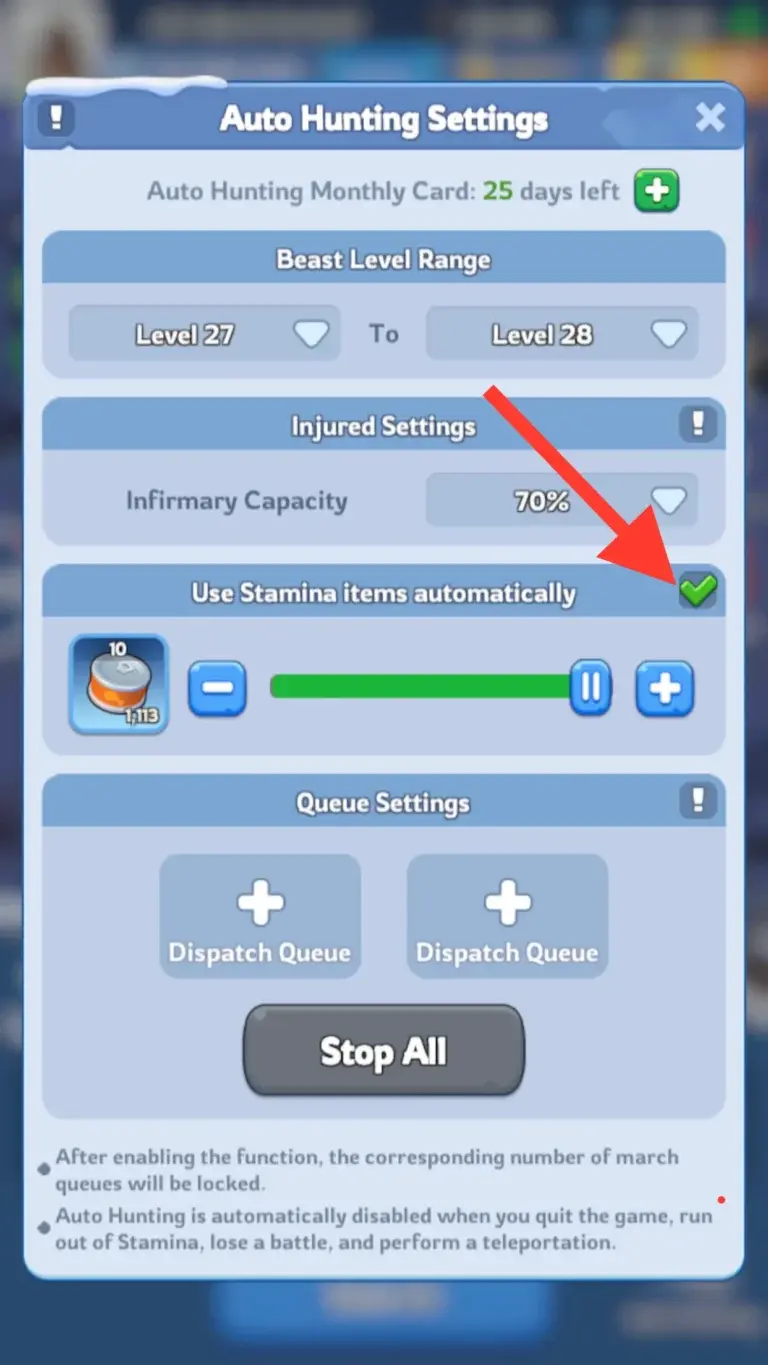
If the Auto Hunting button does not appear, check whether the Monthly Card is active. You can also restart the game and review the current pack description in case the feature’s location or availability changed in a recent update.
Best Whiteout Survival Auto Hunting Settings
The best setup depends on your march power, available stamina, Infirmary usage, active events, and the amount of risk you are willing to accept. Avoid copying a fixed Beast level from another player because account strength varies significantly.
| Setting | Recommended Approach | Why It Matters |
|---|---|---|
| Beast level range | Choose the highest level your selected march defeats consistently. | Higher-level Beasts generally provide better rewards, but one defeat can stop the session. |
| Infirmary limit | Leave comfortable capacity instead of setting the limit near full. | The spare capacity protects you if another battle or event creates additional wounded troops. |
| Stamina allocation | Set a specific budget based on your current event goals. | This prevents Auto Hunting from consuming stamina you intended to save. |
| Troop formation | Use a reliable winning formation rather than simply maximizing displayed power. | Consistency is more important than targeting a level your march only defeats occasionally. |
Test the Target Manually First
Before starting a long session, attack the selected Beast level manually several times with the same formation. If the march wins comfortably and does not create concerning losses, it is a safer target for Auto Hunting.
If the result is close, lower the Beast level. A slightly weaker target is usually better than having the entire session stop after one failed attempt.
Consider Using Gina for Stamina Efficiency
Gina is commonly used for hunting because one of her Expedition skills can reduce the stamina cost of attacking Beasts and Polar Terrors. If you have developed the relevant skill, placing her in the hunting march can help you complete more attacks with the same stamina supply.
Check Gina’s current skill description on your account before planning your stamina budget, especially if her skill is not fully upgraded.
Do Not Commit All Your Stamina Automatically
Auto Hunting makes it easy to spend more stamina than intended. Before starting, review upcoming tasks and event requirements.
You may need stamina for Beast-related objectives in events such as State of Power preparation, Alliance Mobilization, or other rotating activities. Event schedules and scoring rules can vary, so confirm the current requirements in the in-game event panel.
What Stops Auto Hunting?
Auto Hunting is disabled or completed when one of its stop conditions is triggered. Common causes include:
- Losing a Beast battle. The session stops after an unsuccessful attack.
- Closing or quitting the game. Auto Hunting only operates while the game remains active.
- Running out of usable stamina. The hunt cannot continue without enough stamina for another attack.
- Reaching your stamina budget. The session ends after consuming the amount you allocated.
- Reaching the selected Infirmary threshold. This safety setting prevents the hunt from continuing beyond your chosen limit.
- Teleporting your city. Relocating interrupts the active hunting process.
- Cancelling it manually. You can stop the session when you need the march for another activity.
How to Use Auto Hunting More Efficiently
1. Hunt During Beast-Scoring Events
Auto Hunting provides the most practical value when you already need to defeat many Beasts. Check whether an active event awards points for Beast hunts before spending a large stamina reserve.
Do not assume that every hunt contributes the same score. Some events distinguish between normal Beasts, higher-level Beasts, and Polar Terrors.
2. Target a Stable Level, Not Your Maximum Level
Your highest unlocked Beast is not always the safest Auto Hunting target. Choose a level that your march defeats reliably without needing temporary combat bonuses or a perfect lineup.
This reduces interruptions and lets the session continue without constant supervision.
3. Preserve March Availability
The selected march remains involved in repeated Beast hunts. Avoid using every available march for automation when you may need to gather resources, reinforce an ally, join a rally, or complete an Intelligence mission.
4. Review Infirmary Capacity Before Starting
Existing wounded troops reduce your available safety margin. Heal important troops before beginning a long hunting session, especially during competitive events when sudden battles are possible.
5. Keep a Stamina Reserve
Set a clear stopping point instead of selecting the largest possible stamina amount. A reserve gives you flexibility if a better scoring opportunity appears later.
Common Auto Hunting Mistakes
- Expecting offline progress: Auto Hunting does not continue normally after the game is closed.
- Selecting Beasts that are too strong: One defeat can end the automated session.
- Using all available stamina: This may leave you unable to complete later event tasks.
- Ignoring the Infirmary: Starting with limited capacity reduces your protection against additional wounded troops.
- Confusing Auto Hunting with Auto-Join: Auto-Join helps participate in eligible alliance rallies, while Auto Hunting repeatedly attacks normal Beasts.
- Expecting Polar Terror automation: Polar Terrors require rallies and are not handled like normal Auto Hunting targets.
- Forgetting the active march: Your hunting formation may be unavailable when another important activity begins.
Is Whiteout Survival Auto Hunting Worth It?
Auto Hunting can be worthwhile for players who remain active for long sessions, regularly purchase the Ultra Value Monthly Card, and spend large amounts of stamina on Beast-related tasks.
Its main value comes from convenience rather than direct combat power. It reduces repetitive inputs, but it does not increase your march strength or turn an unsafe Beast target into a reliable victory.
Auto Hunting May Be Worth It If You:
- Frequently complete high-volume Beast objectives.
- Keep the game open for extended periods.
- Already value the Monthly Card’s other current benefits.
- Want to reduce repetitive world-map searches and march commands.
- Have enough stamina to make frequent hunting practical.
Auto Hunting May Not Be Worth It If You:
- Only play for short sessions.
- Rarely spend stamina on regular Beasts.
- Expected the feature to work after closing the game.
- Prefer to remain fully free-to-play.
- Mostly spend stamina on Polar Terror rallies instead of normal Beast hunts.
Evaluate the complete Monthly Card rather than judging the purchase through Auto Hunting alone. Pack contents and regional prices can change, so use the current in-game description when deciding.
Auto Hunting and Established-State Progression
Auto Hunting reduces repetitive Beast farming, but it does not remove the time required to develop a new city, heroes, troops, research, and Chief Gear. Players trying to join friends in an established state may compare normal progression with options such as a wos account for sale.
Before evaluating any established account, review its state number, Furnace level, heroes, Chief Gear, transfer eligibility, account binding, and security history. These details matter more than total power alone.
FAQs
How do I turn on Auto Hunt in Whiteout Survival?
Open the world map, tap the magnifying-glass search icon, select the Beast tab, and choose Auto Hunting. Configure the Beast level, Infirmary threshold, stamina budget, and troop formation before starting.
The option generally requires the relevant Monthly Card benefit to be active.
Does Whiteout Survival Auto Hunting work when the game is closed?
No. Auto Hunting requires Whiteout Survival to remain open and active. Closing the app, quitting the game, or having your device suspend the app can stop the session.
Why did my Auto Hunting stop?
The most common causes are losing a battle, running out of stamina, reaching your configured stamina or Infirmary limit, teleporting, closing the game, or manually cancelling the session.
Can Auto Hunting attack Polar Terrors?
Auto Hunting is intended for normal Beasts. Polar Terrors use the rally system, so they require a different process involving rally creation or alliance participation.
What Beast level should I select for Auto Hunting?
Choose the highest level your selected formation can defeat consistently. Test it manually before starting a long automated session, and lower the target if victories are close or unreliable.
Can free-to-play players unlock Auto Hunting?
Current player references associate Auto Hunting with the Ultra Value Monthly Card. Free-to-play players can continue hunting Beasts manually, but they should check the in-game purchase area in case access methods change in a future update.
Is Auto Hunting the same as Auto-Join or Auto Help?
No. Auto Hunting repeatedly sends your selected march against normal Beasts. Auto-Join relates to automatically joining eligible alliance rallies, while alliance help systems reduce timers when members respond to help requests.
Should I use Gina for Auto Hunting?
Gina can be useful because her hunting-related Expedition skill may reduce stamina consumption. Review the skill level on your account and confirm that the selected formation still defeats your target consistently.
Conclusion
Whiteout Survival Auto Hunting is a practical convenience feature for players who regularly defeat large numbers of normal Beasts. It saves repeated searches and march commands, but the game must remain open while it operates.
For the most reliable results, test your formation manually, select a Beast level you can defeat consistently, leave spare Infirmary capacity, and set a controlled stamina budget. Avoid choosing your maximum target simply because it offers slightly better rewards.
The Monthly Card is most valuable when you already use its other benefits and frequently complete Beast-related objectives. Casual players and anyone expecting offline automation may find the feature less useful.
For more stamina advice, event strategies, and progression tips, explore our collection of more Whiteout Survival strategies.