
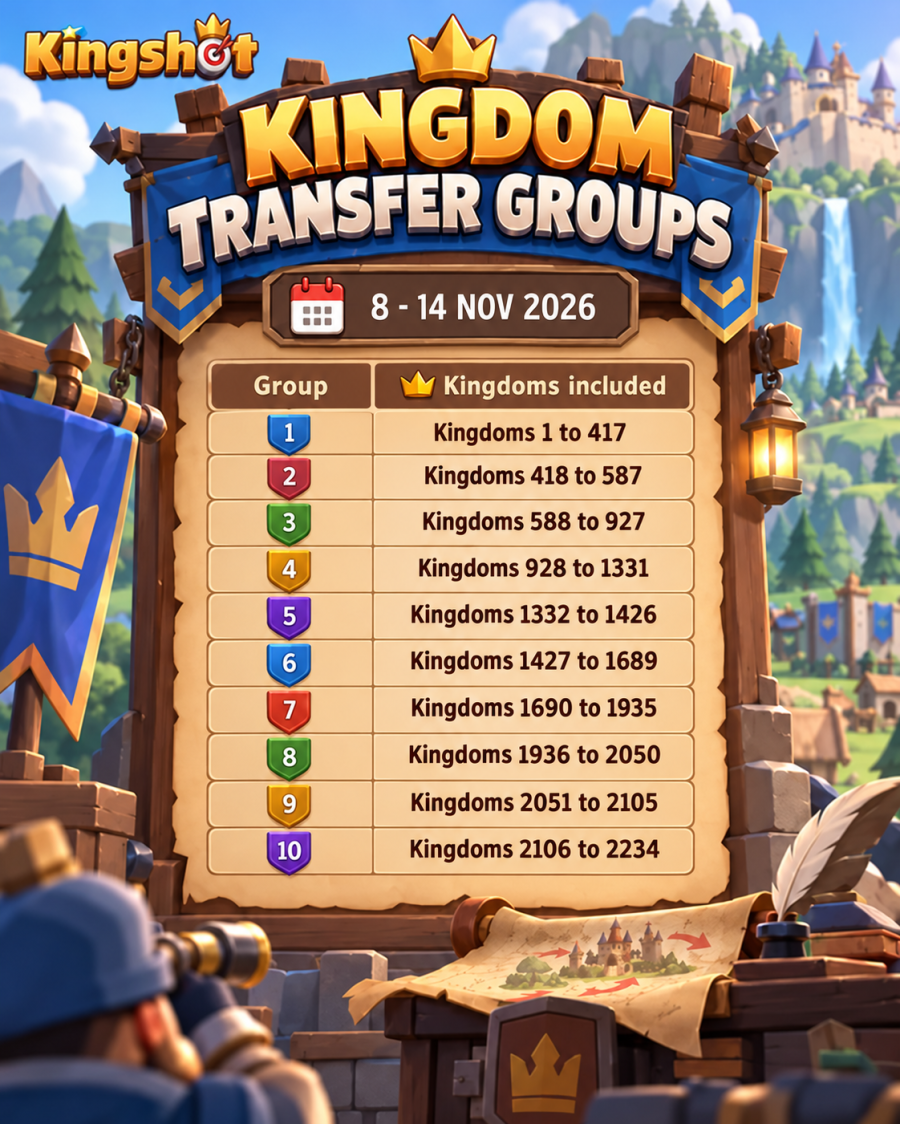
Kingshot Transfer Groups determine which kingdoms can participate together during the Kingdom Transfer Event. You cannot freely move to every kingdom. Your destination must appear in an eligible group and meet the game’s progression, Power Cap, character-age, and capacity requirements.
Kingdom Transfer gives governors an opportunity to join friends, enter a more active alliance, leave an inactive kingdom, or move to a community that better matches their language, time zone, and competitive goals.
The event normally lasts seven days and has three phases: Pre-Transfer, Invitational Transfer, and Transfer Opens. You also need enough Transfer Passes, which can range from one to 50 depending on your account.
This guide covers the latest Kingshot Kingdom Transfer schedule for 2026, current and historical Transfer Groups, Transfer Pass costs, Power Caps, Special Invites, eligibility requirements, event phases, and what happens after moving.
The most recently completed transfer ran from September 13 – 19, 2026. Heaven Guardian is currently tracking November 8 – 14, 2026 as the next projected window based on current community bracket data, but Kingshot has not yet confirmed that period through the in-game event calendar. Collect Transfer Passes early, check your group and Power Cap in-game, and coordinate with the target kingdom before moving.
Last updated: August 19, 2026. Future schedules, group ranges, and Power Caps remain subject to official in-game confirmation.
When Is the Next Kingshot Transfer Event?
The exact next Kingshot Kingdom Transfer date is confirmed through official announcements and the in-game event calendar.
Community transfer trackers currently list the next expected transfer period as:
Expected period: November 8 – 14, 2026
Status: Community-tracked projection, not yet guaranteed by an official in-game announcement
The most recently completed event ran from September 13 to September 19, 2026 and included eight Transfer Groups covering Kingdoms 1-1993.
Schedule warning: Do not leave your alliance, buy paid Transfer Pass packs, or finalize a destination based only on a predicted date. Wait until the event appears in your game.
How Often Does Kingdom Transfer Happen?
Kingshot does not run Kingdom Transfer on a guaranteed fixed interval. Recent cycles have often landed roughly six to eight weeks apart, but the in-game schedule remains the final source.
The interval can change because of:
- Kingdom progression changes
- New kingdoms becoming eligible
- Hero-generation and Truegold updates
- Major seasonal events
- Changes to the transfer grouping system
Use historical dates for preparation only. The live event calendar remains the final source for the next transfer window.Kingshot also notes that before each Kingdom Transfer session, either Kingdom of Power or Castle Battle is held so kingdoms have time to arrange leadership and transfer preparation. The result of that battle does not directly determine the kingdom’s Transfer Power.
What Is Kingdom Transfer in Kingshot?
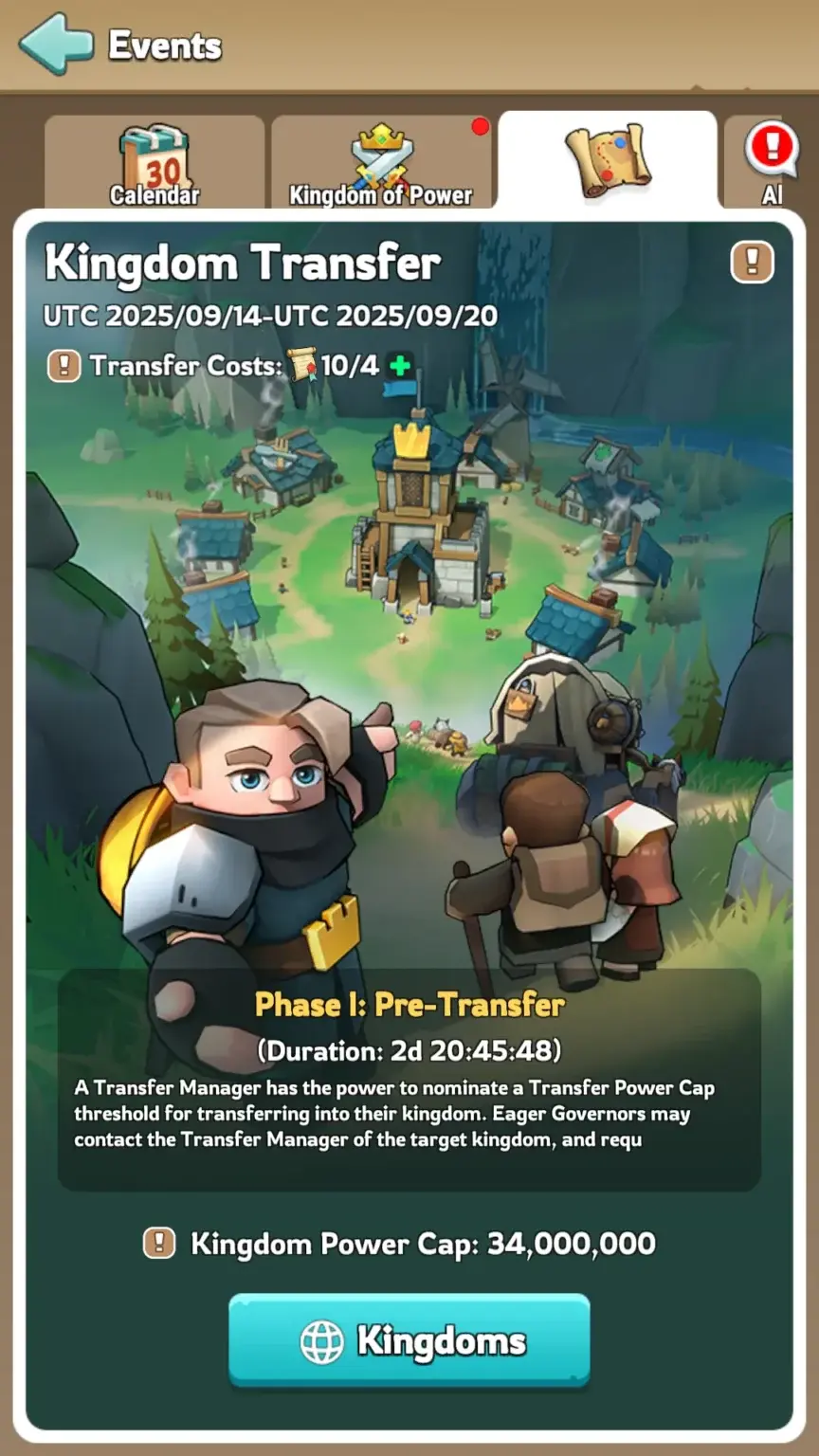
Kingdom Transfer is the official system for permanently moving a developed Kingshot character from one kingdom to another.
Players commonly transfer to:
- Join friends or former alliance members
- Find a more active kingdom
- Escape inactive or poorly organized leadership
- Enter a stronger Kingdom of Power environment
- Find a more casual community
- Move to a better event time zone
- Join an alliance using their preferred language
A successful transfer is permanent. You are not automatically returned to your original kingdom after the event ends.
You may return during a later transfer event only if:
- Your previous kingdom is still compatible.
- It belongs to your eligible Transfer Group.
- It has an available position.
- You meet its current Power Cap.
- You have enough Transfer Passes.
- Your 25-day transfer cooldown has ended.
How Kingshot Transfer Groups Work
Transfer Groups place kingdoms with compatible progression into the same transfer bracket.
Governors can normally transfer only between kingdoms included in the same group.
At minimum, official transfer eligibility requires matching hero generation and Truegold level. In practice, the brackets also tend to reflect the broader progression stage of the kingdoms, including:
- Hero generation
- Truegold progression
- War Academy availability
- Governor Gear progression
- Kingdom age
- Other major systems unlocked by the kingdom
These progression labels help explain why kingdoms are grouped together, but the official in-game Transfer Group is what decides where you can move.
The ranges can change during every event. A kingdom that belonged to one group in July may appear in a different group during the next transfer.
Why Transfer Groups Change
Kingdoms continue unlocking heroes, Truegold levels, pets, Gear systems, and other features. As older and newer kingdoms reach compatible stages, the game can reorganize the brackets.
This is why historical Transfer Group lists should not be used as permanent eligibility tables.
Kingshot Kingdom Transfer Requirements
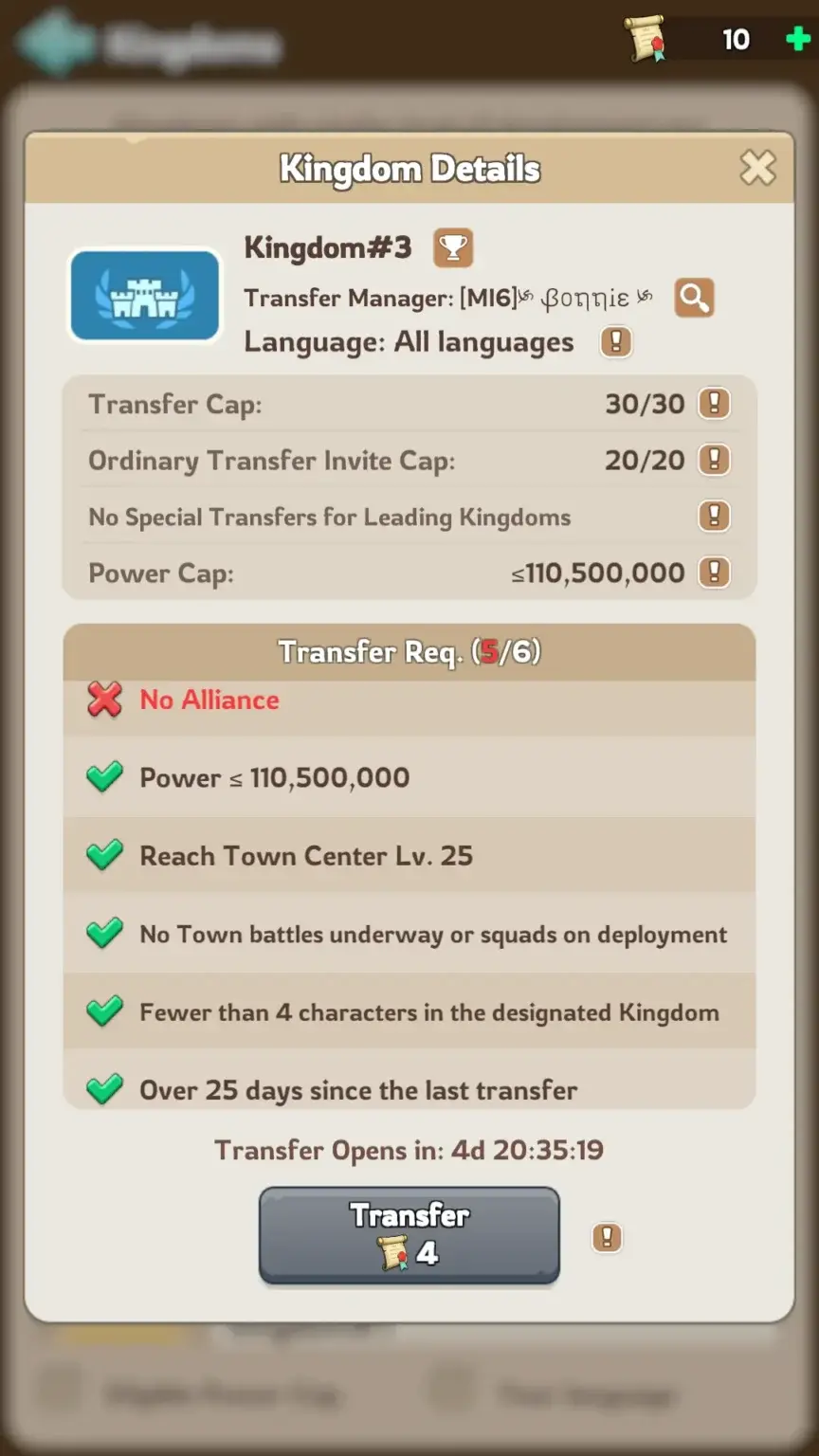
You must satisfy both personal requirements and destination-kingdom requirements.
Personal Requirements
- You must own the required number of Transfer Passes.
- You must leave your current alliance.
- Your city and troops cannot be involved in an active battle.
- Recall gathering, reinforcing, rallying, and occupying marches.
- You must wait 25 days after a previous successful transfer.
- The destination cannot already contain four of your characters.
- You must meet the destination’s Power Cap or hold a valid Special Invite.
- You must pass every requirement shown on the transfer confirmation screen.
Infirmary and Enlistment Office: having soldiers in the Infirmary or Enlistment Office does not by itself prevent Kingdom Transfer. You still need to clear active battles and recall deployed squads before confirming the move.
Can You Transfer While Holding a Kingdom Position?
Yes. Holding a normal kingdom position or having Offender status does not automatically prevent a transfer.
This corrects older transfer guides that said every title had to be removed before moving.
Official support confirms that holding a kingdom position or having Offender status does not itself block a transfer. If you are the King or Transfer Manager, coordinate the kingdom’s transfer-management responsibilities before leaving so incoming players are not left without leadership.
Destination Kingdom Requirements
- The target must appear in your current Transfer Group.
- It must have the same hero generation as your original kingdom.
- It must have the same Truegold level as your original kingdom.
- Your character must meet the permitted age difference.
- The target must have an unused invitation or open-transfer position.
- Your Transfer Power must meet its current limit unless a Special Invite applies.
Character Age Restriction
Your character cannot be too old for the target kingdom.
The permitted difference varies according to the target kingdom’s development. The current official range is between approximately 90 and 180 days.
Matching hero generation and Truegold level does not automatically guarantee eligibility. Check the target kingdom inside the transfer interface.
How Many Characters Can You Have in One Kingdom?
An account can have up to four characters in one kingdom.
If the destination already contains four of your characters, another character cannot transfer there.
What Is Transfer Power?
Transfer Power is the value used to determine whether your character meets the destination kingdom’s Power Cap.
It can also affect the number of Transfer Passes required for the move.
Transfer Power should not be confused with:
- Your normal profile Power
- Your alliance Power
- The target kingdom’s total Transfer Score
- The destination’s Power Cap
Transfer Power vs Power Cap
- Transfer Power: The transfer value assigned to your account.
- Power Cap: The standard maximum accepted by the target kingdom.
If your Transfer Power is below the Power Cap, you can transfer through an Ordinary Invite or an available open-transfer position.
If your Transfer Power exceeds the Power Cap, you normally need a Special Invite from an eligible Ordinary Kingdom.
Can You Lower Transfer Power?
Dismissing all troops or unequipping Gear does not reduce your Transfer Score. Kingshot confirms this directly in the current Kingdom Transfer FAQ.
Do not destroy useful progression in an attempt to force a lower pass requirement or Power Cap. Before making any account change:
- Open the active Kingdom Transfer interface.
- Record your current Transfer Power.
- Check the target kingdom’s Power Cap.
- Review the pass requirement.
- Confirm whether any reversible change affects the displayed value.
The live transfer screen should be treated as the final result.
Kingshot Transfer Pass Cost and Calculator
The game calculates how many Transfer Passes your account needs. The requirement ranges from one to 50 passes.
Higher-power and more developed accounts generally need more passes. However, there is no reliable public formula that converts ordinary account Power directly into a guaranteed pass requirement.
Check the exact number inside the active transfer interface before buying passes or committing to a destination. Then use our dedicated Kingshot Transfer Pass Calculator to compare your current passes, Alliance Coins, weekly shop purchases, and paid-pack planning.
Useful detail: Oasis Island progress does not currently affect the number of Transfer Passes required.
Alliance Token Calculator
After the game displays your required pass count, use this calculation to estimate the Alliance Tokens needed:
Transfer Passes required × 150,000 Alliance Tokens = estimated Alliance Token cost
Scroll sideways to view the full table.
| Passes Needed | Alliance Tokens Needed | Minimum Weekly Purchases |
|---|---|---|
| 1 | 150,000 | 1 week |
| 5 | 750,000 | 5 weeks |
| 10 | 1,500,000 | 10 weeks |
| 15 | 2,250,000 | 15 weeks |
| 20 | 3,000,000 | 20 weeks |
| 30 | 4,500,000 | 30 weeks |
| 40 | 6,000,000 | 40 weeks |
| 50 | 7,500,000 | 50 weeks |
The weekly estimates assume that one Transfer Pass remains available each week for 150,000 Alliance Tokens. Confirm the current shop price and purchase limit in-game.

How to Get Transfer Passes
Transfer Passes can come from:
- The Alliance Shop
- Transfer Event packs
- Other limited in-game offers
Free-to-play players should start collecting passes months before they plan to move. A player requiring 20 passes may need approximately 20 weekly purchases when relying only on the Alliance Shop.
Transfer Pass Packs
Paid Transfer Pass packs can appear during transfer periods. Pack prices, quantities, limits, and regional costs can change.
Check the current store before calculating a paid transfer budget. Do not rely permanently on an old pack-price table.
Kingdom Transfer Event Phases
The Kingshot Transfer Event lasts seven days and is divided into three phases.
| Phase | Duration | Main Activity |
|---|---|---|
| Pre-Transfer | 3 days | Review groups, Power Caps, destinations, and recruitment |
| Invitational Transfer | 2 days | Ordinary and Special Invites are used |
| Transfer Opens | 2 days | Eligible governors claim remaining open positions |
Phase 1: Pre-Transfer
The Pre-Transfer phase lasts three days.
During this phase:
- Transfer Managers review incoming-player plans.
- Kingdom Power Caps are selected.
- Governors can view eligible destinations.
- Transfer Groups and kingdom classifications become visible.
- Transfer chat opens for recruitment.
- Players contact target alliances and leadership.
- No transfers occur yet.
Use this phase to compare destinations and confirm whether you need an invitation.
If your kingdom has no current King: after losing the relevant Kingdom of Power cycle, Kingshot assigns the previous King to perform the transfer-management duties for that session.
Phase 2: Invitational Transfer
The Invitational Transfer phase lasts two days.
Transfer Managers can issue:
- Ordinary Invites for players who meet the Power Cap
- Special Invites for players above the Power Cap
An invite does not pay the player’s Transfer Pass cost. The invited governor still needs the full number of passes shown by the game.
Invite details: King’s Invites cannot be withdrawn after they are issued. Special Invites generate a mail notification for the invited player, while Ordinary Invites do not.
Phase 3: Transfer Opens
The final phase lasts two days.
Eligible players below the destination’s Power Cap can move without an Ordinary Invite while open positions remain.
These positions are first come, first served. Popular kingdoms can fill quickly after the phase begins.
Players above the Power Cap still need a valid Special Invite from an eligible Ordinary Kingdom.
Ordinary vs Leading Kingdoms
Kingdoms are classified as either Ordinary or Leading during the transfer event.
A kingdom’s classification is based on the combined Transfer Score of its top 100 active governors.
| Feature | Ordinary Kingdom | Leading Kingdom |
|---|---|---|
| Total standard transfer capacity | 55 governors | 30 governors |
| Ordinary Invite positions | 35 | 20 |
| Open-transfer positions | 20 | 10 |
| Special Invites | Available | Not available |
| Power Cap flexibility | Generally more flexible | Restricted to the lowest available tiers |
Ordinary Kingdoms
Ordinary Kingdoms include all eligible kingdoms not classified as Leading.
They can normally accept:
- 35 governors through Ordinary Invites
- 20 governors during Transfer Opens
- Selected governors above the Power Cap through Special Invites
This makes Ordinary Kingdoms more practical for large alliance or friend-group transfers.
Leading Kingdoms
Leading Kingdoms are among the strongest kingdoms in their transfer bracket.
They can normally accept:
- 20 governors through Ordinary Invites
- 10 governors during Transfer Opens
Leading Kingdoms cannot issue Special Invites and generally operate with stricter Power Caps.
How Special Invites Work
A Special Invite allows a governor above an Ordinary Kingdom’s normal Power Cap to transfer there.
Current Special Invite rules include:
- Only governors above the Power Cap use Special Invites.
- Each eligible kingdom initially has three Special Invites.
- One spent Special Invite is restored on the first day of each month at 00:00 UTC.
- A kingdom cannot hold more than three.
- Leading Kingdoms cannot issue Special Invites.
- The invited player still pays their own Transfer Pass cost.
Special Invites are limited and should be reserved for high-priority recruits who have already confirmed their destination alliance and role.
Ordinary Invite vs Special Invite
| Invite Type | Used For | Power Cap Rule |
|---|---|---|
| Ordinary Invite | Standard invited transfer | Player must meet the target Power Cap |
| Special Invite | Selected high-power recruit | Allows an eligible player above the standard Power Cap |
Kingdom Transfer Groups (Updated November 05, 2026)
Current event period: November 08 – 14, 2026
Status: Up-Coming
These are the transfer groups being tracked for the current event. This current table is kept separate from the prediction table below so players can clearly distinguish live/current grouping from future estimates.
| Group | Kingdom Range | Progression | Preview Power Caps |
|---|---|---|---|
| 1 | 1–417 | Advanced TG Research – Gen 8 | 550.0M / 320.0M |
| 2 | 418–587 | Advanced TG Research – Gen 7 | 450.0M / 270.0M |
| 3 | 588–927 | TG8 – Gen 7 | 400.0M / 250.0M |
| 4 | 928–1331 | TG8 – Gen 6 | 340.0M / 213.0M |
| 5 | 1332–1502 | TG8 – Gen 5 | 270.0M / 170.0M |
| 6 | 1503–1689 | TG5 + WA – Gen 5 | 230.0M / 145.0M |
| 7 | 1690–1935 | TG5 + WA – Gen 4 | 200.0M / 130.0M |
| 8 | 1936–2050 | TG5 + RG – Gen 4 | 170.0M / 110.5M |
| 9 | 2051–2105 | TG5 + RG – Gen 3 | 150.0M / 97.5M |
| 10 | 2106–2234 | TG5 – Gen 3 | 130.0M / 84.5M |
Future groups expand as newer States reach State Transfer eligibility.
Predicted Transfer Groups
The next transfer cycle is expected to occur in either December 2026 or January 2027. Below are our projected transfer groups for both potential timelines to help you plan ahead.
It is intentionally labeled separately from the current transfer groups and should not be treated as an official announcement.
December 2026
Predicted next event period: N/A
Status: N/A
| Group | Kingdom Range | Progression | Power Caps |
|---|---|---|---|
| 1 | |||
| 2 | |||
| 3 | |||
| 4 | |||
| 5 | |||
| 6 | |||
| 7 | |||
| 8 | |||
| 9 | |||
| 10 |
These groups are predictions, not confirmed official groups.
January 2027
Predicted next event period: N/A
Status: N/A
| Group | Kingdom Range | Progression | Power Caps |
|---|---|---|---|
| 1 | |||
| 2 | |||
| 3 | |||
| 4 | |||
| 5 | |||
| 6 | |||
| 7 | |||
| 8 | |||
| 9 | |||
| 10 |
These groups are predictions, not confirmed official groups.
How to Transfer Kingdoms in Kingshot
- Wait for the official Kingdom Transfer Event.
- Open the event and identify your Transfer Group.
- Check your Transfer Power.
- Check the exact number of Transfer Passes required.
- Compare eligible target kingdoms and check remaining transfer capacity in the Kingdom List.
- Contact the target King, Transfer Manager, or alliance leadership.
- Confirm whether you need an Ordinary Invite, Special Invite, or open position.
- Confirm that the destination alliance has room for you.
- Leave your current alliance.
- Recall all troops and end active battles.
- Reduce exposed resources below Storehouse protection.
- Claim important event and ranking rewards.
- Open the Kingdom Transfer menu.
- Select the target kingdom.
- Review the transfer warnings.
- Confirm the move.
How to Choose the Best Target Kingdom
Do not choose a kingdom only because it has high Power or one famous alliance.
Check Leadership
- Are kingdom rules clearly explained?
- Are disputes handled consistently?
- Are alliances treated fairly?
- Is leadership active outside major events?
- Are high-power players controlled by the same rules?
Check Alliance Activity
- Bear Hunt schedule
- Castle Battle attendance
- Kingdom of Power participation
- Alliance Brawl activity
- Swordland participation
- Rally organization
- Alliance gift activity
Check Time Zone and Language
A powerful alliance may not suit you when its main events begin while you are asleep.
Confirm:
- Primary alliance language
- Bear Hunt times
- Castle Battle schedule
- Officer availability
- Main rally windows
- Kingdom of Power coordination times
Confirm Your Position Before Moving
Ask the destination alliance:
- Which alliance will accept you?
- Is your place guaranteed?
- Are farms accepted?
- Are there minimum event scores?
- Can your friends transfer with you?
- Which rally or garrison role will you have?
- Are there kingdom-wide contribution requirements?
Can an Entire Alliance Transfer Together?
Yes, but the alliance itself does not move as one object.
Every member must transfer individually and satisfy:
- The target kingdom’s compatibility rules
- The Power Cap or Special Invite requirement
- The Transfer Pass requirement
- The 25-day cooldown
- The character limit
- The available invitation or open-transfer capacity
A full group should coordinate with the target kingdom before the event. Ordinary Kingdoms are generally more suitable for large groups because they have more standard positions.
What Happens After a Kingdom Transfer?
Several account and event systems can change after moving.
| Feature | What Happens |
|---|---|
| City placement | Your city is placed randomly in the destination kingdom and normally receives temporary protection. |
| Alliance membership | You arrive without your previous alliance and must join a destination alliance. |
| Chats | Friends and private chats are preserved, but all Chat Groups are removed. |
| Resources | Resources above your Storehouse Protection limit are lost. |
| Secured resources | Secured resources and unopened inventory items are generally protected. |
| Arena | Arena ranking and points may reset for the destination kingdom. |
| Ongoing events | Event handling varies. Kingshot confirms that unsettled leaderboard ranking rewards are not awarded after a transfer; only eligible progress-based rewards can be settled. |
| Unclaimed rewards | Claim available rewards before moving. Unsettled leaderboard ranking rewards cannot be finalized after transfer. |
| Previous kingdom | Other players will see only your current kingdom after the transfer; your previous kingdom is not displayed. |
| Core progression | Heroes, buildings, troops, research, Gear, pets, and permanent account development remain. |
Protect Resources Before Moving
Resources above the Storehouse Protection limit are discarded during transfer.
Before moving:
- Spend exposed resources on useful upgrades.
- Keep unopened resource items inside your inventory.
- Check your Storehouse Protection limit.
- Avoid opening more resource items than necessary.
- Confirm the protected amount on the transfer warning screen.
Complete Important Events First
Before confirming a transfer:
- Claim available milestone rewards.
- Wait for important leaderboard settlement.
- Use expiring event currencies.
- Claim alliance gifts.
- Complete important Arena activities.
- Read every event-specific warning in the transfer interface.
Kingdom Transfer Preparation Checklist
Several Weeks Before
- Purchase Transfer Passes whenever available.
- Save Alliance Tokens.
- Research several possible target kingdoms.
- Review your 25-day cooldown.
- Contact destination alliances.
- Compare time zones and event schedules.
- Ask whether space is available for friends or farms.
During Pre-Transfer
- Confirm your official Transfer Group.
- Check the target kingdom’s progression.
- Check your Transfer Power.
- Check the exact required passes.
- Review target Power Caps.
- Confirm whether the target is Ordinary or Leading.
- Request an invitation when needed.
Before Confirming the Move
- Leave your alliance.
- Recall every troop march.
- End active rallies and battles.
- Protect or spend exposed resources.
- Claim event rewards.
- Take screenshots of important account information.
- Confirm that the destination alliance is ready.
- Review the target kingdom one final time.
Common Kingdom Transfer Mistakes
Using an Old Transfer Group List
Transfer Groups change as kingdoms progress. Always use the list from the current event.
Waiting Too Long to Collect Passes
Accounts needing many passes may require several months of weekly Alliance Shop purchases.
Assuming You Can Enter Any Kingdom
The target must meet group, hero generation, Truegold, age, Power Cap, and capacity requirements.
Destroying Progress to Lower Transfer Cost
Do not dismiss troops or dismantle Gear without confirming that the live transfer value changes.
Moving Without a Confirmed Alliance
Arriving without alliance space can leave you without rally support, event rewards, territory bonuses, or protection.
Ignoring the Open-Transfer Competition
Popular kingdoms may fill quickly. Secure an invite when possible rather than relying entirely on the open phase.
Leaving Exposed Resources
Resources above Storehouse protection are lost during transfer.
Transferring Before Event Settlement
Unsettled ranking rewards may not be protected. Finish important events before moving.
Players entering a mature kingdom may need developed heroes, pets, Gear, troops, and transfer-ready progression immediately. Those comparing established options can review a kingshot account for sale before rebuilding every account system from the beginning.
FAQ
When is the next Kingshot Transfer Event?
Community trackers currently list September 13-19, 2026 as the next expected window. Wait for an official in-game announcement before treating the date as confirmed.
Where can I find the latest Kingshot Transfer Groups?
The official group list appears inside the Kingdom Transfer Event. Historical group tables can help with planning, but ranges may change every cycle.
Is there a Kingshot Transfer Pass calculator?
Yes. Use the Kingshot Transfer Pass Calculator after the game shows your required pass count. The calculator can plan Alliance Coins, weekly shop purchases, and paid packs, while the official transfer interface remains the final source for the number of passes your account needs.
How many Transfer Passes do I need?
The requirement ranges from one to 50 passes. Higher-power and more developed accounts generally require more.
How long is the transfer cooldown?
You must wait 25 days after a successful transfer before transferring again.
Can I lower my Transfer Power by dismissing troops?
Do not assume that dismissing troops will reduce the recorded Transfer Power or pass requirement. Check the live transfer screen before changing your account.
Can I transfer with soldiers in the Infirmary or Enlistment Office?
Yes. Soldiers in the Infirmary or Enlistment Office do not by themselves prevent a transfer. You still need to clear active battles and recall deployed squads.
Will dismissing troops or unequipping Gear lower my Transfer Score?
No. Kingshot’s current official FAQ states that dismissing all troops and unequipping Gear does not affect the Transfer Score.
Can my entire alliance transfer together?
Yes, but every member must qualify and transfer individually. The destination must also have enough invitation or open-transfer positions.
What do I lose when transferring kingdoms?
Resources above Storehouse protection are lost. Some rankings, event progress, alliance membership, and group-chat access may also reset or end.
Conclusion
Kingshot Transfer Groups decide which kingdoms can move together during each Kingdom Transfer Event. Because the brackets change as kingdoms progress, always use the group list shown in the active event.
The July 19-25, 2026 event is now complete. Heaven Guardian currently tracks September 13-19, 2026 as the next projected window based on current community bracket data, but the schedule should remain labeled as a prediction until Kingshot confirms it in-game.
Prepare early by purchasing Transfer Passes, saving Alliance Tokens, researching target kingdoms, and confirming your transfer cooldown. Once the event begins, check your exact Transfer Power, pass requirement, group, Power Cap, and destination capacity.
Ordinary Kingdoms can accept 55 standard transfers and use Special Invites. Leading Kingdoms can accept 30 standard transfers and cannot issue Special Invites.
Before moving, leave your alliance, recall all troops, protect exposed resources, claim important rewards, and confirm that your destination alliance has reserved a place for you.
Finally, do not select a kingdom based only on Power. Leadership, alliance stability, event schedules, language, time zone, and community rules will have a greater effect on your long-term experience.
