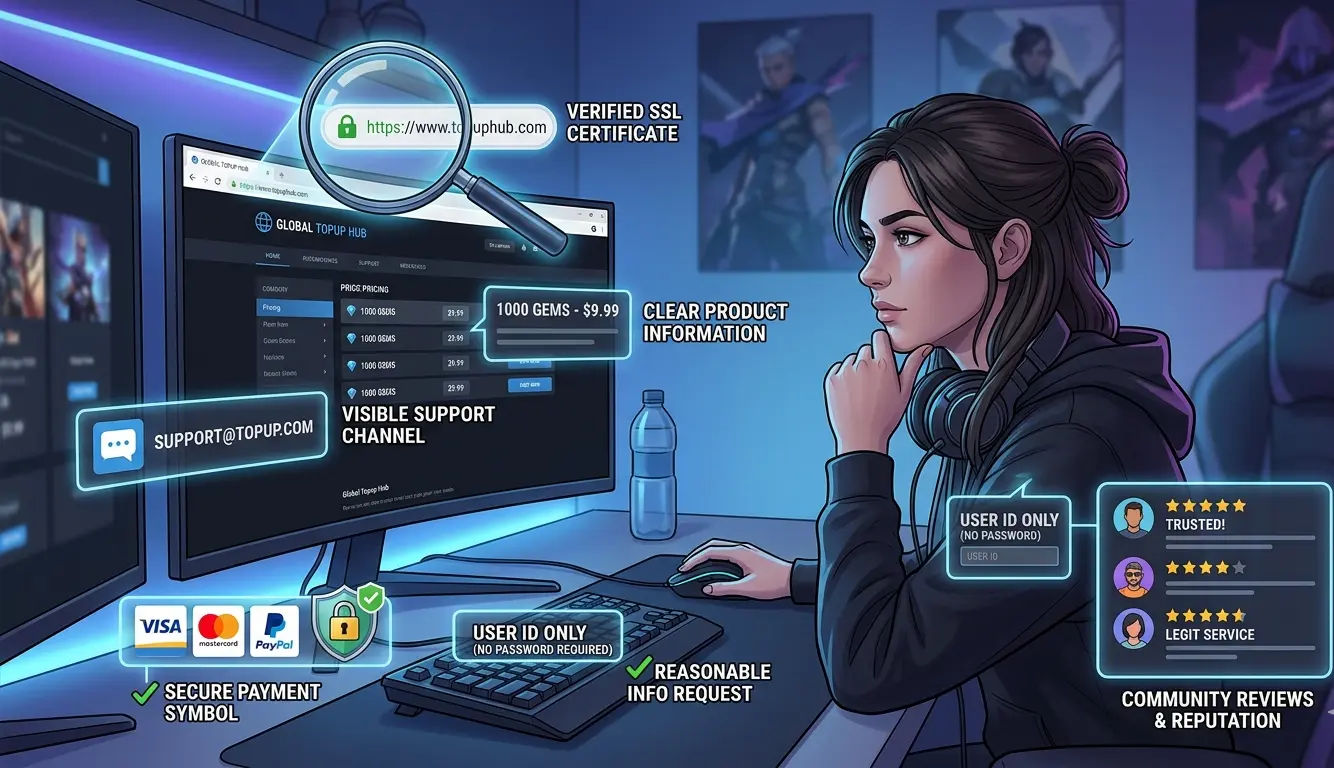
 Knowing how to verify a game top-up website is legit is important before paying for currency, bundles, passes, or other in-game purchases through a third-party service.
A professional-looking website is not enough. Scam and low-trust sites can imitate legitimate businesses, use convincing product pages, and even provide HTTPS connections. What matters is whether the seller can be independently verified and whether its payment, support, account-access, and policy information makes sense as a whole.
Before buying, take a few minutes to check the exact website address, investigate the seller’s reputation, understand how payment works, review what account information is requested, and confirm that there is a realistic way to get help if something goes wrong.
Why You Should Verify a Game Top-Up Website Before Buying
Players often compare top-up sellers by price and speed. Those factors matter, but they should come after trust and transparency.
A questionable seller can create several types of risk. You might pay and receive nothing, encounter unexpected fees, be redirected to an unrelated payment account, disclose account information to the wrong person, or discover too late that the site’s refund and support procedures are unclear.
There is also no single badge, payment logo, review score, or browser icon that proves a top-up business is legitimate. Verification works best when several independent signals agree with each other.
1. Check the Exact Website Address
Start with the URL before looking at discounts or packages.
Fraudulent websites may imitate a familiar company using a slightly altered domain. The differences can be easy to miss, especially when you arrive through an advertisement, private message, search result, or shortened link.
Look carefully for:
- misspelled versions of a known brand name;
- extra words or characters that do not appear on the real business website;
- unexpected subdomains;
- links that redirect you to a different domain before payment or login;
- a brand name displayed on the page that does not match the actual domain.
Do not assume a sponsored search result or social media advertisement is authentic simply because it appears above other results. If you already know the company’s correct address, typing it directly or using a trusted bookmark can reduce the chance of following an imitation link.
Pay attention to browser warnings
If your browser displays a prominent security or deceptive-site warning, do not enter payment information or login details and do not try to bypass the warning merely to reach the deal.
However, the absence of a warning does not automatically prove that a business is trustworthy. Browser security tools can help identify known technical threats, but you should still investigate the seller itself.
2. Remember That HTTPS Is Not Proof of Legitimacy
HTTPS is useful because it helps protect information while it travels between your browser and the website. You should be cautious about entering sensitive information on a page your browser identifies as insecure.
But HTTPS answers a different question from business legitimacy.
A site can have an encrypted connection while still making misleading offers, providing poor support, misrepresenting products, or attempting fraud. Therefore, the padlock or secure-connection indicator should be treated as a basic technical requirement rather than a trust certificate.
Continue with the checks below even when the connection appears secure.
3. Check Whether the Seller Is Transparent
Good design is easy to imitate. Detailed and consistent business information is more useful.
A legitimate game top-up website should make it reasonably easy to understand what it sells, what information it requires, how the transaction is handled, and what customers can do when they need assistance.
Clear product information
Read the actual product or service description before paying. Depending on the game and top-up method, important information may include:
- the correct game;
- the currency, bundle, pass, or package being purchased;
- the amount or package contents;
- any relevant region, server, state, kingdom, or platform restrictions;
- what information the seller requires from the player;
- how the top-up will be completed.
Be cautious when the product description is so vague that you cannot tell what will actually be delivered.
Reachable support
Look for a clearly identified support channel that matches the way the business operates. That might be a contact page, support system, help center, ticket system, email address, or another published channel.
The important question is not whether the seller uses one particular support technology. It is whether customers can identify the official support route and distinguish it from impersonators.
Terms, privacy, and refund information
Before paying, check whether the website publishes understandable information about its terms, privacy practices, refunds, failed orders, or other issues relevant to the transaction.
You do not need to read every line of legal text for a small purchase, but you should know what the seller says will happen if the transaction cannot be completed.
4. Examine Payment Methods and Their Protections
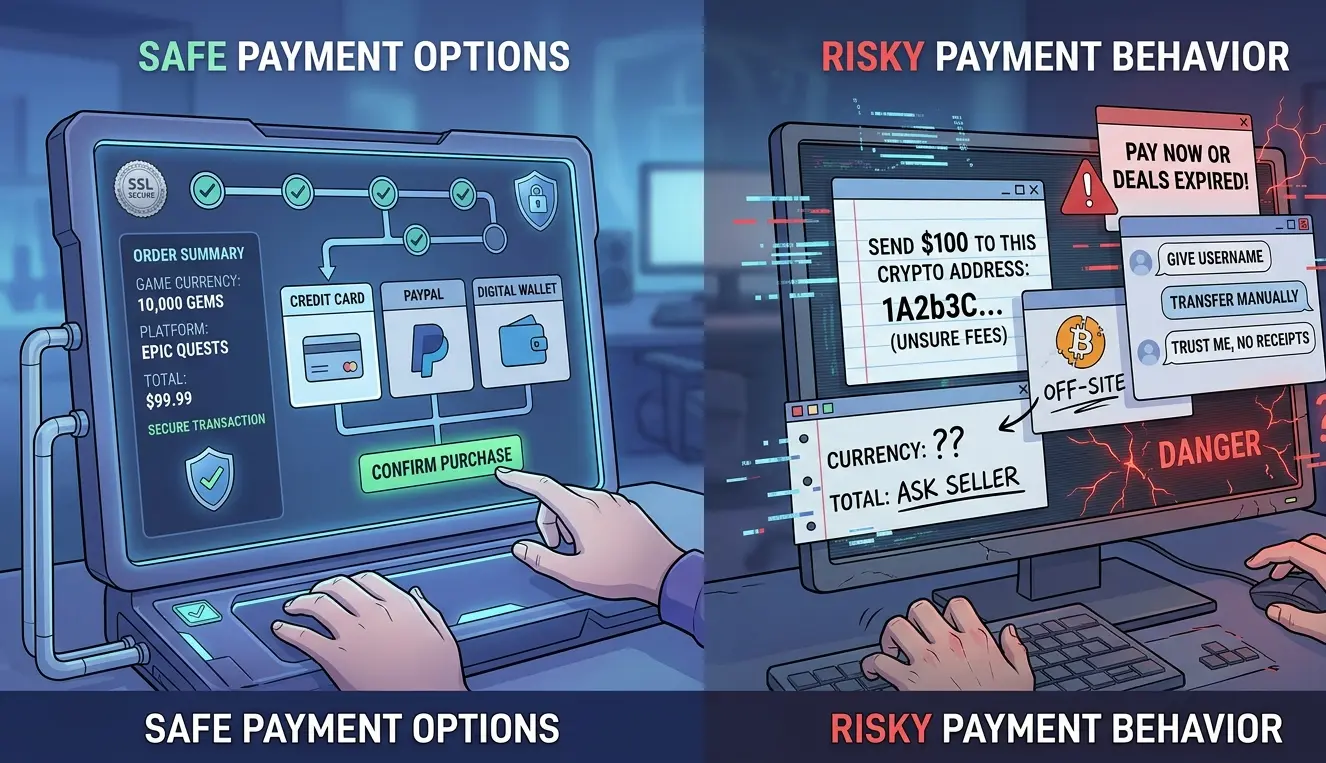 Payment method is one of the most useful things to investigate, but it needs to be interpreted correctly.
A particular payment method does not automatically prove that a seller is legitimate or fraudulent. Instead, find out what protections the method provides, how difficult a payment is to reverse, and whether the payment instructions match the seller’s published process.
Questions to ask before paying
- Does the seller clearly state which payment methods it accepts?
- Do the payment recipient and instructions match the verified business or its published process?
- Are the final price and any fees clear before you send money?
- Does the payment provider offer a dispute process for this particular transaction type?
- Are you being pressured to change payment methods unexpectedly?
- Does someone contact you privately and provide instructions that conflict with the official website?
Credit-card transactions may provide useful dispute rights depending on your issuer and jurisdiction. By comparison, cryptocurrency, wire transfers, gift cards, peer-to-peer transfers, and similar payment types can offer different or more limited recovery options. That does not make every seller using one of these methods a scam, but it makes careful verification more important.
For example, PayPal distinguishes eligible commercial purchases from Friends & Family transfers. Friends & Family payments should not be treated as if they provide standard PayPal Buyer Protection.
When evaluating any independent game top up service, check the provider’s current payment information rather than relying on old articles, screenshots, or assumptions. Understanding the payment method before sending money is also why secure payment matters when buying game currency online.
5. Check What Account Information the Top-Up Requires
Account requirements vary between games and top-up methods. One service may need only a player identifier, while another method may require temporary access to the game account to complete the requested purchase.
Therefore, a request for temporary game access is not automatically proof of fraud. The better question is whether the request is necessary, clearly disclosed, limited to the transaction, and submitted through the verified private channel.
Before providing temporary account access, check:
- whether the service explains why access is required;
- whether you are using the provider’s verified private ordering or support channel;
- whether the request matches the process published on the real website;
- whether the site’s privacy or service information explains how account information is handled;
- whether the game’s own rules place restrictions on third-party access or account sharing.
Do not post login information in public comments, public Discord channels, review pages, social media posts, or other places where unrelated people can see it.
Also distinguish a temporary game-account login from unrelated sensitive credentials. A top-up seller should not need your banking password, cryptocurrency wallet seed phrase, private key, email-account password, or other unrelated security credentials simply to purchase an in-game item.
6. Research the Seller Outside Its Own Website
Never rely entirely on testimonials or claims published by the seller itself.
Search both the company name and its exact website address. Useful searches include combinations such as:
- brand name + review;
- brand name + complaint;
- brand name + scam;
- website URL + review;
- website URL + scam;
- brand name + refund;
- brand name + delivery.
Check more than one source. Reviews on independent platforms, search results, gaming communities, social networks, and other public discussions can help reveal patterns that a single review page might miss.
Look for patterns, not one dramatic review
A negative review does not automatically prove fraud, just as a perfect five-star rating does not automatically prove legitimacy.
Instead, look for repeated themes. Multiple unrelated customers reporting the same type of non-delivery, unexpected payment request, impersonation attempt, or support problem deserves more attention than an isolated complaint.
Also be skeptical of suspiciously repetitive reviews, vague praise, sudden clusters of ratings, or testimonials that seem disconnected from the product being sold.
7. Be Careful With Unrealistic Discounts and Urgency
Low prices are one reason players use third-party top-up services, so a discount by itself is not evidence of fraud.
The concern is an offer that becomes difficult to explain when combined with other warning signs.
Be especially careful if a seller:
- offers a price dramatically below comparable sellers without explaining why;
- uses constantly resetting countdown timers;
- claims an offer will disappear immediately unless you pay;
- pressures you to skip normal verification;
- contacts you unexpectedly after you visit another website;
- asks you to switch to an unlisted payment account to preserve a special price.
A genuine promotion can still give customers enough time and information to understand what they are purchasing. Pressure that prevents verification is a different matter.
These techniques overlap with several common top-up scams and how to avoid them, so the discount should always be considered alongside the seller’s other trust signals.
8. Make Sure the Actual Ordering Process Matches What Was Advertised
Not every game top-up service uses a traditional ecommerce checkout. Some use a website checkout, while others may complete transactions through a clearly published ticket or support workflow.
The important test is consistency.
If the website says one process will be used but you are suddenly asked to follow a completely different procedure, stop and verify the instruction before proceeding.
Check that:
- the game and package are correct;
- the final amount matches what you agreed to pay;
- required account information was disclosed before payment where practical;
- the communication channel is the one identified by the real website;
- the payment recipient has not unexpectedly changed;
- you receive enough information to identify or document your order.
Keep relevant receipts, transaction references, order messages, and screenshots until the top-up has been completed and verified on the correct game account.
9. Verify Delivery and Refund Claims
Fast delivery can be convenient, but phrases such as “instant,” “within minutes,” or “guaranteed” should not replace actual verification.
If delivery speed matters to you, check whether the seller clearly describes its normal processing expectations and whether those statements are presented as realistic estimates rather than impossible promises.
Also check what the service says happens when an order is delayed or cannot be completed. A written refund or support policy is more useful than a vague promise that customers will “always be protected.”
Remember that a seller’s own refund policy and protection offered by a payment provider are separate things. Do not assume one automatically gives you the other.
10. Use a Pre-Buy Verification Checklist
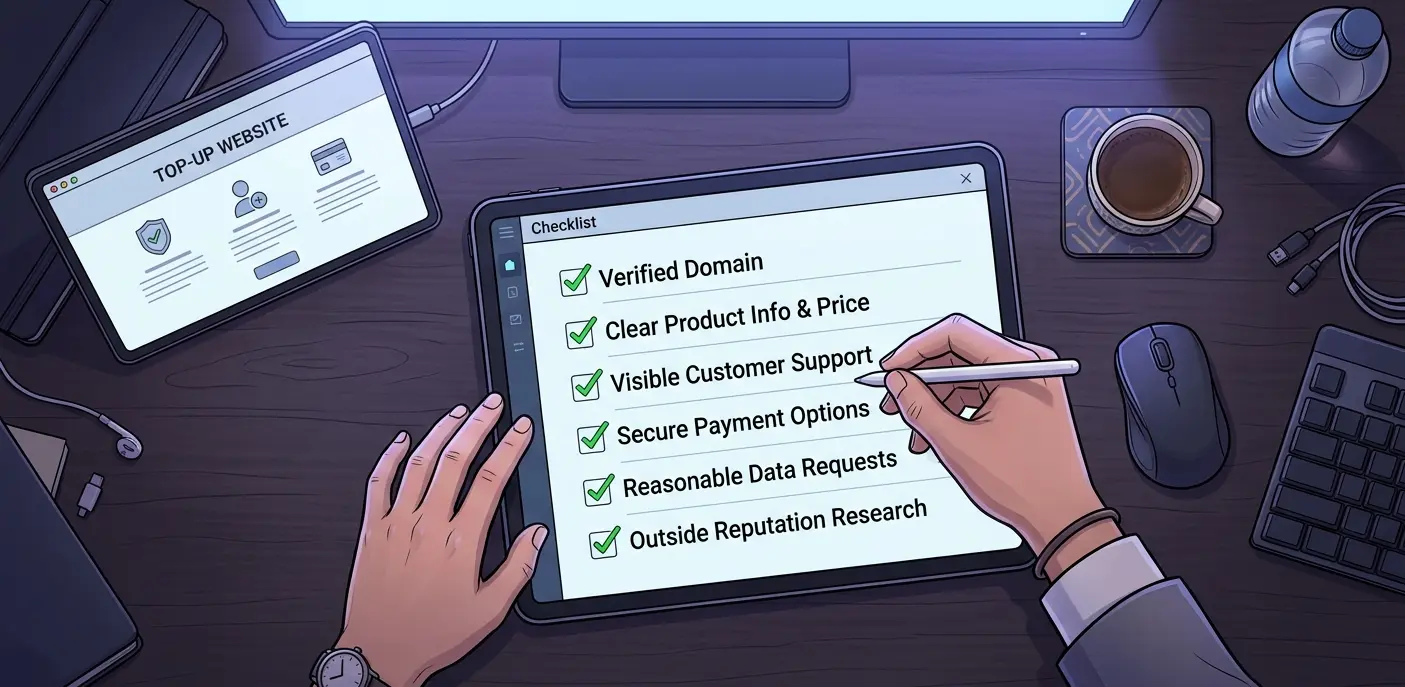 You do not need to perform an advanced cybersecurity investigation for every small top-up. A consistent checklist is usually more practical.
| Check | What You Want to See | Reason for Concern |
|---|---|---|
| URL | Correct, consistent domain | Misspelling, unexpected redirects, copied branding |
| Products | Clear game, package, amount, and requirements | Vague or contradictory listing |
| Payment | Published method, clear price and terms | Unexpected recipient or last-minute payment change |
| Account access | Requirement explained and handled privately | Unexplained request or public credential sharing |
| Support | Clearly identified official support channel | No identifiable way to resolve an order problem |
| Policies | Understandable terms and refund information | Missing or contradictory policies |
| Reputation | Independent information from several sources | Repeated complaints about the same serious issue |
If several important checks fail, do not talk yourself into the purchase simply because the price is attractive. There will usually be another opportunity to top up after you have found a service you can verify more confidently.
FAQ
How can I tell if a game top-up website is legit?
Check the exact URL, product descriptions, support channels, policies, payment terms, account-access requirements, and independent reputation. A trustworthy decision should come from several consistent signals rather than one logo, review, or security icon.
Is HTTPS enough to prove a game top-up website is safe?
No. HTTPS helps secure the connection between your browser and the website, but it does not prove that the company behind the website is legitimate. Continue checking the seller’s identity, reputation, payment process, policies, and support.
Is a game top-up website suspicious if it accepts cryptocurrency?
Cryptocurrency alone does not prove that a seller is fraudulent. However, cryptocurrency payments can have different recovery and dispute options from card or protected commercial-payment transactions, so you should verify the seller carefully and understand the payment terms before sending funds.
Does PayPal Friends & Family provide Buyer Protection?
PayPal Friends & Family payments should not be treated as protected commercial purchases. If a seller accepts this payment type, understand that limitation before paying and evaluate the service’s other trust signals accordingly.
Is temporary game-account login automatically a scam?
No. Some top-up methods can require temporary game-account access. What matters is whether the requirement is clearly disclosed, actually necessary for the stated service, and handled through the provider’s verified private channel.
Never publish login details publicly, and do not provide unrelated sensitive information such as banking passwords, cryptocurrency seed phrases, or private keys.
Can online reviews prove that a top-up site is legitimate?
No single review platform can prove legitimacy. Search several independent sources and focus on recurring patterns rather than relying only on star ratings or testimonials published by the seller itself.
What should I do if I cannot verify a top-up website?
Do not rush the purchase. Double-check the domain, search for independent information, review the payment and refund terms, and compare the seller with other services. If important questions remain unanswered, choosing another provider is usually the more cautious option.
Conclusion
Learning how to verify a game top-up website is legit is mainly about checking whether multiple trust signals agree. The correct URL, transparent product details, understandable payment terms, appropriate account requirements, visible policies, and independent reputation all matter.
Do not rely on HTTPS, a low price, a familiar payment logo, or a collection of positive reviews by itself. Consider the complete transaction and pay particular attention when instructions suddenly change or when the seller asks for information that was not disclosed beforehand.
If the website remains difficult to verify after these checks, there is no reason to force the purchase. A few minutes of research before paying can prevent much larger problems afterward.
For more practical advice on buying game currency and evaluating recharge services, explore our game top-up guides.