Migration in Rise of Kingdoms allows an existing character to move from one kingdom to another by spending Passport Pages. Your commanders, buildings, technology, VIP progress, equipment, troops, and most inventory items remain attached to the character after the transfer.
However, migration is not determined by Passport Pages alone. The destination kingdom’s season, immigration status, available places, power cap, character-age restrictions, and approval settings can all affect whether your account is eligible to move.
This ROK migration guide explains the current requirements, Passport costs, 2026 season rules, migration to younger kingdoms, and the checks you should complete before confirming a transfer.
Always treat the in-game Kingdom Info and immigration requirement screens as the final authority. Migration limits, available places, power caps, character-age rules, and opening times can change through game updates or kingdom progression.
Do not buy Passport bundles, leave your alliance, or reduce your power until the destination kingdom has confirmed that your account can enter.
What Is ROK Migration?
ROK migration, also called immigration or kingdom transfer, moves your existing city to another kingdom. It differs from creating a new character because your account progression travels with you.
Players commonly migrate to:
- Join friends or an organized migration group.
- Move to a more active kingdom.
- Find stronger alliance leadership.
- Enter a kingdom with a better KvK schedule.
- Move to a lower or higher competition seed.
- Escape an inactive or poorly managed kingdom.
- Find a kingdom that better matches their power and activity.
- Repeat an earlier KvK season when the current rules permit it.
A successful migration changes your home kingdom, but it does not automatically improve your account. Your new kingdom still needs suitable leadership, alliances, time-zone coverage, KvK expectations, and a role for your troop type and power level.
ROK Migration Requirements in 2026
Before the Immigrate button becomes available, the game checks a series of personal and destination requirements. Every required condition must be completed before the transfer can proceed.
Personal Migration Requirements
- Your City Hall must be level 16 or higher.
- You must have enough Passport Pages for your displayed power.
- You must leave your current alliance.
- All marches must return to the city.
- All scouts must return to the city.
- Your city and troops must not be fighting.
- You cannot be participating in an active rally.
- Your open resources must not exceed your Storehouse protection capacity.
- Your previous migration cooldown must be complete.
- Any required account-security verification must be completed.
A successful standard migration normally begins a 30-day cooldown. During that period, the character cannot complete another normal migration.
Destination Kingdom Requirements
- The kingdom must currently accept your migration type.
- Your character and the destination must satisfy the applicable season rules.
- Your character age must fall within any route-specific limit.
- Your power must be below the normal immigration cap, unless an approved exception applies.
- The destination must still have available immigration places.
- The kingdom must not display a closed or unsupported migration status.
- Any registration, application, or leadership approval must be completed.
Having enough Passport Pages does not override these conditions. A king may control the normal power cap and approve certain applications, but kingdom leadership cannot bypass every season, age, cooldown, or system restriction.
ROK Migration Rules by Immigration Type
Migration rules depend on the relationship between your character, your current kingdom, and the destination kingdom. The game may classify the move as same-season, cross-season, same-region, or a special post-season transfer.
| Migration Type | General Meaning | Main Restrictions |
| Same-season immigration | The character and destination are in compatible stages of the same season. | Character-age difference, destination status, available places, and opening window. |
| Cross-season immigration | An older character moves to a destination in an earlier season. | Stricter character-age limits, limited places, power requirements, and possible application or deposit. |
| Same-region immigration | A character moves between compatible kingdoms within the same region. | Current region rules, destination status, power cap, and migration timing. |
| Post-season team immigration | An approved move to another kingdom that participated in the same Lost Kingdom. | Application, approval, post-season window, and destination eligibility. |
| Special immigration | An approved entry that may allow a character above the normal power cap. | Limited kingdom chances, leadership approval, and all remaining system requirements. |
Same-Season Immigration
Same-season immigration applies when your character and destination are in compatible stages of the same season. It is not enough for both kingdoms to display the same season name. The destination must also be inside an active immigration window and meet any character-age requirement.
For example, a kingdom that is already inside its active Lost Kingdom map may not accept a standard same-season transfer even when both kingdoms are listed as Season 2.
Cross-Season Immigration
Cross-season immigration allows an older character to move to a kingdom in an earlier season. This is the migration route commonly used by players trying to return to KvK2 or KvK3.
Cross-season moves are more restrictive because a developed account can significantly affect a younger kingdom. The game may check:
- The age difference between the character and destination kingdom.
- The character’s displayed power.
- The destination’s cross-season quota.
- The king’s configured power limit.
- Registration and eligibility timing.
- A temporary Gem deposit when required by the current system.
2026 Character-Age Limits
The March 2026 adjustments shortened several migration windows. Current migration interfaces may apply limits similar to the following:
| Destination | Reported 2026 Character-Age Limit | What to Check |
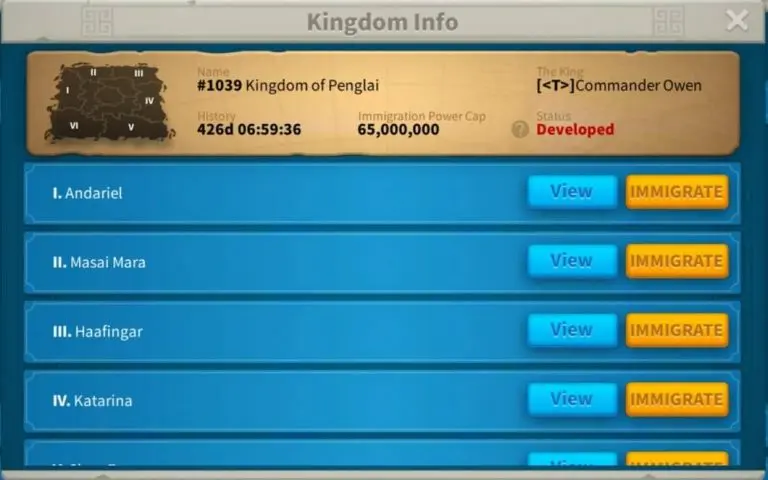
| Season 2 or KvK2 | Character may be no more than approximately 80 days older than the destination. | Check the exact age calculation and available cross-season places. |
| Season 3 or KvK3 | Character may be no more than approximately 120 days older than the destination. | Confirm the destination’s current season and registration window. |
| First Season of Conquest story | Character may be no more than approximately 150 days older than the destination. | Review the destination’s first-story status and remaining capacity. |
| Later Season of Conquest kingdoms | Rules depend more heavily on current immigration status, capacity, and power cap. | Use Kingdom Info rather than relying on one universal age rule. |
These limits may be adjusted through future updates. Therefore, do not calculate eligibility from an old spreadsheet alone. Search the destination kingdom in Kingdom Overview and allow the game to check your specific character.
Post-Season Immigration Within the Same Lost Kingdom
Season of Conquest kingdoms may receive a special post-season migration period. During this window, a governor can apply to another kingdom that participated in the same Lost Kingdom.
After approval, the migration may require fewer Passport Pages than a standard transfer. The exact application time, cost, and eligibility appear on the Season page before the immigration period begins.
This system does not mean players can freely migrate during active KvK. The designated post-season window and approval process still apply.
Can You Migrate to a Younger Kingdom?
You can migrate to a younger kingdom only when your character satisfies the destination’s cross-season rules. This is no longer determined by one simple rule such as waiting until a kingdom is 120 days old.
Before attempting to migrate backward, check:
- Your character creation date.
- The destination kingdom’s opening date.
- The maximum permitted age difference.
- The destination’s current season.
- The cross-season power limit.
- The number of remaining cross-season places.
- Whether the king requires registration or approval.
- Whether your character meets the minimum or maximum power requirements.
An old Season of Conquest account may be too old to return to KvK2 or KvK3 even when its power is below the destination’s cap. Reducing power does not change the character’s age.
How Many Passports Do You Need to Migrate in ROK?
The number of Passport Pages required for standard migration is based primarily on your displayed power when the transfer is confirmed. Higher-power accounts require more Passport Pages.
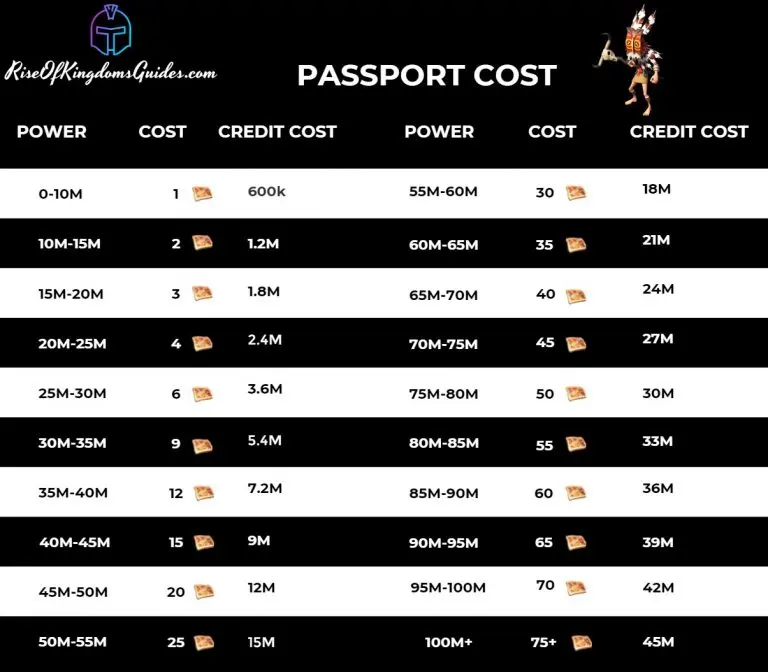
The table below reflects the commonly used Passport Page brackets. Always confirm the final amount shown in the migration interface before purchasing Pages or reducing power.
| Displayed Power | Passport Pages Required | Individual Credit Cost |
| 0 to 10 million | 1 | 600,000 |
| 10 to 15 million | 2 | 1,200,000 |
| 15 to 20 million | 3 | 1,800,000 |
| 20 to 25 million | 4 | 2,400,000 |
| 25 to 30 million | 6 | 3,600,000 |
| 30 to 35 million | 9 | 5,400,000 |
| 35 to 40 million | 12 | 7,200,000 |
| 40 to 45 million | 15 | 9,000,000 |
| 45 to 50 million | 20 | 12,000,000 |
| 50 to 55 million | 25 | 15,000,000 |
| 55 to 60 million | 30 | 18,000,000 |
| 60 to 65 million | 35 | 21,000,000 |
| 65 to 70 million | 40 | 24,000,000 |
| 70 to 75 million | 45 | 27,000,000 |
| 75 to 80 million | 50 | 30,000,000 |
| 80 to 85 million | 55 | 33,000,000 |
| 85 to 90 million | 60 | 36,000,000 |
| 90 to 95 million | 65 | 39,000,000 |
| 95 to 100 million | 70 | 42,000,000 |
| More than 100 million | 75 | 45,000,000 |
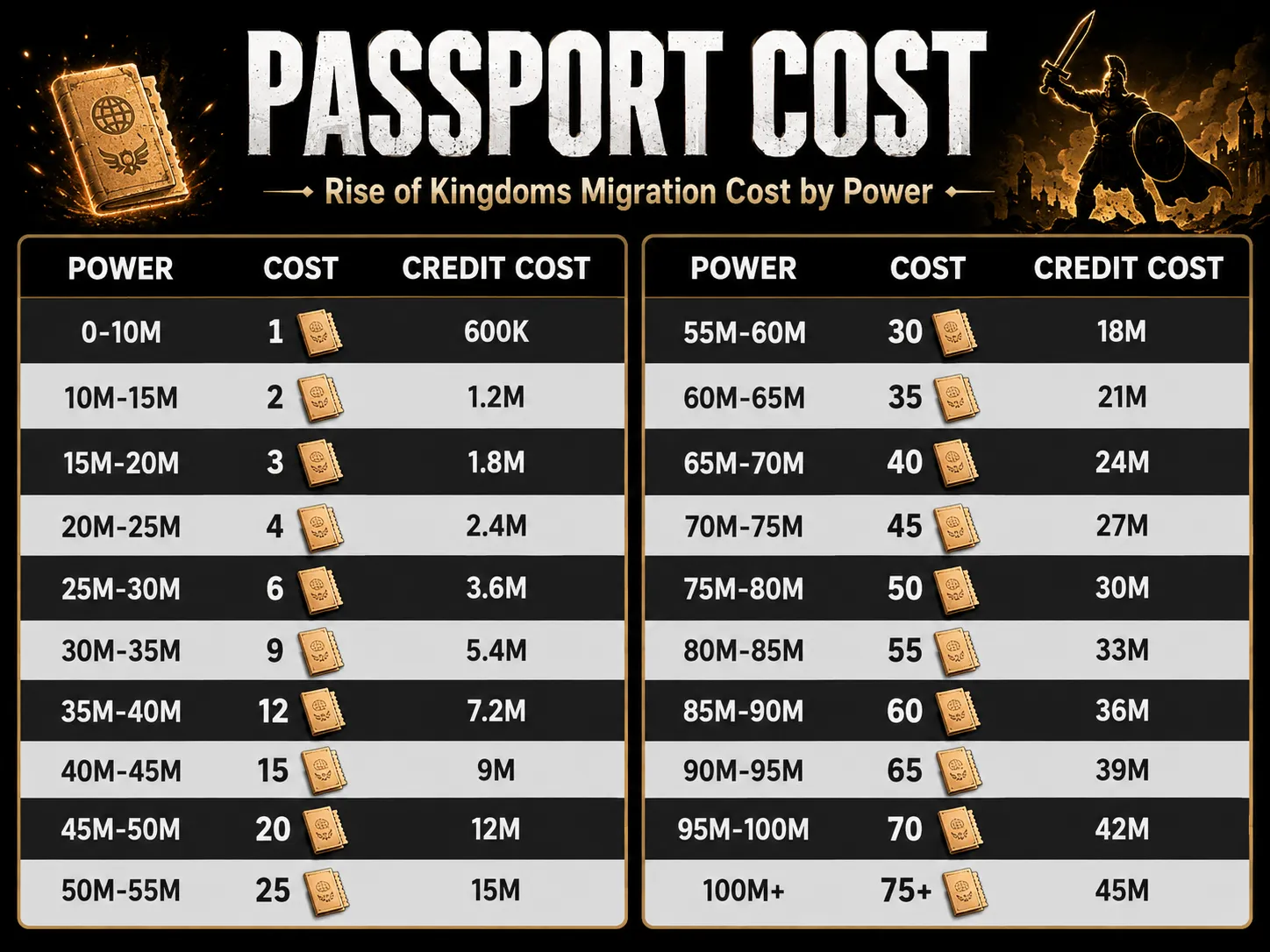
Cost formula: Passport Pages required × 600,000 Individual Credits.
For example, a 38 million-power character normally needs 12 Passport Pages. Purchasing all 12 through the Alliance Shop would require 7.2 million Individual Credits.
How ROK Migration Cost Is Calculated
The migration system reads your displayed power near the time the transfer is confirmed. Power can increase or decrease through troops, hospital status, buildings, technology, commanders, and other account systems.
Small changes can have a large effect near a Passport threshold. For example, moving from just below 35 million to just above 35 million can increase the requirement from nine to 12 Passport Pages.
Migration Cost Examples
| Account Power | Passport Pages | Credit Cost | Planning Note |
| 24 million | 4 | 2.4 million | Avoid crossing 25 million before migrating. |
| 32 million | 9 | 5.4 million | Dropping below 30 million could save three Pages. |
| 38 million | 12 | 7.2 million | Dropping below 35 million could save three Pages. |
| 48 million | 20 | 12 million | The 45 million threshold creates a major cost increase. |
| 72 million | 45 | 27 million | High-power migration requires long-term credit planning. |
| 100 million or higher | 75 | 45 million | Confirm kingdom acceptance before purchasing paid bundles. |
Where to Get Passport Pages
Passport Pages are mainly obtained through the Alliance Shop or the paid New World bundle. Start collecting Pages well before the expected migration window, especially when your account requires more than a few Pages.
Alliance Shop
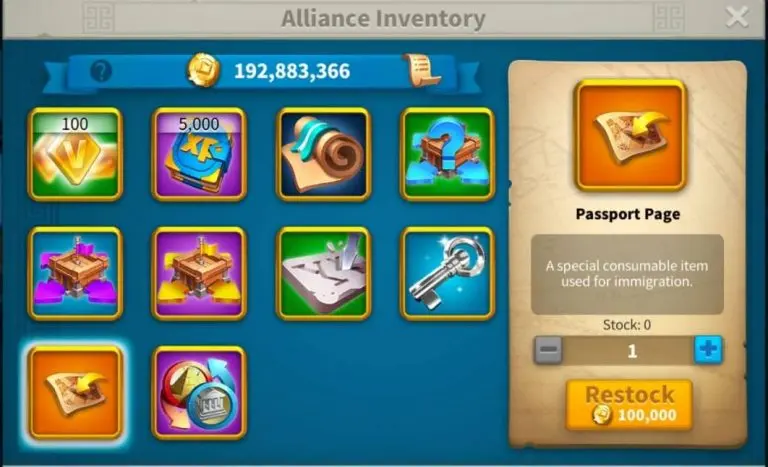
One Passport Page normally costs 600,000 Individual Credits. Depending on the current Alliance Shop interface, Passport Pages may appear through personal weekly stock, shared alliance inventory, or both.
For shared inventory:
- An alliance leader or Rank 4 officer may need to restock the item.
- Restocking one Passport Page commonly costs the alliance 100,000 Alliance Credits.
- The member then purchases the Page with 600,000 Individual Credits.
- Shared stock can be purchased by another member, so coordinate before leaving.
Do not leave your alliance before buying the required Pages. Once you leave, you may lose immediate access to the shop and its available stock.
New World Bundle

The New World bundle is the standard paid method for obtaining Passport Pages. Bundle tiers, regional prices, purchase limits, and reset timing may differ, so there is no universal dollar cost for migration.
Before buying several bundle tiers:
- Confirm that the destination will accept your account.
- Check the current Passport requirement in-game.
- Verify that the immigration window will remain open.
- Confirm whether your application or registration has an expiration time.
- Compare the paid cost with reducing power to a lower bracket.
How to Reduce the Number of Passports Needed
Reducing displayed power before migration may move your account into a cheaper Passport bracket. However, every power-reduction method has a cost, so compare the saved Passport value with the resources and speedups required to rebuild.
Stop Increasing Power Before Migration
When you are close to the next threshold, delay unnecessary upgrades until after the move. Avoid completing large technology, building, or troop-training upgrades immediately before migration.
Use Hospital Power Carefully
Wounded troops contribute less displayed power than healthy troops. Therefore, a planned hospital fill may reduce the Passport requirement.
However, check hospital capacity, healing resources, speedups, and the risk of overflow before using this method. All field marches must still return to the city, and the city cannot be fighting when migration is confirmed.
Review Unnecessary Siege Units
High-tier Siege units add power but may provide limited value to an established combat account. Players near a Passport threshold sometimes remove part of their excess Siege force.
Do not remove valuable combat troops without comparing the Passport savings against retraining costs. A cheaper migration can become more expensive when millions of resources and large amounts of training speedups are needed afterward.
Keep Resources in Item Form
Resource items stored in inventory are different from open resources displayed at the top of the city screen. Avoid opening resource packs before migration.
Spend, transfer, or otherwise reduce excess open resources until they fall within the Storehouse protection limit. Resources above the protected amount may be removed during the migration process.
Comparing migration with a different progression path? Moving a high-power character can require dozens of Passport Pages, kingdom approval, and substantial preparation. Players evaluating an already-developed roster can also review an ROK account for sale, while carefully comparing commanders, equipment, troop technology, migration eligibility, account security, and kingdom status.
How to Migrate in ROK Step by Step
Once you have confirmed eligibility and collected enough Passport Pages, complete the migration in the following order.
- Contact the destination kingdom. Confirm its power cap, activity requirements, KvK expectations, available places, and immigration time.
- Check your eligibility in Kingdom Overview. Search the kingdom number and review every displayed migration condition.
- Collect the required Passport Pages. Buy them before leaving your alliance.
- Stop unnecessary power growth. Avoid crossing into a more expensive Passport bracket.
- Reduce open resources. Keep them below your Storehouse protection capacity.
- Recall every march and scout. Make sure no troop is gathering, reinforcing, rallying, or fighting.
- Leave your current alliance. Complete this only after purchasing Passport Pages and settling alliance responsibilities.
- Open Kingdom Overview. Zoom out, tap the globe icon, and search for the destination.
- Tap Apply, Register, or Immigrate. The displayed action depends on the migration route and kingdom status.
- Complete any security or Gem-deposit requirement. Cross-season registration may require additional verification.
- Review the final Passport cost. Confirm the number shown by the game rather than relying only on an external chart.
- Confirm the transfer. The game will reload and place the character in the destination kingdom.
How to Choose the Best Kingdom Before Migrating
A kingdom can be open for immigration without being a good destination. Before moving, evaluate its leadership, activity, expectations, and long-term direction.
| Factor | Questions to Ask |
| Leadership | Is decision-making stable, transparent, and active across time zones? |
| KvK expectations | What are the minimum kills, deaths, honor, resources, and participation requirements? |
| Seed and matchmaking | Is the kingdom trying to rise, drop, or remain in its current competition level? |
| Alliance placement | Which alliance will accept you, and what role will your account have? |
| Activity schedule | Do Ark, events, rallies, and KvK fights match your time zone? |
| Account fit | Does the kingdom need your troop type, commanders, equipment, and power level? |
| Internal stability | Are there unresolved civil wars, leadership disputes, or alliance conflicts? |
| Migration policy | Do you have written approval, and is your place reserved? |
A strong kingdom for one player may be a poor choice for another. Whales, rally leaders, garrison players, field fighters, support accounts, and casual players need different environments.
Imperium and High-Power Kingdom Migration
Imperium and other high-competition kingdoms normally manage immigration more strictly. Their leadership may limit entry to specific rally leaders, garrison captains, high-activity field fighters, or accounts that fill a strategic roster gap.
Common controls include:
- A lower normal immigration power cap.
- Limited standard migration places.
- Application forms and account reviews.
- Special immigration approval for accounts above the normal cap.
- Requirements for kills, deaths, commanders, equipment, or activity.
- Migration windows coordinated around KvK registration.
Special approval does not eliminate every system rule. A high-power account may still fail because of character age, season incompatibility, a closed window, cooldown, or unavailable places.
What Happens After You Migrate?
After a successful migration, the game reloads your character in the destination kingdom. The city normally appears in an available province rather than a manually selected location.
Progress That Normally Remains
- City Hall and building levels
- Academy technology
- Commanders and skill levels
- Equipment and armaments
- VIP level and VIP points
- Troops and hospital contents
- Inventory items
- Gems and currencies retained by the character
Changes to Expect
- You will no longer belong to your former alliance.
- Your city will appear in the destination kingdom.
- The required Passport Pages will be consumed.
- A new migration cooldown will begin.
- Excess open resources may be removed.
- Some event progress, ranking eligibility, or participation status may change.
- You will need to join the assigned alliance and relocate within its territory.
Post-Migration Checklist
- Contact the destination leadership and confirm your assigned alliance.
- Join the correct alliance before using valuable teleports.
- Move into the alliance’s approved territory or zone.
- Heal troops if you migrated with a full hospital.
- Check kingdom titles, rules, and event schedules.
- Review KvK contribution requirements.
- Confirm Ark of Osiris and alliance-event times.
- Update troop presets, equipment presets, and march formations.
- Avoid unnecessary power growth until leadership confirms the kingdom’s plan.
- Save the date when your 30-day migration cooldown ends.
Common ROK Migration Mistakes
- Using an outdated Passport chart: The old 30M-plus requirements can significantly underestimate the cost.
- Assuming the 120-day rule applies everywhere: Modern migration depends on route, season, character age, and kingdom status.
- Buying bundles before receiving approval: The destination can change its cap or fill its available places.
- Leaving the alliance too early: Buy the required Passport Pages first.
- Ignoring character age: Reducing power cannot make an old account eligible for every younger kingdom.
- Opening resource items before migrating: Excess open resources may be lost.
- Crossing a Passport threshold: One upgrade can add several Pages to the cost.
- Moving without a confirmed alliance: An open kingdom does not guarantee alliance placement.
- Choosing a kingdom only by seed: Leadership quality and time-zone coverage matter just as much.
- Trusting verbal approval alone: Reconfirm the immigration window and account details before transferring.
- Reducing power without calculating recovery costs: Rebuilding troops may cost more than the saved Pages.
- Assuming a king can override every restriction: Leadership controls only part of the immigration process.
FAQ
How many Passports do I need to migrate in ROK?
The number depends on your displayed power. Requirements begin at one Passport below 10 million power and rise to 75 Passports above 100 million power. Check the migration interface for the final amount.
How much does ROK migration cost?
One Passport Page normally costs 600,000 Individual Credits in the Alliance Shop. Therefore, a migration requiring 12 Pages costs 7.2 million Individual Credits. Paid bundle costs vary by region and bundle tier.
Can I migrate to a younger kingdom in ROK?
Yes, but only when your character meets the destination’s cross-season rules. Character age, power, season, available places, and approval requirements all affect eligibility.
Can I migrate to KvK2 in 2026?
A character can migrate to a Season 2 destination only when it falls within the current character-age limit and satisfies the cross-season power, quota, registration, and kingdom-status requirements.
Can I migrate while my kingdom is in KvK?
Your destination normally needs to display an open immigration status. A destination inside an active Lost Kingdom is generally closed to standard migration, although a designated post-season transfer period may allow approved moves within the same Lost Kingdom.
Can I migrate with troops in the hospital?
Hospitalized troops do not automatically block migration. In fact, wounded troops can lower displayed power. However, every field march must return, the city cannot be fighting, and you should prepare enough resources to heal after arriving.
How often can I migrate in Rise of Kingdoms?
A successful standard migration normally begins a 30-day cooldown. Check the immigration interface for the exact remaining time on your character.
What happens to resources when migrating?
Open resources above your Storehouse protection capacity may be removed. Resource items kept unopened in inventory normally remain with the character, so avoid opening them before migration.
Conclusion
ROK migration can improve an account’s long-term experience, but only when the destination kingdom matches the player’s power, activity, time zone, commanders, and KvK goals.
Before moving, confirm the destination’s season, immigration status, character-age limit, power cap, available places, and leadership approval. Next, calculate the correct Passport requirement from your displayed power and collect the Pages before leaving your alliance.
The Passport chart is only one part of the process. Same-season, cross-season, special, and post-season immigration each apply different restrictions. For that reason, the in-game Kingdom Info screen should always be the final eligibility check.
Finally, avoid rushing into a kingdom because its immigration window is open. A well-planned move should provide a stable alliance, suitable KvK expectations, active leadership, and a clear role for your account.
Explore more migration, commander, event, alliance, and progression content in the Rise of Kingdoms guide collection.
How to Migrate Step by Step 🧭
Once you meet the requirements and have enough Passport Pages, the actual migration process is simple.- Make sure all personal requirements are complete.
- Leave your alliance.
- Recall all marches and scouts.
- Reduce your carried resources below storehouse protection if needed.
- Collect the required Passport Pages.
- Zoom out on the map and tap the Globe Icon.
- Select your target kingdom.
- Review the kingdom status, season, and current immigration cap.
- Let the system check your eligibility.
- Confirm the move.
Smart Migration Tips That Actually Help 💡
1. Check the Kingdom Before You Spend Passports
Do not choose a kingdom just because it is active. You should also check leadership quality, alliance structure, event coordination, KvK expectations, and whether your account power fits the kingdom’s current plan.2. Talk to Leadership First
Some kingdoms use immigration caps or manual approval systems. Reaching out first can save you from wasting passports on a kingdom that will not accept your account.3. Plan Around Season Timing
Migration rules now depend more heavily on kingdom status and seasonal systems. Same-season immigration, cross-season migration, and quota-based entry can all affect what is available.4. Reduce Migration Cost Where Possible
Some players lower their power before migrating to reduce passport cost brackets or fit under kingdom power caps. Common approaches include cleaning up unnecessary siege and avoiding needless power gains before the move. Treat this as cost optimization, not a guaranteed shortcut.5. Move With a Purpose
Good reasons to migrate include joining trusted friends, entering a more organized kingdom, or aligning your account with a better seasonal path. Migrating without a clear reason usually leads to a second migration later.Preparing Your Account Before Migration ⚙️
Passport Pages are only part of migration prep. You should also think about:- Speedups for rebuilding momentum after the move
- Resources for healing, training, and donations
- Commander readiness for the season you are entering
- Alliance availability in the destination kingdom
Post-Migration Checklist 🧾
After you arrive in the new kingdom, do these first:- Join or rejoin the correct alliance
- Read kingdom mail and leadership rules
- Check event timing and seasonal priorities
- Confirm your role in rallies, garrisons, or field fighting if relevant
- Settle in before making major resource or troop decisions
Common Migration Mistakes to Avoid ❌
- Forgetting to leave your alliance before attempting migration
- Trying to migrate without checking kingdom status first
- Using an outdated passport cost table
- Ignoring immigration power caps
- Assuming every kingdom follows the same seasonal rules
- Spending passports before talking to leadership
- Moving into a kingdom that does not match your play style or account power