
Decoding Your Governor Profile in Rise of Kingdoms ⚔️
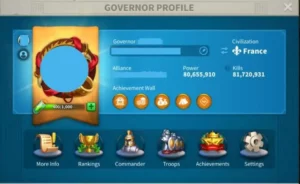
Want to become a legendary ruler in Rise of Kingdoms? Understanding your Governor Profile is key. It’s your digital ID and a window into your kingdom’s power!
Let’s dive in and decode every element, from your ID to your commanders.
Your ROK Governor Profile: An In-Depth Look 🏆
Your Governor Profile is your personal hub within Rise of Kingdoms. It’s a treasure trove of information about your account. Think of it as your resume in the world of kingdoms and conquests!
This profile is where you display your achievements and track your progress.
Here’s a breakdown of what you’ll find:
- Governor ID: A unique identification number for your city. It might change as the game expands.
- Username: Your unique player name. No two players can share the same username. Change it for 500 gems or a name-changing item!
- Avatar: Your chosen image, reflecting your style. You can also use special avatar frames earned through events.
- Album: Showcase up to six photos! Share your best moments or keep them private.
- Power: A measure of your strength, including troop, building, and tech.
- Kills: Tracks the number of enemy units you’ve eliminated.
- Action Points: Spend these to attack neutral units and complete tasks. Recharge them with runes or VIP levels.
- Achievement Wall: Display your greatest accomplishments for all to see.
- Ranking: See how you stack up against other players in different categories. Unlocks at City Hall level 8.
- Alliance: Shows your current alliance, or a dash if you’re not in one.
- Troops: Detailed breakdown of your troop tiers and capacity.
- Achievement: Unlocks at City Hall level 10, with six categories of challenges.
- Civilization: Displays your chosen civilization. You can change it with gems or special items.
- More Info: Detailed account statistics, including power, battle, and resource stats.
Digging Deeper: Key Profile Sections 💡
Let’s explore some of the most important sections of your Governor Profile in more detail. Learning them will help you strategize!
Commanders: Buffs and Titles 🔥
Commanders are crucial for your success in Rise of Kingdoms. Giving them titles grants special stat boosts!
Here’s a breakdown of commander titles and their requirements:
| Title | Power Requirement | Bonus Stats |
|---|---|---|
| Range | 80,000 | Damage to barbarians +5%, Commander EXP gain 5% |
| Tax Officer | 200,000 | Gathering Speed |
| Drillmaster | 500,000 | Troops Attack 1% |
| Iron Guard | 1,200,000 | Troops Health 1% |
| Supply Captain | 3,000,000 | Gathering Speed +5%, Troop Load +5% |
| Charge Captain | 8,000,000 | Rally Army Attack 1%, Rally Army March Speed 1% |
| Knight Head | N/A | Troop Defense 1%, Troop Health 1% |
Settings: Customize Your Experience ❄️
The settings menu is your control panel for customizing Rise of Kingdoms. It allows you to adjust everything to your preferences!
Here’s a quick rundown:
- Notifications: Control which in-game alerts you receive.
- General Settings: Adjust graphics, sound, and other interface options.
- Emojis: Choose your favorite emojis for in-game chat.
- Player Search: Find other players by their username.
- Character Management: Manage multiple accounts.
- Account: Connect your account to Facebook or Google to save progress.
- Customer Service: Contact support for help.
- Language: Change the game’s language.
- Community: Access official Rise of Kingdoms communities.
- Redeem: Enter redeem codes for rewards.
- Block Mail: Block unwanted messages from other players.
FAQs
Q: How do I change my username?
A: You can change it for 500 gems or a name-changing item from the Alliance Shop.
Q: Can I hide my album from other players?
A: Yes, you can set your album to private in the display options.
Q: How often does my power on the leaderboard update?
A: It doesn’t update immediately. It takes some time to reflect changes.
Q: What do I spend action points on?
A: You spend action points on attacking neutral units and completing various tasks.
Q: How do I unlock the Achievement section?
A: Reach City Hall level 10.
Q: Where can I find redeem codes for Rise of Kingdoms?
A: Check the official Rise of Kingdoms social media channels and community forums.
Conclusion
Understanding your Governor Profile is vital to dominating Rise of Kingdoms. From tracking your progress to customizing your settings, it’s your key to success!
Master these elements and watch your kingdom flourish.
💎 Looking for a safe way to boost your progress? Explore ROK account for sale on Heaven Guardian, a trusted marketplace offering lifetime warranty and premium support. Learn more about Rise of Kingdom’s on the official website.