Rok Migration Guide

Last updateย : 04/07/2026

Rise of Kingdoms Migration Guide 2026 ๐ŸŽฎ๐Ÿ”ฅ : Kingdom Transfer Rules & Smart Tips

Rise of Kingdoms migration guide

Migrating to a new kingdom in Rise of Kingdoms can completely change how your account performs. A better kingdom can mean stronger alliances, more active leadership, better event coordination, and a healthier long-term KvK environment. This guide breaks down how migration works, what you need before moving, how many Passport Pages you may need, and what to check before committing to a new kingdom. If you are preparing your account before a move, this is also a good time to stock up through your Rise of Kingdoms account shop so your resources, speedups, and migration prep stay on track.

What Is Kingdom Migration in Rise of Kingdoms? ๐ŸŽฏ

Kingdom Migration lets you move your city to another kingdom by using Passport Pages. Players usually migrate to join friends, leave inactive kingdoms, find stronger leadership, or position their account better for future seasons. Migration changes your kingdom, but it does not reset your commanders, buildings, or core account progress.
Migration is not just a location change. It is a long-term account decision that can improve or hurt your next several months of gameplay depending on where you move.

Migration Requirements in 2026 ๐Ÿ“‹

Before you migrate, you need to meet both personal requirements and destination kingdom requirements.

Personal Requirements

  • City Hall must be level 16 or higher.
  • All troops and scouts must be inside your city.
  • Your city and troops must not be in combat.
  • You must not be in an alliance.
  • Your resources must be under your storehouse protection limit.
  • You must wait 30 days between migrations.

Destination Kingdom Requirements

  • The target kingdom must be in a migration-eligible state.
  • The kingdom may have an immigration power cap.
  • Season rules can affect whether same-season or cross-season migration is allowed.
  • Some kingdoms may be immigration-limited or follow leadership approval rules.
Important: do not rely on a single old rule such as โ€œthe kingdom must be 120 days old.โ€ Migration now depends more heavily on kingdom status, season, and current immigration settings. Always check the in-game migration screen before spending Passport Pages.

Kingdom Status and Season Rules Matter More Than Ever ๐ŸŒ

One of the biggest mistakes players make is assuming migration works the same way for every kingdom. In reality, your destination kingdom may be in a different seasonal stage, may have limited immigration, or may be following same-season or cross-season restrictions. Depending on the kingdom, you may see statuses such as:
  • Nascent Kingdom
  • Preparation Season
  • Season 1
  • Season 2
  • Season 3
  • Season of Conquest
  • Immigration Limited
That matters because the game may apply different rules to same-season immigration, cross-season immigration, quotas, kingdom age gaps, or fixed power caps depending on where you are trying to go. In practice, that means you should always check:
  • Whether the kingdom is currently open to your migration type
  • Whether the kingdom has limited slots
  • Whether your power is above the current immigration cap
  • Whether the kingdom leadership expects approval before entry

Imperium and High-Competition Kingdoms ๐Ÿน

Imperium kingdoms and other high-competition kingdoms usually apply stricter immigration control. These kingdoms are often more selective because they already have a large concentration of powerful players and are trying to manage matchmaking, season balance, and role distribution. Common restrictions can include:
  • Fixed or reduced power caps
  • Limited migration slots
  • Cross-season quotas
  • Manual approval from leadership
Do not assume that having enough Passport Pages is enough. If you are trying to enter a competitive kingdom, contact leadership first and confirm whether your account fits their current immigration plan.
The most expensive migration mistake is not overpaying on passports. It is moving into a kingdom that does not actually want or fit your account.

How Many Passport Pages Do You Need? ๐Ÿ“œ

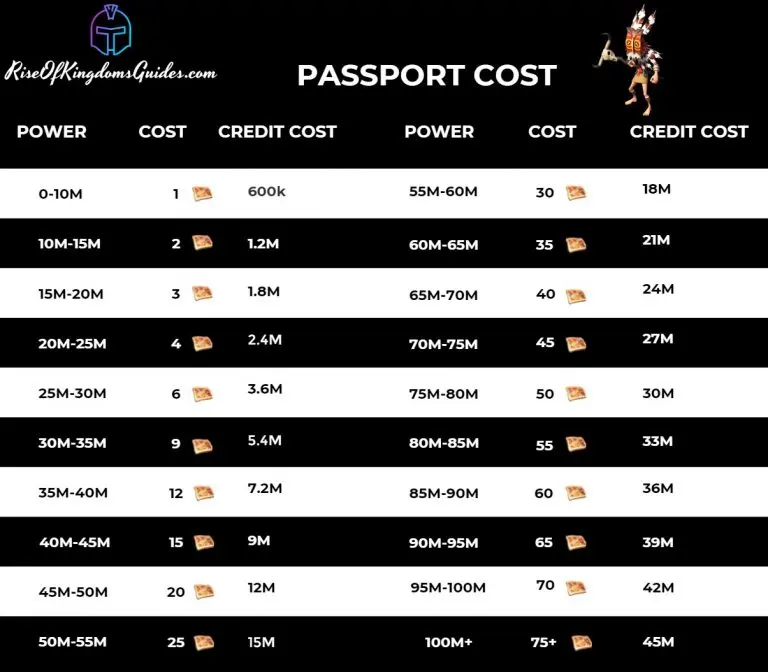
The number of Passport Pages you need is based on your total power. Your previous version simplified this too much, so here is a more detailed table that is easier for readers to actually use.
Power Range Passport Pages Required
0 โ€“ 10M 1
10M โ€“ 15M 2
15M โ€“ 20M 3
20M โ€“ 25M 4
25M โ€“ 30M 6
30M โ€“ 35M 8
35M โ€“ 40M 10
40M โ€“ 45M 12
45M โ€“ 50M 15
50M โ€“ 55M 20
55M โ€“ 60M 25
60M โ€“ 65M 30
65M โ€“ 70M 35
70M โ€“ 75M 40
75M โ€“ 80M 45
80M โ€“ 85M 50
85M โ€“ 90M 55
90M โ€“ 95M 60
95M โ€“ 100M 65
100M+ 75
Tip: the higher your power, the more expensive migration becomes. That is why many players plan their move in advance instead of waiting until their account has become much heavier.

Rise of Kingdoms Passport costs


Where to Get Passport Pages ๐Ÿ’ฐ

You can get Passport Pages in two main ways:

Alliance Shop

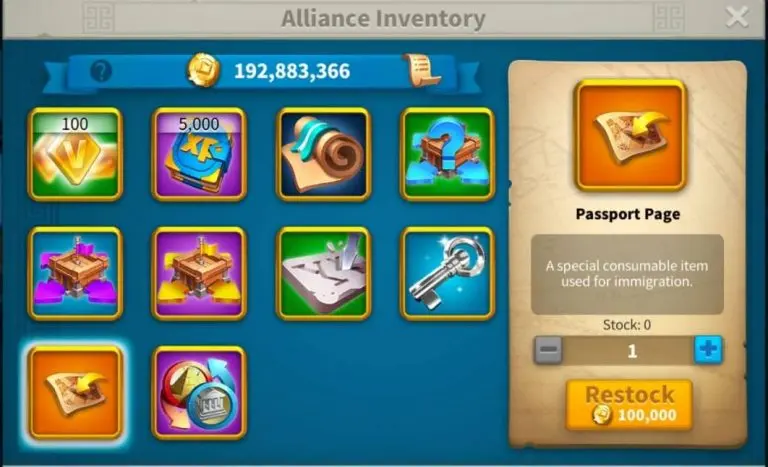
  • Passport Pages are commonly bought through the Alliance Shop.
  • They generally cost around 600,000 individual Alliance Credits each.
  • Availability can depend on alliance leadership and shop restocking, so personal credits are not the only thing that matters.

Rise of Kingdoms Alliance Shop

Bundle Packs

  • The New World bundle is the most well-known paid option for getting Passport Pages.
  • This is mainly useful for higher-power accounts or players trying to move on a tighter schedule.

Rise of Kingdoms Passport bundle package

If migration is part of your long-term plan, start saving Alliance Credits early. Waiting until the last minute makes the process much harder.

How to Migrate Step by Step ๐Ÿงญ

Once you meet the requirements and have enough Passport Pages, the actual migration process is simple.
  1. Make sure all personal requirements are complete.
  2. Leave your alliance.
  3. Recall all marches and scouts.
  4. Reduce your carried resources below storehouse protection if needed.
  5. Collect the required Passport Pages.
  6. Zoom out on the map and tap the Globe Icon.
  7. Select your target kingdom.
  8. Review the kingdom status, season, and current immigration cap.
  9. Let the system check your eligibility.
  10. Confirm the move.

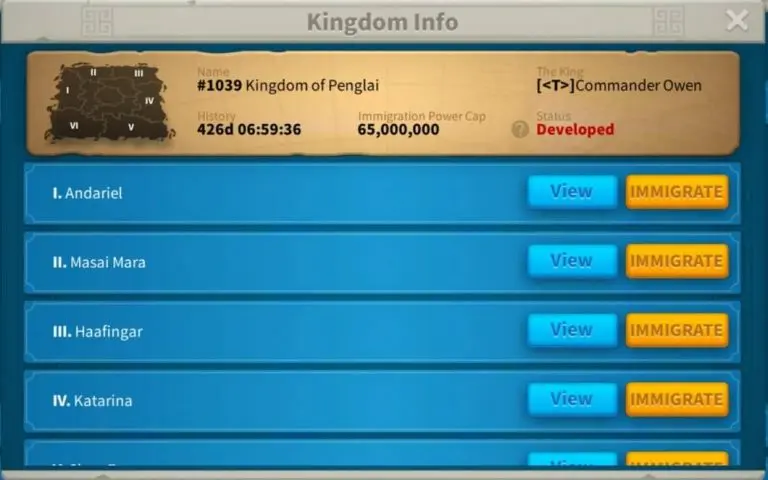
Rise of Kingdoms migration kingdom info


Smart Migration Tips That Actually Help ๐Ÿ’ก

1. Check the Kingdom Before You Spend Passports

Do not choose a kingdom just because it is active. You should also check leadership quality, alliance structure, event coordination, KvK expectations, and whether your account power fits the kingdomโ€™s current plan.

2. Talk to Leadership First

Some kingdoms use immigration caps or manual approval systems. Reaching out first can save you from wasting passports on a kingdom that will not accept your account.

3. Plan Around Season Timing

Migration rules now depend more heavily on kingdom status and seasonal systems. Same-season immigration, cross-season migration, and quota-based entry can all affect what is available.

4. Reduce Migration Cost Where Possible

Some players lower their power before migrating to reduce passport cost brackets or fit under kingdom power caps. Common approaches include cleaning up unnecessary siege and avoiding needless power gains before the move. Treat this as cost optimization, not a guaranteed shortcut.

5. Move With a Purpose

Good reasons to migrate include joining trusted friends, entering a more organized kingdom, or aligning your account with a better seasonal path. Migrating without a clear reason usually leads to a second migration later.

Preparing Your Account Before Migration โš™๏ธ

Passport Pages are only part of migration prep. You should also think about:
  • Speedups for rebuilding momentum after the move
  • Resources for healing, training, and donations
  • Commander readiness for the season you are entering
  • Alliance availability in the destination kingdom
If you want your account ready before the migration window opens, this is a natural time to use your RoK account shop option so your preparation does not stall right before the transfer.

Post-Migration Checklist ๐Ÿงพ

After you arrive in the new kingdom, do these first:
  • Join or rejoin the correct alliance
  • Read kingdom mail and leadership rules
  • Check event timing and seasonal priorities
  • Confirm your role in rallies, garrisons, or field fighting if relevant
  • Settle in before making major resource or troop decisions

Common Migration Mistakes to Avoid โŒ

  • Forgetting to leave your alliance before attempting migration
  • Trying to migrate without checking kingdom status first
  • Using an outdated passport cost table
  • Ignoring immigration power caps
  • Assuming every kingdom follows the same seasonal rules
  • Spending passports before talking to leadership
  • Moving into a kingdom that does not match your play style or account power

Frequently Asked Questions About RoK Migration ๐Ÿค”

Q1: What is the minimum City Hall level for migration? Your City Hall must be at least level 16. Q2: Can my alliance migrate together? Yes, but each player must individually meet the migration requirements and still fit the target kingdomโ€™s rules. Q3: Can I migrate during active KvK? Migration availability depends on the kingdomโ€™s current status and system restrictions. Always verify in-game before planning around an event window. Q4: How often can I migrate? You generally need to wait 30 days between migrations. Q5: Can I reduce power to save Passport Pages? Some players do, especially to lower cost brackets or fit under immigration caps, but you should plan carefully rather than making rushed account changes. Q6: What is the best way to get Passport Pages? Most players get them through the Alliance Shop, while paid bundles are the faster alternative. Q7: Is the old 120-day kingdom rule still enough to judge migration? Not by itself. Modern migration is better understood through kingdom status, seasonal rules, immigration caps, and in-game eligibility checks.

Conclusion ๐Ÿ

Kingdom migration in Rise of Kingdoms is one of the most strategic systems in the game. A well-planned move can improve your alliance options, event participation, seasonal positioning, and long-term account growth. The key is to prepare early, use an accurate Passport Page estimate, and check the target kingdom carefully before you commit. If your goal is to move cleanly and stay competitive after the transfer, planning matters more than speed. Make sure your account is ready, make sure the kingdom is the right fit, and only then spend your Passport Pages.

Need a stronger account before your next kingdom move? Browse our RoK accounts for sale and find a better starting point for your next migration.

Rewards

Receive redemption code automatically by registering your ID

Join our Community

Heaven Guardian

Check among a variety of
cavalry, infantry, archer
account ๐Ÿ‘‡

The safest place for gamers

4.8 based on 90+ reviews

Select your currency
EUR Euro