
Want to experience Rise of Kingdoms like never before? Playing on PC unlocks a new level of control and power. Dive into our guide to learn how to play ROK on your computer and discover why it’s a game-changer!
Why Rule on PC? 🎮
Playing Rise of Kingdoms on PC transforms the game. Imagine smoother gameplay, especially during massive kingdom battles. Forget lag and hello, strategic domination!
Let’s explore the advantages:
- Enhanced Performance: Emulators provide superior processing power. This eliminates lag during crucial battles.
- Better Control: Mouse and keyboard offer precise control over your troops. Execute strategies with ease.
- Multi-Accounting: Manage multiple accounts simultaneously. Farm resources and reinforce allies efficiently.
- Bigger Screen: Enjoy the stunning graphics on a larger display. Immerse yourself in the world of Rise of Kingdoms.
Many top players and teams leverage the power of PC gaming. You’ll find it easier to coordinate attacks and defend your kingdom. Rise to the top ranks with this advantage.
How to Download and Install ROK on PC 💡
Getting started is simple. Just follow these steps to download and install Rise of Kingdoms on your PC.


1. Download the Lilith Emulator: Visit the official Rise of Kingdoms website. Find the download button for the Lilith Emulator.
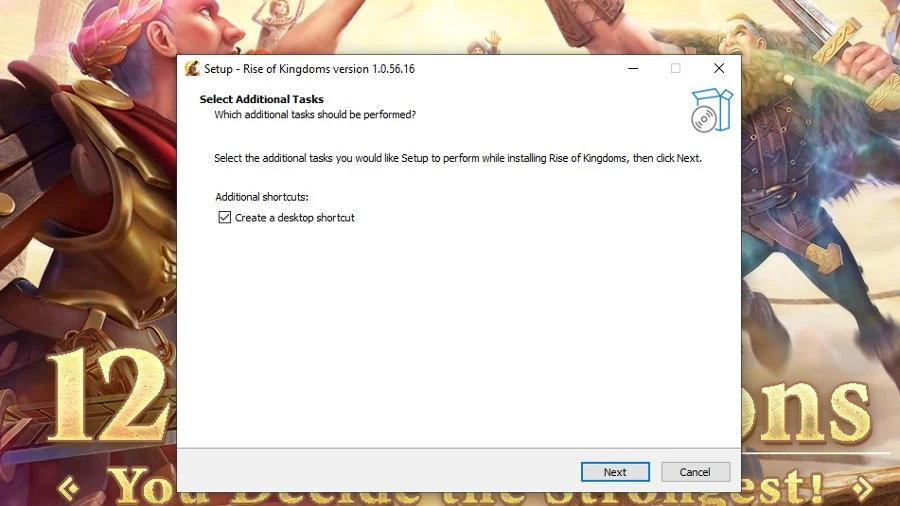
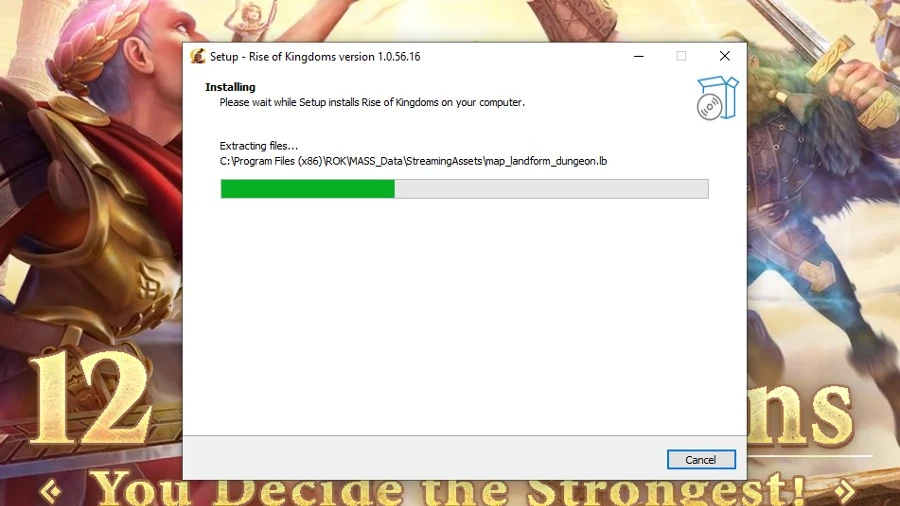
2. Installation: Double-click the downloaded file to begin the installation. Follow the on-screen instructions.

3. Login or Create Account: Once installed, launch the emulator. Log in with your existing account or create a new one.
Pro Tip: If you encounter any issues with the download button, try refreshing the page. Alternatively, use a private or incognito tab in your browser.
PC Requirements 🔥
Before you begin, ensure your PC meets the minimum requirements. This will guarantee a smooth and enjoyable gaming experience.
| Requirement | Specification |
|---|---|
| Processor | Intel or AMD Processor |
| Operating System | Microsoft Windows 7 and above |
| RAM | At least 2GB of RAM |
| Hard Drive | 5GB Free Disk Space |
| Administrator | You must be an Administrator on your PC |
| Graphics Drivers | Up to date drivers from Microsoft or vendor |
Meeting these requirements will help you avoid performance issues. You’ll be ready to conquer kingdoms without interruption.
Emulators: Safe and Powerful 🛡️
Using emulators is perfectly safe. Game developers use them for testing. You won’t get banned for playing Rise of Kingdoms on an emulator.
Emulators are faster than most smartphones. They provide a significant performance boost. Enjoy lag-free gaming during intense battles.
Level Up Your Gameplay ❄️
Playing on PC offers numerous advantages. Let’s dive into some advanced strategies and tips.
- Farming Efficiency: Automate farming tasks while multitasking. Watch videos or browse the web simultaneously.
- Strategic Coordination: Communicate with alliance members via voice chat. Plan and execute coordinated attacks seamlessly.
- Talent Tree Optimization: Easily manage and optimize your commander talent trees. Maximize their potential.
Managing Multiple Accounts 🧊
The Lilith emulator allows you to run multiple accounts. You can farm, participate in wars, and support your main account simultaneously. This is a huge advantage for active players.
FAQs
Q: Can I play Rise of Kingdoms on PC?
A: Yes, you can play Rise of Kingdoms on PC using the official Lilith Emulator. It’s free to download and use.
Q: Is it safe to use emulators?
A: Absolutely! Emulators are safe and won’t get you banned. Game developers use them for testing purposes.
Q: Can I link my mobile account to the PC version?
A: Yes, you can link your account via Facebook or Google. This allows you to seamlessly switch between devices.
Q: What are the minimum PC requirements?
A: You need Windows 7 or above, at least 2GB of RAM, and 5GB of free disk space.
Q: Can I play multiple accounts at the same time?
A: Yes, the Lilith Emulator allows you to run multiple accounts simultaneously.
Q: Is the Lilith Emulator free from malware?
A: Yes, the Lilith Emulator is 100% safe and secure. It protects your account from data theft.
Conclusion
Playing Rise of Kingdoms on PC offers a superior gaming experience. It provides enhanced performance, better control, and the ability to multi-task. Level up your game today!
💎 Looking for a safe way to boost your progress? Explore ROK account for sale on Heaven Guardian, a trusted marketplace offering lifetime warranty and premium support.
Learn more about Rise of Kingdoms updates from the official website.