

Whiteout Survival Top Up
 Global
Top up Whiteout Survival for Global accounts with fast, secure, and convenient delivery. Choose from packs or gems, complete your purchase easily, and get back into the game with a smooth top-up experience.
This page is for an assisted Whiteout Survival login top-up service for custom packs. To complete the purchase, you will need to sign in to your game account, and after payment our team may contact you if a Google or Facebook verification code is required. If you prefer a self-service Frost Star top-up, that is a different method.
🧊 Standard Packs


📅 Weekly & Monthly Cards


🎉 Event Packs


🛡️ Hero & Gear Packs


🌟 Premium Bundles


💎 Gems Top Up


Whiteout Survival Top Up Guide, Important Notes & FAQ
Looking for a fast, guided, and reliable Whiteout Survival top up? At Heaven Guardian, we make the process easier for players who want to buy their preferred in-game packs with full support from our team. Please read the important notes and instructions below carefully.
Whether you are purchasing a special pack, value pack, or premium package, this guide will help you complete your Whiteout Survival recharge smoothly and correctly.
⚠ Important Notes
- This product is a Login Top Up service, which means we need to log in to your game account to complete the purchase on your behalf.
- Please make sure all required information is filled in accurately so your Whiteout Survival top up can be processed quickly.
- After payment is successful, you may need to cooperate with our team by providing a Google or Facebook verification code.
- Please pay close attention to real-time chat messages from our team during the process.
- Do not log in to the game while the top up is being processed to avoid interruptions or login conflicts.
Tip: Preparing your account details and package screenshot in advance will help speed up the order process.
🎮 Whiteout Survival Top Up Information Required
To complete your Whiteout Survival login top up, please prepare the following information:
- Your bound Whiteout Survival account via Google or Facebook
- Your character name
- A screenshot of the package you want to purchase
- The exact package name
Important: After payment is completed, our team may ask you to provide a verification code so the recharge can be completed securely.
💎 Recharge Result
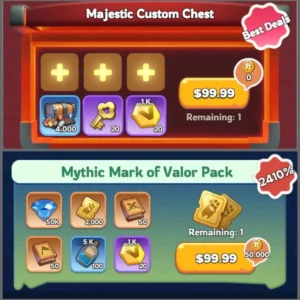
If you purchase a product such as 99.99 Standard Packs, it can be used for any in-game pack worth 99.99.
For example, you can contact our team and send the screenshot of the pack you want. Our team will then confirm which Whiteout Survival pack top up should be processed for your order.
The same rule also applies to other price-based packages.
📌 How to Top Up Whiteout Survival Pack
1. Place your order and complete payment
Submit your order and complete the payment on Heaven Guardian.
2. Provide your login information
After payment, provide your Google/Facebook login details so we can log in and complete the Whiteout Survival top up.
Important: Please do not log in to the game during this process.
3. Provide the package screenshot
Send a screenshot of the pack you want to buy, and we will purchase the in-game item based on the product you ordered.
4. We complete the top up
After the purchase is completed, we will log out of your account and clear the login history.
5. Receive notification and verify
Once the top up is complete, you will receive a notification. You can then log back in to verify the transaction.
🔐 How to Obtain the In-Game Bound Account + Package Name
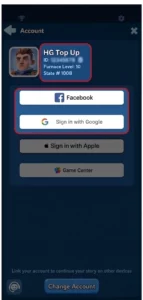
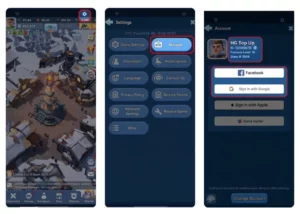
1. Bind your account with Google or Facebook
To get your in-game bound account:
- Log in to the game
- Click the Gear Icon in the upper-right corner
- Select Account
- Link your game account with Google or Facebook
2. Select the package you want to buy
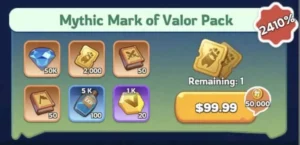
Log in to the game and check the exact name of the package you want to purchase. Then provide that package name when submitting your order.
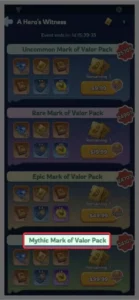
Example: If you want to buy the package shown in the screenshot below, please enter “Mythic Mark of Valor Pack” when submitting your information.
Please also provide the matching screenshot of the pack to help us process your order correctly.
❓ Whiteout Survival Login Top Up FAQ
1) What is Whiteout Survival Login Top Up?
Login Top Up means the recharge is completed by logging in to your account and purchasing items or packs on your behalf, instead of using a UID-only delivery method.
2) What details are needed to place a Whiteout Survival login top up?
Usually, you will need to provide:
- Your login method
- Your bound account details
- Verification code or OTP if required
- Your character name
- The package name
- A screenshot of the package
For your safety, never share card details or unrelated personal information.
3) Is login top up riskier than UID top up?
Yes. Since Whiteout Survival login top up requires account access, it carries more risk than UID top up. This is why it is important to stay in contact with our team and monitor verification requests carefully.
4) How can I reduce risk before ordering?
- Bind your account to an email or phone number you control
- Be ready to receive OTP or verification requests
- Avoid using shared or public devices
- Take screenshots of your User ID, server, and character name
- Stay available in case our team needs confirmation
5) Do I need to log out while the top up is being processed?
Yes, in most cases. To avoid login conflicts, it is recommended that you log out and do not log back in until you receive confirmation that the order is complete.
6) How long does Whiteout Survival login top up take?
Many orders are completed within 10–30 minutes, but some may take longer if OTP verification or additional security checks appear.
7) What should I do if the game asks for a verification code during the process?
Only provide the OTP or verification code through the official Top Up chat for your active order. If you are unsure, contact our team before sending anything.
8) What if I receive an unexpected security email or SMS?
Check whether the alert matches your active order timing. If it looks suspicious:
- Contact our team immediately
- Change your password
- Enable stronger account security
9) What if items are partially delivered?
Sometimes packs may be processed in batches. Please take screenshots of your inventory or purchase status and contact our team with your order number for confirmation and follow-up.
10) Can I refund a Whiteout Survival login top up?
If the order has not been processed or delivered, a refund may be possible depending on policy. Once delivery is completed, refunds are generally not available. Please contact our team with your order number to check eligibility.
🌟 Why Buy Whiteout Survival Top Up at Heaven Guardian?
Get a more guided and dependable Whiteout Survival top up experience with clear support from start to finish.
- Guided order support
Our team helps you complete Whiteout Survival top up orders with clearer instructions and direct assistance when needed. - Help with specific packs and packages
Whether you want a gift pack, a standard price-based package, or a custom top up request, we help you choose the right option. - Support for login top up orders
If your order requires a Whiteout Survival login top up, we provide active guidance during the process, including verification steps when needed. - Smoother and more reliable experience
We focus on responsive communication, careful handling, and a more efficient top up process so you can order with greater confidence.
Order now in our Discord
Customer Feedback: Trusted Reviews on Heaven Guardian Service

From the beginning to end, constant communication and thoroughness. Thank you for making the process easy and efficient. There rep I had answered all my questions too! I recommend using their services.
Adrian


Great experience with the seller! Very fast and easy
Mario Rosso

The purchase went smoothly. After paying for the order, I received all the necessary account information and was guided step-by-step through what I needed to do and how. I recommend it 100%.
Michal Urh

I recently sold my WOS game account with the help of this team, and the entire process took about a month. From start to finish, it was a very smooth experience. They handled everything on my behalf, kept things transparent, and made sure every step was secure and stress-free.
HonestReviewer

Everything was perfect step by step till they transferred the money to me 👍👍👍👍
Moh Alshammari

Heaven Guardian provides good middlemen services, experience and knows how to navigate the transfer process.
Lehlomo

Hello, I decided to sell my account through these guys. After one month, they found a buyer, and the whole transaction went smoothly. I sent them the account details, and they sent me the money. I have never seen anybody be this trustworthy. 11/10! Would recommend.
Michal

I was right to buy an account from your store. The most impressive thing is the enthusiastic support almost 24/7
Hiếu Lê

Legit Seller, bought ROK worth $5k, and helped me through out the full process and secured the account for me.
R AK

Great team, everything worked out… I’m a shame the buyer didn’t get in touch to confirm the goods. Nevertheless, everything worked out great.
Kevin
Recommended! fast and efficient, and they’re quite experienced in selling accounts, it’s all smooth sailing.
Sold my WoS account faster than I expected 😀
Shino

Honest good company fast responses. I trusted them and everything went smooth!
Westin
Thanks you for the account
Munson P
If you’re looking to sell I highly recommend. Easy and fluent without problems.
Alfie Parr

was fast respond from the admin and fun experience from this shop. would choose this one again
Aqil Fadilah

Few days ago bought farm for my CoD account.Seller wrote immediately a few minutes after ordering, to clarify details.
What can I say about the services, I recommend it.
I don’t regret using the seller’s services, everything is reliable and honest.
10/10 🙂
Taras Eysmont

Bought and account and extremely happy. Seller wa very understanding with me and made my purchase smooth. I would highly recommend buying an account from them. They will make sure you are satisfied and will help. I could not be more happier!
Cody Cheung
サービスにとても満足しているので、友達にも勧めたいと思います。
Yuli Ana
I have made several account purchases from Heaven Guardian, and I highly recommend their services. Their customer service, professionalism, and trustworthiness are unmatched. The payment process was seamless, and the delivery was fast, secure, and efficient. I will continue to do business with Heaven Guardian in the future and will keep my review updated should anything change.
Ricky
Great service, everything went smooth
Emil Wennberg

Service conforme à description simple rapide efficace quoi dire de plus. Je recommande
antonio fernandes
Bought an account from this seller over 2 years ago quit the game and came back and helped me recover the account as I’d forgot the details and went above and beyond! 11/10 would recommend
Trevjn
Transaction was smooth and quick also insures safety from ban and was really responsive.
Iccirus

Super échange réalisé en toute sécurité, je recommande
Sandrine Marinoni

Great seller good support and fast…
Great seller good support and fast delivery
PINK Rainbow Dash

Safe and easy
I bought my first account on this safe website !
Frederic rsm
Absolute best and safest!
Hands down, the best service you can get.
Jerimiah Bartlett
Great communication. quick response and explain the progress definitely reach out if i need the service again 1
티망
I recommend 100% Heaven Guardian, it’s such a great customer service. I had a great exprience with it !
Lola
Fast and easy experience, 100% safe solution, Fair prices, Great customer service. I recommend !
Arnho
Great experience
I bought an account and upgrade it thanks to his upgrade plan. Very fair prices, I recommend !
Luca Grondin
Done what they told a bit off time but still good
Yundris
The customer service was top-notch and I felt safe throughout the process.. Highly recommended !
Damien
Excellent!
The seller is very helpful and guided me throughout the whole process. I 100% recommend.
Clara Moran Alarcon

Vendeur professionnel, à l écoute ! Toujours eu de bon échange . Et très honnête .
Grare
I was impressed by the safety of the site and the professionalism, I recommend 100%.
Lilou Rauch
Friendly
Friendly, on time, and understanding.
Mohsen Heidari
Perfect service and super safe.
Fanfan
Simple, fast and very secure. Perfect
Enzo Marinoni
100% safe solution !
Chloé
100% safeee
I recommend !!
Jade
I recommend !
Great
Coco
I recommend !
Solenn Messager
I purchased an account from him valued at over 250 euros. The seller in question was highly responsive and attentive.
Alexboj
❄️ WOS Top Up Options: Frost Star vs Assisted Login Top Up
When players search for WOS top up or Whiteout Survival top up, they are not always looking for the same purchase method. Some players prefer Whiteout Survival Frost Star as a more direct self-service option, while others need help buying specific packs, bundles, or gems through a guided order process.
At Heaven Guardian, this page is focused on assisted top up for custom packs and login-based orders. This means our team helps players purchase selected Whiteout Survival packs and gems that may require account sign-in and verification during the order process.
That is different from a Frost Star top-up, which is usually handled as a separate self-service method. If you are looking for custom pack top up, support with selected bundles, or help with a login-based purchase, our service is designed for that type of order.
💡 In short: If you want a guided service for selected packs and bundles, Heaven Guardian is the right fit. If you prefer a direct self-service method, Whiteout Survival Frost Star top-up may be the better option for you.
Quick FAQ
1. What is the difference between Frost Star top-up and login pack top-up?
Frost Star top-up is generally a self-service purchase method, while login pack top-up is an assisted service that may require account sign-in and verification to complete the order.
2. Do you offer WOS top up for packs and gems?
Yes. We provide WOS top up support for selected Whiteout Survival packs and gems, including custom pack requests and login-based purchases.
3. Is this page for official Frost Star top-up?
No. This page is for assisted top up and custom login-based pack orders. If you are looking for a self-service Whiteout Survival Frost Star method, that is a different top-up option.
4. Who is assisted login top-up best for?
This option is best for players who want help purchasing specific custom packs, bundles, or gems and are comfortable following account sign-in and verification steps during the process.
5. Do assisted top-up orders require verification?
Sometimes, yes. Depending on your login method, our team may need a Google or Facebook verification code to complete the order securely.